Are you wondering whether your Vivo phone is eligible for the Android 16 update? You’re not alone. With the latest version of Android rolling out, many users are eager to find out if their device will receive the upgrade.
Vivo smartphones have always stood out to me for their smooth performance and the unique experience offered by Funtouch OS. This custom interface transforms the look and feel of Android, making it more intuitive and feature-rich. The good news is that the Android 16 update has already begun rolling out to select Vivo devices. If you’re curious about whether your phone is on the list, this complete guide will help you find out.
Android 16 update comes with amazing features to make your phone faster and better. They have completely changed the UI. Let’s check out all the details:
Also Read: Realme Phones Eligible for Android 16 Update: Full List
How to Check and Update Android on Your Vivo Phone
To update your Vivo phone to Android 16, follow these easy steps:
- Go to Settings: Open the Settings app on your Vivo phone.
- Find System Update: Scroll down and tap on “System Update” or “Software Update.”
- Check for Updates: Click the “Check for Updates” button. If Android 16 is available for your phone, it will show up here.
- Download and Install: If the update appears, tap to download it. Make sure you are connected to Wi-Fi to save data. After download completes, follow the instructions to install.
- Restart Your Phone: After installation, your phone will restart automatically.
Android 16 Quick Overview
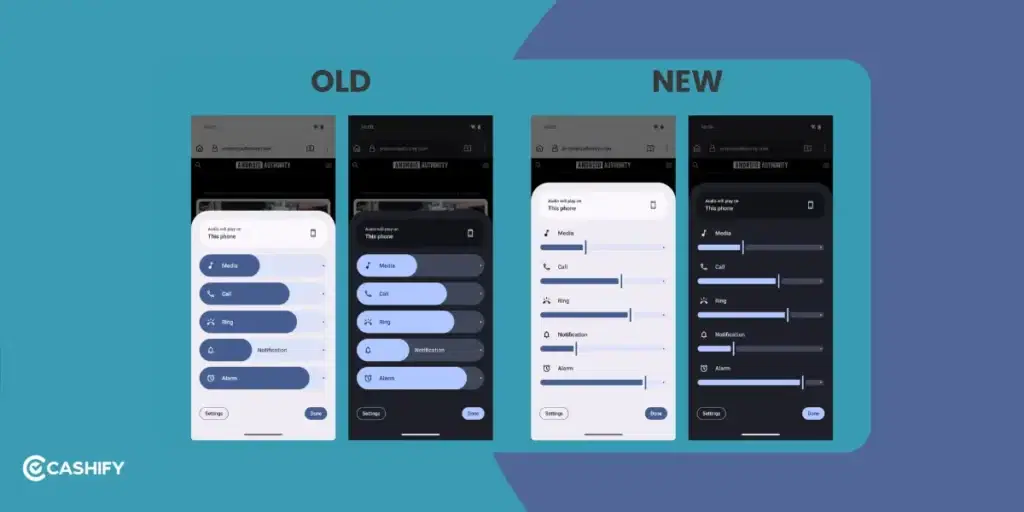
Android 16 (codename: Baklava) brings a cleaner look and several useful upgrades. On Vivo phones, these changes get an extra layer through Funtouch OS 16. It includes refined animations, AI tools, and gaming improvements.
Here’s a simple breakdown of what’s new:
Live Updates:
Track rides, food deliveries, or navigation in real time from the lock screen or notification panel. No need to keep opening apps.
Stronger Privacy & Security:
Better protection against malware, tighter control over background apps, theft detection, and reset protection.
Fresh Look & Feel
Material 3 Expressive design brings new colours, a cleaner Settings app, animations, and more gestures.
Battery & Performance Boosts
Smarter battery health tracking, adaptive performance tweaks, and improved optimisation across different screen sizes. It also includes foldables.
Extra Additions
Support for 8K video recording on compatible devices, new emojis, an improved photo picker for apps like Instagram and Snapchat, plus productivity upgrades.
Overall, the focus stays on a cleaner interface, better security, and improved day-to-day performance.
Also Read: These Redmi Phones Will Get Android 16: Is Yours on the List?
Which Vivo Phones Are Eligible for Android 16?
Vivo started rolling out the Android 16 update in early November 2025. By April 2026, most flagship phones and a lot of mid-range models have already got the stable update. The rest of the eligible devices should receive it by mid-2026.
Here’s the latest eligibility status (this can vary a bit depending on region and exact model variant):
| Series | Model | Status |
|---|---|---|
| X Series (Flagships & Foldables) | Vivo X Fold 5 | Received / Rolling Out |
| X Series (Flagships & Foldables) | Vivo X Fold 3 Pro | Received / Rolling Out |
| X Series (Flagships & Foldables) | Vivo X200, X200 Pro, X200 FE | Received / Rolling Out |
| X Series (Flagships & Foldables) | Vivo X100, X100 Pro | Received / Rolling Out |
| X Series (Flagships & Foldables) | Vivo X90, X90 Pro | Rolling Out / Received in 2026 |
| X Series (Flagships & Foldables) | Vivo X200 Ultra, X100 Ultra | Received / Rolling Out |
| X Series (Flagships & Foldables) | Older models (X Fold 2, X Flip, X90 Pro+, X90s) | Limited or Unlikely |
| V Series (Mid-Range) | Vivo V60, V60e, V60 Lite | Received / Rolling Out |
| V Series (Mid-Range) | Vivo V50, V50e | Received / Rolling Out |
| V Series (Mid-Range) | Vivo V40, V40 Pro, V40e | Rolling Out / Received |
| V Series (Mid-Range) | Vivo V30 Series (V30, V30 Pro, V30e) | Rolling Out in 2026 |
| T Series | Vivo T4 Ultra, T4 Pro | Received / Rolling Out |
| T Series | Vivo T4, T4R, T4x, T4 Lite | Rolling Out / Expected soon |
| T Series | Vivo T3 Series (T3, T3 Pro, T3 Ultra) | Rolling Out in 2026 |
| Y Series (Budget) | Vivo Y400 / Y400 Pro, Y300 Series, Y200 Pro | Rolling Out / Expected soon |
| Y Series (Budget) | Vivo Y58, Y39 | Rolling Out in 2026 |
| Y Series (Budget) | Vivo Y29 / Y28 / Y18 Series | Limited or Expected (varies by model) |
| Y Series (Budget) | Older / very budget Y models | Unlikely |
Also Read: Xiaomi HyperOS Vs MIUI 14: Which Is A Better OS For You?
Important Tips Before You Update
- Always back up your data to Vivo Cloud or Google Drive before the update.
- Fully charge your phone or keep it plugged in during the update.
- Connect to a stable Wi-Fi network for a smooth download.
- If you experience problems after the update, try doing a factory reset (but back up first!).
- Join community forums like Reddit’s r/Vivo to get tips or help with beta versions or issues.
- Keep an eye on Vivo’s official website for announcements about updates.
In A Nutshell
Android 16 brings Live Updates, stronger privacy tools, a refreshed UI, and better efficiency. As of April 2026, the update has already reached most recent X, V, and T series models. The rollout is still going on and expected to continue till mid-2026.
If a device is not in the eligible list, switching to a newer Vivo or iQOO model can help get longer software support going forward.
FAQs: Vivo Phone Eligible for Android 16
Which Vivo phones will get Android 16?
Most X series (X200, X100, X90, X Fold 5), V series (V60, V50, V40), T series (T4, T3), plus recent Y series models are eligible. Flagships received it first, followed by mid-range devices.
When did the Android 16 rollout start for Vivo?
Stable rollout began in early November 2025 for flagships like the X200 series and X Fold 5. Mid-range devices started between December 2025 and January 2026. Remaining models are expected by June 2026.
How do I check for the Android 16 update?
Go to Settings > System Update > Check for Updates. Vivo also sends OTA notifications to eligible devices.
Can I join the Android 16 beta on Vivo?
Beta access was available for select models such as X200 Pro and iQOO 13 earlier. Availability depends on Vivo’s current testing program.
What are the best new Android 16 features for Vivo phones?
Live Updates on the lock screen, stronger privacy and theft protection, Material 3 Expressive UI changes, better battery tracking, plus AI and gaming tools in Funtouch OS 16.
Will older phones like X90 or V30 series get Android 16?
Yes, many X90 and V30/V40 models are receiving or have already received the update in 2026.
Is Android 16 the same as Funtouch OS 16 or OriginOS 6?
Android 16 is the base system. Vivo applies it as Funtouch OS 16 for global and India devices, and OriginOS 6 for China variants.
What if my Vivo phone is not eligible?
Upgrading to newer models like X200, V60, or select iQOO phones gives longer software support. Older devices can still be used normally, depending on condition.
Are there risks in updating?
Updates are generally stable. Back up data before installing. Use Wi-Fi and avoid interruptions during installation. Minor issues can often be fixed with a reset.
Do iQOO phones get Android 16 too?
Yes. Devices like iQOO 13 and iQOO 12 received updates on a similar timeline as Vivo flagships.
Will Android 16 improve camera performance?
Software tuning can improve image processing, low-light output, and AI scene detection, even if hardware stays unchanged.
Will Android 16 slow down older Vivo phones?
Vivo optimizes updates for stability. Older devices may not gain major speed improvements, but everyday performance stays steady in most cases.
If you’ve just bought a new phone and don’t know what to do with your old phone, then here’s your answer. Sell old mobile to Cashify and get the best price for it. If you are planning to buy a new phone, check out Cashify’s refurbished mobile phones. You can get your favourite phone at almost half price with six-month warranty, 15 days refund and free delivery.