Calls on your OnePlus 9RT should sound clear, not quiet or muffled. If the voice on the other end feels low even after increasing the volume, it can quickly become annoying. The OnePlus 9RT low call volume issue is more common than you might think and often starts without any warning.
Let’s look at what affects call sound on the OnePlus 9RT and the simple fixes you can try on your own. We will also cover when professional repair makes more sense and how Cashify can help.
Also read: Vivo Y83 Pro Aux Jack Not Working? Repair It Fast With Cashify
Why Is Call Volume Low On OnePlus 9RT?

There are several reasons for the OnePlus 9RT low call volume issue. Let’s look at the important ones below:
Receiver Mesh Partially Shifted
The fine mesh covering the receiver can shift slightly over time. This usually happens due to pressure or frequent pocket use. When the mesh is not in place, sound does not pass through properly.
Call Audio Routing Issues
Sometimes the phone struggles to switch audio correctly during calls. The sound may not fully route to the receiver. This makes voices sound softer than usual.
Adaptive Sound Features Interfering
OnePlus 9RT adjusts sound based on usage. Sometimes, these features reduce call output without you noticing. This can result in the OnePlus 9RT low call volume issue.
Internal Residue Build-Up
Not all blockages are visible. Fine residue from sweat or air exposure can build up inside the receiver path. This slowly reduces sound clarity during calls.
Pressure Damage from Tight Cases
Very tight or hard cases can press against the top part of the phone. Over time, this pressure can affect the receiver’s sound output.
System Cache Issues
Old system cache files can affect call audio performance. This may cause volume to stay low even when settings look correct.
Also read: Vivo Y73 Not Powering On? Motherboard Repair Explained!
Try These Simple Fixes Before Professional Help
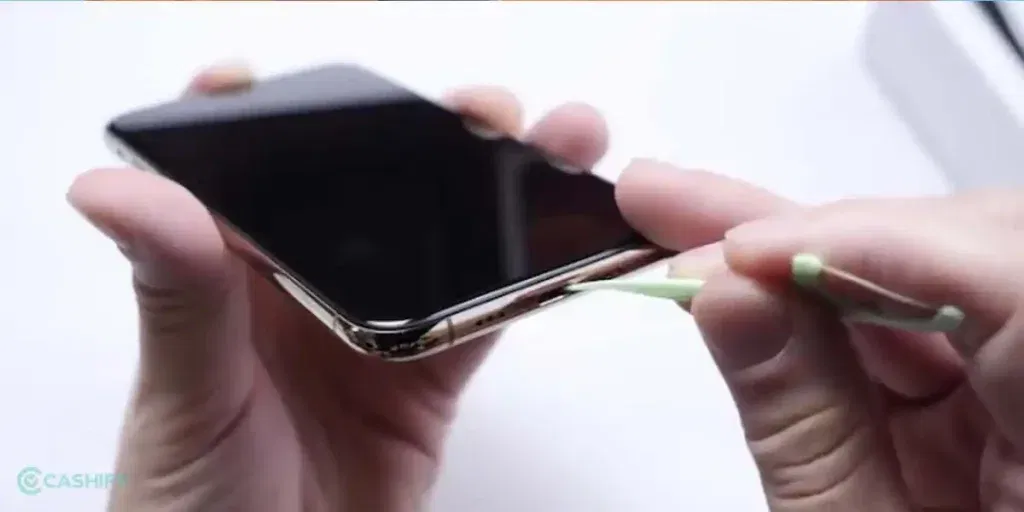
Before moving ahead with professional repair, try these simple checks at home. These steps may help fix the OnePlus 9RT low call volume issue:
Clean and Adjust the Receiver
Gently clean the receiver area using a soft brush or a dry cloth. If the mesh covering the speaker seems slightly out of place, carefully realign it. This ensures sound passes through clearly and consistently during calls.
Refresh Call Audio Settings
Restart your phone to refresh system settings. After restarting, open Settings > Sound & Vibration and make sure the call volume is set at the desired level. This step helps the phone maintain proper sound output.
Turn Off Adaptive Sound Features
Go to Settings > Sound & Vibration > Adaptive Sound and toggle it off. This prevents automatic adjustments and ensures call volume stays consistent every time you make or receive a call.
Clear Dust and Residue from the Receiver
Use a soft brush or a small air blower to remove dust and residue from the receiver path. This can help reduce the OnePlus 9RT low call volume issue over time. Avoid liquids that may damage internal components. Regular cleaning improves overall sound clarity.
Adjust or Remove Phone Case
Remove tight or hard cases that may press on the top of your phone. Switching to a softer or looser case allows the receiver to perform optimally and helps maintain good call sound.
Clear System Cache
Go to Settings > Storage > Cached Data and clear it. Restart the phone afterwards to ensure smoother performance. Clearing cached data helps the phone manage audio properly and can improve overall call quality.
If these steps do not improve the sound, the issue is likely hardware-related. It will need professional OnePlus Mobile repair.
Also read: 8 Signs That Your Android Phone Motherboard Needs Repair!
Why Choose Cashify For OnePlus 9RT Mobile Repair?
Choosing a reliable service is important when it comes to fixing OnePlus 9RT low call volume issues. Here is what you get with Cashify:
Repairs Done by OnePlus-Trained Experts
Every repair is handled by trained technicians. They understand OnePlus phones and follow proper repair steps during service.
Use of High-Quality Compatible Parts
Cashify uses high-quality compatible parts for repairs. These parts help restore clear call sound and support smooth phone performance.
Clear Pricing Shared Before Booking
The mobile repair cost is shown before you confirm the service. This helps you avoid confusion and unexpected charges later.
Repair at Home or Service Centre, Based on the Issue
A trained technician checks your phone first. Minor issues are fixed on the spot, while more serious problems are handled at a service centre if needed. Payment is made only after the repair is complete.
Easy Access to Nearby Service Centres
Cashify has more than 200 service centres across India. You can visit a nearby centre if you prefer in-store repair.
Also read: How Do I Check My Android Hardware Health?
How to Book OnePlus 9RT Receiver Repair with Cashify?
Follow these simple steps to book receiver repair and fix the OnePlus 9RT low call volume issue:
- Visit the Cashify website or open the Cashify app and go to the Mobile Repair section.
- Select OnePlus as your phone brand from the list.
- Choose OnePlus 9RT from the available models.
- Pick Receiver as the problem you want to fix.
- Enter your address to check service availability and book a technician visit. You only pay for the repair, not the visit.
- Choose a date and time slot that suits you best.
- Confirm the booking. A trained technician will inspect your phone and complete the phone repair based on the issue severity.
(You can also use the code RPR50 to get up to 50% off on your OnePlus 9RT receiver repair. This offer is available for a limited time and requires a minimum order value of Rs. 1,000.)
Also read: How To Fix Vivo V11 Pro Screen Issues? Replace It Affordably!
Final Thoughts On OnePlus 9RT low call volume
To sum up, the OnePlus 9RT low call volume issue can often be fixed with a few simple checks at home. Cleaning the receiver, adjusting settings, or clearing cache usually helps improve call sound. If the problem still continues, it is better to consult a professional to avoid further damage. Cashify makes the repair process easy with trained technicians, clear pricing, and flexible repair options.
If you have any questions or need help booking a mobile phone repair, feel free to ask in the comments. I will be happy to help.
If you’ve just bought a new phone and don’t know what to do with your old phone, then here’s your answer. Sell old mobile to Cashify and get the best price for it. If you are planning to buy a new phone, check out Cashify’s refurbished mobile phones. You can get your favourite phone at almost half price with six-month warranty, 15 days refund and free delivery.