Apple has finally stopped tiptoeing around the word “AI.” At its September event, it put artificial intelligence at the centre of the iPhone, reframing the device as your “intelligent personal hub.” New Apple Intelligence features are available from 14 September, with Siri AI rolling out in English.
But beneath the polished demos and the marketing gloss, only one thing really matters. Which features will you actually use every day, and which are just nice to look at once? This guide looks at the iPhone 18 Apple Intelligence features. Each feature gets an honest verdict. This will help you decide what to turn on and whether these features are worth upgrading for.
Also Read: Apple iPhone 18 Pro vs Samsung Galaxy S26 Ultra: Which One Should You Buy?
iPhone 18 Apple Intelligence Features At a Glance
The iPhone 18 Apple Intelligence features include everyday tools, useful time-savers, and a few fun extras. Here’s a quick look at what’s worth using before we take a closer look.
| Feature | What it does | Genuinely useful? |
| New Siri AI | Understands your context and searches your messages, emails and photos; takes action inside apps | Yes |
| Visual Intelligence | Search and act on what’s in your camera or on screen | Yes |
| Photo editing (Clean Up, Spatial Reframing, Extend) | Removes distractions, reframes a shot after it is taken and expands the frame | Yes |
| Write with Siri and Proofreading | Drafts, proofreads and rewrites text anywhere you type | Yes |
| Live Translation | Real-time translation in Messages, calls and AirPods | Yes |
| Call Context | Surfaces a confirmation code or reservation number when you call a business | Maybe |
| Safari (tab topics and Notify Me) | Groups tabs by topic and watches a page for price drops or restocks | Wait-and-see |
| Passwords auto-upgrade | Fixes weak or compromised passwords on your behalf | Nice-to-have |
| Image Playground / Genmoji | Generates photorealistic images and custom emoji | Wait-and-see |
The New Siri AI: The Change That Actually Matters
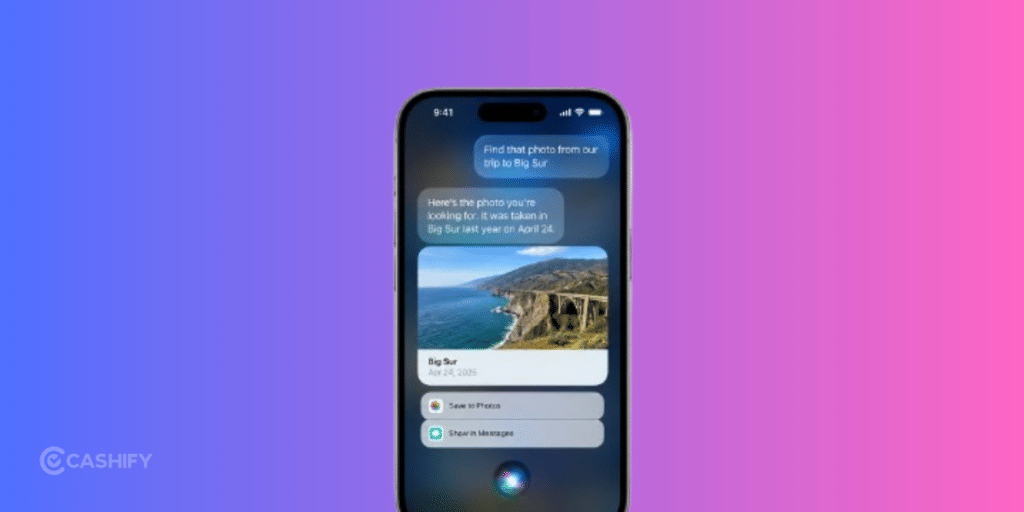
Of all the iPhone 18 Apple Intelligence features, the new Siri AI is the biggest one. It could change how you use your iPhone. Siri can now have natural, back-and-forth conversations. It can help you brainstorm and answer open-ended questions using up-to-date web information.
Personal context is another major upgrade. Siri can find an old photo, email, or note just by asking. It can also work across apps like Messages, Music, and Reminders.
For example, you can edit a message you just sent or add a song to your workout playlist. There is also a dedicated Siri app. This lets you continue a conversation on your iPad after starting it on your iPhone.
Verdict: Genuinely useful, so long as it works reliably. The context awareness alone is the reason to care about Apple Intelligence. Just note that Siri AI is launching in beta and in English first, so temper expectations for the first few weeks.
Visual Intelligence: Your Phone Can Now “See”

Among the iPhone 18 Apple Intelligence features, Visual Intelligence feels the most futuristic. It can also be very useful in daily life. Using Siri mode in the camera, you can point at something and ask about it. You can also take action with a single tap.
The useful features add up quickly. You can check nutrition details for a dish. You can turn a photo of a loyalty or membership card into a Wallet pass. You can also ask questions about anything on your screen.
Point the camera at some produce, for example. Siri can find a related recipe in your email. It can then tell you what to buy and add the ingredients to a list in another app.
Verdict: It can make small daily tasks much easier. The most advanced camera features, however, are limited to newer Pro models.
Photo Editing: Clean Up Does The Heavy Lifting
The photo-editing side of the iPhone 18 Apple Intelligence features is where AI quietly earns its keep. The star is the enhanced Clean Up tool, which now removes even larger objects with more natural infill: that stranger photobombing your holiday shot disappears in a tap, even in a busy scene.
- Spatial Reframing reframes a photo after it’s taken, adjusting the angle or zoom as if you’d repositioned the camera in the original scene.
- Extend stretches a cropped shot outward to recover a wider frame, straighten a crooked horizon or change the aspect ratio.
One honest heads-up. Any photo you edit with these tools carries a hidden SynthID watermark that marks it as AI-edited, which is worth knowing if you post professionally.
Verdict: Genuinely useful. Clean Up, Reframe and Extend will see real mileage, and they respect the original shot rather than over-processing it.
Write With Siri And Proofreading: Small Daily Time-Savers
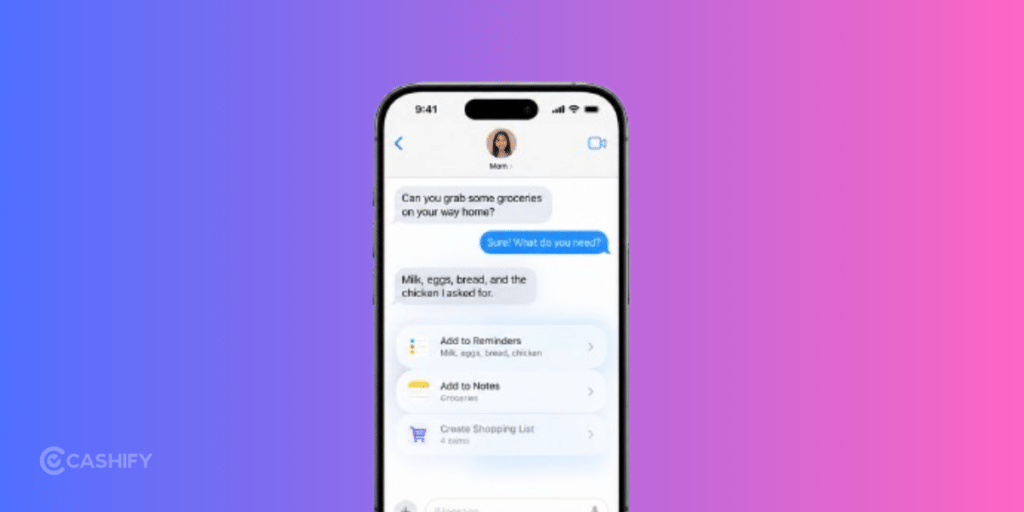
A quieter set of iPhone 18 Apple Intelligence features takes aim at the boring-but-constant task of typing. Write with Siri can draft from scratch or give feedback on what you’ve written, virtually anywhere you type, and in Messages and Mail it matches your own style, punctuation and tone. Smart Reply can now lean on that personal writing style too.
Running alongside it, automatic proofreading checks your grammar and spelling as you type across the system, so typos get caught before you hit send. It’s the kind of thing you stop noticing precisely because it just works.
Verdict: Genuinely useful. These are low-drama features that save a few seconds dozens of times a day, which adds up fast.
Live Translation: Break The Language Barrier
Live Translation is one of the most travel-friendly iPhone 18 Apple Intelligence features. It automatically translates texts in Messages, shows live translated captions in FaceTime, and gives spoken translation on calls and through your AirPods, so a conversation in another language can flow almost in real time.
Verdict: Genuinely useful. If you travel, deal with overseas family, or work across languages, this is the feature that quietly pays for itself.
Call Context: Handy When You Ring A Business
Call Context is a smaller entry in the list of iPhone 18 Apple Intelligence features, but a thoughtful one. When you call a business, it proactively surfaces relevant information, like a confirmation code or reservation number, right there in the Phone app. Ring an airline to change a flight, for example, and it can pull your booking code from Mail without you digging for it. It looks at who you’re calling rather than what you’re saying, and runs entirely on device.
Verdict: Maybe. It’s genuinely clever when it triggers, but it only helps in a narrow situation, so you’ll appreciate it occasionally rather than every day.
Safari: Tab Topics And Notify Me
The Safari-focused iPhone 18 Apple Intelligence features are the sort that sound useful on stage but need to prove themselves in daily use. Safari can now group your open tabs into topics automatically, so a pile of travel-planning pages lands in one place. Notify Me goes a step further, watching a web page for changes like a price drop or a restock and pinging you when it’s time to act.
Verdict: Wait-and-see. The ideas are good, but tab grouping and page-watching only earn their place if they slot into habits you already have. Give them a few weeks before deciding whether they stick.
Passwords Auto-Upgrade
Among the more behind-the-scenes iPhone 18 Apple Intelligence features, the Passwords app can now flag weak or compromised passwords and fix them for you with a tap, securely signing in to a site and swapping in a strong password on your behalf. It’s a genuinely smart use of on-device intelligence for your security.
The catch: Apple has said this one arrives in a future software update rather than on day one, so don’t expect it the moment you update.
Verdict: Nice-to-have. Good for your security hygiene and effortless when it lands, but it runs occasionally in the background rather than being something you actively use.
Image Playground And Genmoji
The most playful of the iPhone 18 Apple Intelligence features are Image Playground and Genmoji. Image Playground can now generate high-quality images in almost any style, including photorealistic, and let you modify them by describing a change or tapping and circling an object. Genmoji quality is better too, with the ability to describe the tweaks you want. Generated images carry a hidden SynthID watermark marking them as AI-made.
Verdict: Wait-and-see. Great for a laugh and the odd custom sticker, but for most people these are novelties rather than daily tools.
Also Read: Top 5 Things To Know Before Pre-Ordering Apple iPhone 18 Pro And Pro Max!
The Privacy Angle: A Real Differentiator
Underpinning all the iPhone 18 Apple Intelligence features is Apple’s privacy stance, and this is where it separates itself from rivals. Apple Intelligence defaults to on-device processing, so the system is aware of your personal information without collecting it. When a request needs more power, it goes to Private Cloud Compute, where, Apple says, your data is never stored, is used only for your request, and the promise is verifiable.
Verdict: Genuinely useful, not as a feature you tap, but as peace of mind. If data privacy weighs on your choice of phone, this is a real point in Apple’s favour.
Which iPhones Get The Apple Intelligence Features?
Not every device gets every feature. Basic Apple Intelligence reaches a wide range of recent iPhones, but the newest, most advanced iPhone Apple Intelligence features (the full Siri AI experience, Siri mode in Camera and voice customisation) are gated to the latest Pro-class hardware. Here’s how access compares.
| Device | Base Apple Intelligence | Advanced Siri AI + camera Visual Intelligence |
| iPhone 18 Pro / Pro Max | Yes | Yes |
| iPhone Air / 17 Pro / 17 Pro Max | Yes | Yes |
| iPhone 17 / 17e / 16 series | Yes | Partial |
| iPhone 15 Pro / 15 Pro Max | Yes | Partial |
| iPhone 15 / 14 and older | No | No |
A quick note for India: Siri AI is rolling out in English first, which covers Indian users, though a handful of features arrive in stages and some require newer, higher-memory devices.
Should You Upgrade For Apple Intelligence?
Here’s the honest take. If you already own an iPhone 16 or a iPhone 15 Pro, most of the Apple Intelligence features that matter (the new Siri AI, Write with Siri, Clean Up and Live Translation) will reach you through a software update. That alone isn’t a reason to spend on a new phone.
Upgrading makes sense if you want the fastest, most complete experience: camera-based Visual Intelligence, voice customisation and the best on-device performance are tied to the newer Pro-class chips. If your current phone is an iPhone 14 or older, this is a genuinely good moment to jump: you get the full feature set plus years of headroom.
Also Read: 5 Best Reasons To Buy The iPhone 18 Pro Max: Is It Really Worth Your Investment?
Final Thoughts
So what’s actually worth your time? Strip away the marketing and the genuinely useful iPhone 18 Apple Intelligence features come down to five: the context-aware Siri AI, Visual Intelligence, the upgraded photo editing tools, Write with Siri, and Live Translation. These are the ones that save you real seconds every day and will quietly earn their place on your home screen.The rest are pleasant extras, worth exploring but not worth overthinking. Switch on what fits your day, ignore the novelties, and let the useful ones quietly save you time.
Frequently Asked Questions
1. Which iPhones support the Apple Intelligence features?
Base Apple Intelligence runs on iPhone 17 models, iPhone 16 models and later, plus iPhone 15 Pro and 15 Pro Max. However, the most advanced features, such as full Siri AI, camera-based Visual Intelligence and voice customisation, are reserved for the latest Pro-class devices such as the iPhone 18 Pro and Pro Max.
2. Is Siri AI available at launch?
No, Siri AI is rolling out in beta and in English to start, from 14 September. Expect a few rough edges early on, with more languages and features arriving in stages.
3. Do the Apple Intelligence features work offline?
Many run on-device and work without a connection. More demanding requests use Private Cloud Compute, which needs the internet and may be subject to daily usage limits.
4. Is my data private with Apple Intelligence?
Apple processes most requests on-device and uses Private Cloud Compute for the rest, where it says your data is never stored and is used only for your request, not made accessible to Apple or anyone else.
5. Do I need the Pro model to use Apple Intelligence?
No. Many iPhone 18 Apple Intelligence features reach non-Pro and older supported iPhones. But the newest, most advanced capabilities are tied to Pro-class hardware, so a Pro model gets you the complete experience.
If you have just bought a new phone and are not sure what to do with the old one, here is your answer. Sell your old mobile to Cashify and get the best price for it. And if you are planning to buy your next phone, check out Cashify’s refurbished mobile phones. You can grab your favourite model at almost half the price, with a six-month warranty, 15-day refund and free delivery.