Buying a used or refurbished DSLR camera at low price is a smart purchase. You can get this to start your photography journey at a budget-friendly price. But before you pay, there is one number worth checking: the shutter count.
Think of shutter count as the number of times a camera’s shutter has been activated. It gives you an idea of how much the camera has been used. A lower count can be reassuring, but it should not be the only thing you check. The camera’s physical condition, sensor, autofocus, buttons, ports, lens mount, and overall performance matter too.
So, how do you check the shutter count on a used DSLR? Let’s check it out.
Also Read: How To Check Used Camera Before Buying? Full Checklist Explained!
What Is Shutter Count?
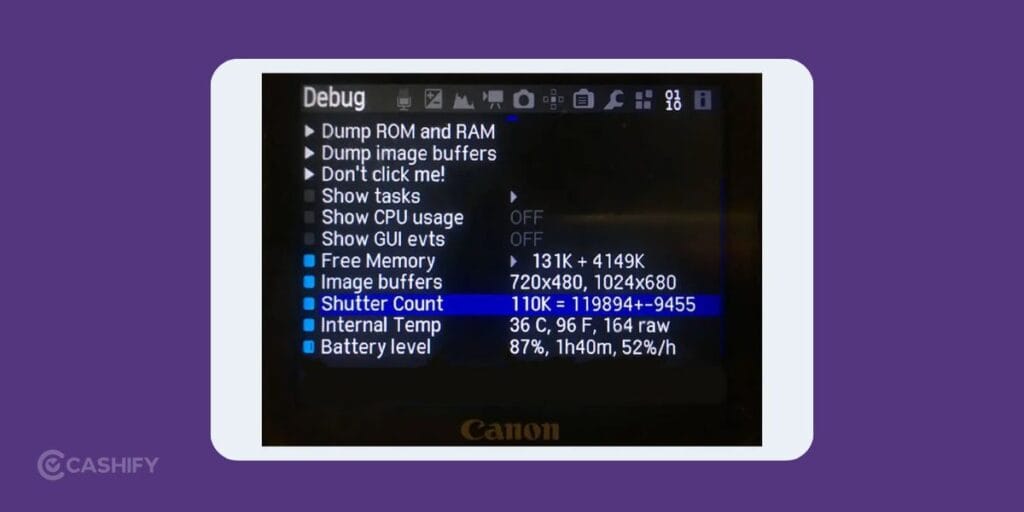
Every time you take a photo, the DSLR’s mechanical shutter completes an actuation cycle. The total number of these cycles is known as the shutter count. Camera manufacturers usually rate shutters for a certain number of actuations. The exact rating depends on the camera model. A professional DSLR may have a higher rated shutter life than an entry-level model.
A high shutter count does not automatically mean the camera is about to fail. Similarly, a low count does not guarantee that the camera is in perfect condition. Treat it as one useful indicator, not a final verdict.
How To Check Shutter Count On A Used DSLR
There are several ways to check the shutter count.
1. Check The Camera’s Metadata
One simple method is to take a fresh photo using the DSLR and inspect its EXIF data. EXIF information has details about the camera. You can find shutter-related information.
Transfer the photo to your computer and use a reliable EXIF reader to inspect the available data. Keep in mind that not every camera stores shutter count in a standard EXIF field.
2. Use A Shutter Count Tool
Some online tools and desktop applications can read shutter information from a camera’s image file. Upload a recent, unedited JPEG or RAW file and check the reported count.
The exact method varies by camera brand and model. It is a good idea to check compatibility before relying on a particular tool.
3. Ask The Seller
If you are buying from an individual seller, ask for the shutter count and request a recent sample photo. If possible, check the count yourself rather than relying only on the seller’s claim.
Also inspect the camera in person. Test the shutter, autofocus, flash, screen, viewfinder, dials, buttons, battery compartment, memory card slot, and connection ports.
What Shutter Count Is Good For A Used DSLR?
There is no single number that works for every DSLR.
A camera having 10,000 actuations is generally in a different position from one having 100,000 actuations. A camera rated for 150,000 actuations should be judged differently from one rated for 300,000.
For a used DSLR, I would treat a lower shutter count as a positive sign. But then, check the rest of the camera as well before deciding. Here buying second hand DSLR cameras from Cashify has a lot of benefits.
Benefits Of Buying Used DSLR Camera From Cashify!
Buying second-hand camera from an established platform like Cashify can reduce the uncertainty element. Cashify’s used cameras are tested before sale. Even the condition grades are based on cosmetics rather than performance. The company states that every camera is fully tested.
You can find refurbished camera lens, second hand DSLR cameras, refurbished gadgets, and refurbished action camera.
32-Point Quality Checks
Cashify has 32-point quality checks for its pre-owned products. This gives buyers a structured quality check instead of having to judge a used DSLR solely from photographs or a seller’s description.
Six-Month Warranty
Refurbished DSLR cameras from Cashify come with a six-month warranty. An additional six months is available for a small fee.
For a second-hand DSLR, warranty coverage can be useful. It is because mechanical components such as shutters can require attention.
15-Day Refund
Cashify provides a 15-day refund period. This gives you some time to inspect the camera after purchase and decide if it suits your needs.
Condition Grades
Cashify categorises cameras into three cosmetic grades:
- Superb: Like new, no scratches, cracks, or pixel issues. All applicable functions work perfectly.
- Good: Minor scratches or small dents on the outer body. All applicable functions work perfectly.
- Fair: Major scratches or dents on the outer body. All applicable functions work perfectly.
The important point is that these grades describe the cosmetic condition, not camera performance.
Cashify also lists used cameras as having under 60% shutter count. It can help buyers identify models positioned around lower shutter usage.
Free Shipping And Payment Options
Cashify provides free shipping and supports payment through UPI, cards, and net banking. There are also options such as split payment and no-cost EMI, depending on eligibility.
Discounts can include Cashify Gold membership, UPI, and card discounts.
Also read: Why Buy a Refurbished Apple iPhone 16e? Features, Value & Performance Explained
Final Verdict
Shutter count is one of the first things you should check when buying a used DSLR. But it should never be the only deciding factor. Honestly, you should also check the camera’s actual performance, physical condition, and shutter count together.
Let me know if you have any doubts about how to count shutter count on used camera. I would love to help you with your queries.
If you’ve just bought a new phone and don’t know what to do with your old phone, then here’s your answer. Sell your old mobile to Cashify and get the best price for it. If you are planning to buy a new phone, check out Cashify’s refurbished mobile phones. You can get your favourite phone at almost half price with a six-month warranty, 15-day refund and free delivery.