Canva has emerged as one of the most popular designing platforms in recent years, making graphic design easier for both beginners and professionals. From social media posts and presentations to thumbnails and marketing creatives, Canva offers a simple alternative to more complex designing software such as Adobe Photoshop.
Initially, Canva Pro also had a premium charge of around ₹4,000 for every user. But in a recent collaboration with Jio, Canva Pro and Canva Pro Lite are now free for available Jio users. To grab this amazing and worthwhile premium tool, follow the simple steps below.
Also Read: Samsung Galaxy Z Fold8 Ultra First Impressions: Slimmer, Smarter, But Is It Truly Ultra?
How To Grab Canva Pro For Free
To get Canva Pro for free, you have to have a Jio SIM or log in to the MyJio app with a friend’s or family member’s number. Now, just follow a few simple steps:
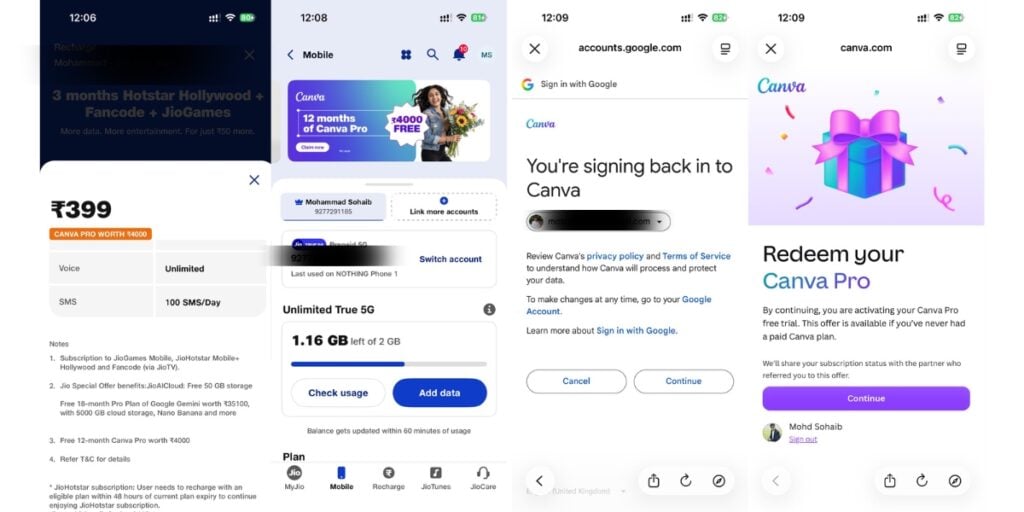
- Log in to the MyJio app.
- Recharge with the ₹349 plan for Canva Pro Lite or the ₹399 plan for Canva Pro.
- You will then find an offer banner at the top of the app.
- Tap on the banner to get redirected to the email ID section.
- Now, redeem the offer and log in with your preferred email ID.
- After the sign-up process, it will be automatically redeemed.
- Now, you have Canva Pro for free.
What Are the Benefits of Canva Pro?
Canva Pro offers several features that are restricted or limited in the standard version. I have been using Canva for a long time, and I noticed a significant difference after moving from the standard version to the Pro subscription.
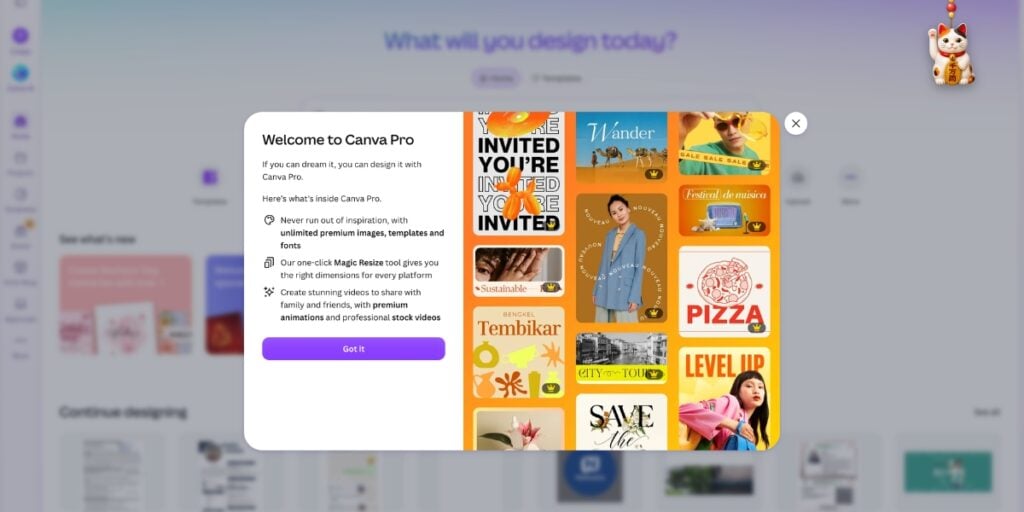
Earlier, I often faced limitations while using premium templates, icons, and other design elements. I also had to rely on external tools for tasks such as removing backgrounds from images. Canva Pro makes many of these tasks much easier by bringing them directly into the platform.
Also Read: Samsung Galaxy Z Flip7 Long Term Review: The True King Of Flip Phones
Here are some of the key Canva Pro features:
- Premium templates: Get access to a much larger collection of professionally designed templates.
- Premium elements: Use additional icons, graphics, photos, videos and other design assets.
- Background Remover: Remove the background from images directly inside Canva without using a separate tool.
- Magic Resize: Quickly resize a design for different platforms and formats.
- Brand Kit: Store brand colours, fonts and other branding elements in one place.
- Premium stock content: Access a wider selection of photos, videos, graphics and audio.
- Content Planner: Plan and schedule social media content from Canva.
- More cloud storage: Store more designs and media files in your Canva account.
- AI-powered tools: Use Canva’s built-in AI tools to create and edit designs more efficiently.
- Transparent backgrounds: Export designs with transparent backgrounds for easier use across different platforms.
Canva Pro vs Standard Canva
The biggest difference between Canva Pro and the standard version is access to premium content and advanced editing tools. Free Canva is sufficient for basic designs, but users who regularly create social media posts, YouTube thumbnails, presentations, marketing creatives or professional graphics can benefit from the additional Pro features.
For me, features such as Background Remover, premium elements and templates are particularly useful because they reduce the need to switch between multiple third-party tools.
Also Read: Samsung Galaxy Z Fold8 First Impressions: Samsung’s Boldest Foldable Yet
Verdict
Canva Pro can be a useful upgrade for anyone who regularly creates digital content. The Jio offer makes it possible for eligible users to access Canva’s premium features through select plans instead of purchasing a separate Canva subscription.
If you already use Jio and need Canva for content creation, social media, presentations, or professional designs, check the Canva offer available in the MyJio app before choosing your recharge plan.
Are you still browsing through your broken screen? Don’t worry! Book an at-home mobile phone screen repair with Cashify—an affordable and one-stop destination for all your mobile phone needs. In case you break your screen within 1 month of repair, we will replace your screen again—for FREE.