Your iPhone 14 may still work, but what happens when it starts heating up more than usual and you want to sell it? iPhone 14 overheating can make you worry about repair costs, resale value, and whether a buyer will accept the device. You don’t necessarily have to repair your phone before selling it. First, understand when the heating occurs, check the phone’s overall condition, and compare your selling options. This will help you decide whether to sell it as-is or get it checked before asking for a resale offer.
Also Read: Selling Galaxy S23 With Pink Line: Should You Repair Or Sell It?
Why Is Your iPhone 14 Overheating?
Before selling your phone, try to understand why it gets hot. Occasional warmth during demanding tasks is different from a phone that becomes unusually hot during everyday use. iPhone 14 overheating can have several causes, and identifying the pattern can help you decide what to do next.
Common causes include:
- Heavy app usage: Playing graphics-intensive games, recording videos for long periods, or using navigation apps can increase processor activity and make your phone warm.
- Charging habits: Using your phone while charging or charging it in a hot environment can raise its temperature.
- Background activity: After an iOS update, your phone may temporarily run background tasks such as photo indexing and data syncing.
- Weak network signals: Your phone may use more power while searching for a cellular signal in an area with poor coverage.
- Battery wear: An ageing or faulty battery can affect performance and may contribute to unusual heating.
- Software or hardware problems: A software bug, damaged component, or other fault can cause repeated overheating.
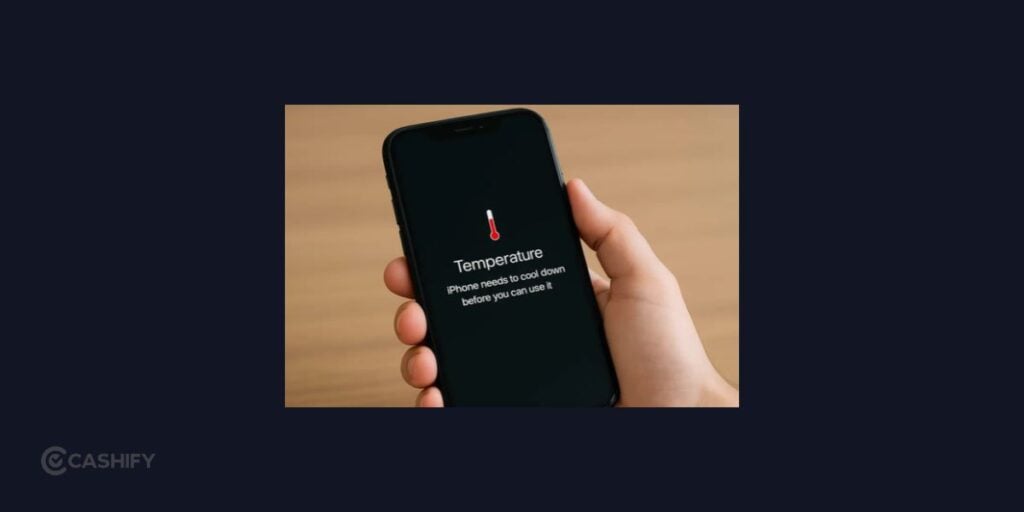
Notice when the phone gets hot. Does it happen only while gaming, or does it occur when you check messages or leave the phone idle? This information can help a technician assess the problem and help you explain the device’s condition to a potential buyer.
If your phone becomes excessively hot or displays a temperature warning, stop using and charging it. Let it cool naturally in a safe place. If the problem keeps happening, get it checked rather than continuing to use it as usual.
Can You Sell An iPhone 14 With An Overheating Issue?
Yes, you can look for a buyer for your iPhone 14 even if it overheats. However, acceptance depends on the buyer’s policy, the phone’s condition, and whether the issue affects its basic functions. With iPhone 14 overheating, the offer may be lower than it would be for a fully working device because the buyer may need to investigate or repair the fault.
You have three main options:
- A phone buyback platform: Some services assess used phones and provide resale offers for eligible devices. Check their fault and condition policies before proceeding.
- A local mobile dealer: A dealer may inspect the phone and offer a price based on its condition and potential repair costs.
- A private buyer: You can sell directly to another person, but you should clearly disclose the heating issue and agree on the phone’s condition before completing the sale.
You don’t necessarily need to pay for a repair first. If the phone is otherwise in good condition, compare the price offered for it as-is with the likely cost of fixing the problem. If the repair is expensive or the cause is unclear, selling it without repairing it may be more practical.
Also Read: OnePlus Phone Green Line Issue? Here’s How To Sell It Without A Big Loss
Where Can You Sell Your iPhone 14 With An Overheating Issue?
If you want to sell your phone without finding an individual buyer yourself, a buyback platform may be worth considering. For iPhone 14 overheating, the important thing is to confirm whether the buyer accepts your device’s actual condition.
Here are the options you can explore.
Cashify
Cashify is a great option to consider if you want to sell your iPhone 14 without finding a buyer yourself. You can check an estimated resale price online and, if the phone is eligible, arrange a doorstep pickup in your location. The phone is inspected before the final price is confirmed, so the amount may differ from the initial estimate.
If your iPhone 14 has an overheating issue, disclose it when checking your selling options. Confirm whether Cashify accepts devices with this specific fault, as eligibility and the final offer depend on the phone’s condition and inspection.
Local Mobile Dealers
Visit more than one dealer if possible. Ask whether they accept phones with heating issues and whether they need to diagnose the problem before making an offer. Comparing quotes can give you a better idea of the phone’s value in its current condition.
Private Buyers
You can also list the phone on a suitable marketplace. Mention the overheating issue clearly, share details about the battery and physical condition, and allow the buyer to inspect the device. Avoid hiding the fault to secure a higher price.
Before choosing an option, compare the offer, inspection process, payment terms, and conditions for faulty devices. The highest advertised price may not be the amount you receive after the phone is assessed.
How To Sell iPhone 14 On Cashify?
- Go to the official website of Cashify or use the Cashify app.
- Head to the Sell Old Phone section.
- Then, select your phone brand and you will be redirected to Sell Old Apple iPhone page.
- There, choose your iPhone model.
- Answer the device related questions, get a final quote and schedule the free doorstep pickup.
What to Do Before Handing Over Your iPhone 14
Once you’ve found a buyer, prepare the phone for the handover. If iPhone 14 overheating is the reason you’re selling, make sure the buyer knows about the issue before the final inspection.
Follow these steps:
- Back up your data: Use iCloud or a computer to save your photos, contacts, messages, and other important files.
- Check your battery health: Go to Settings > Battery > Battery Health & Charging. Review the maximum capacity and any service recommendations. Battery health alone cannot confirm the cause of overheating, but it gives you useful information about the device.
- Explain the problem: Tell the buyer when the phone gets hot, whether it happens during charging or normal use, and whether you’ve had it checked.
- Sign out and erase your data: Once your backup is complete, follow Apple’s instructions to sign out of your Apple Account and erase the iPhone.
- Remove your SIM card: Take out your physical SIM, if applicable.
- Keep the sale records: Save the confirmed offer, inspection details, and payment confirmation.
If the phone becomes excessively hot, don’t charge it just to complete the backup or prepare it for sale. Let it cool and seek professional advice if the problem persists. You can decide how to handle the data transfer once the phone is safe to use.
Should You Repair Or Sell Your iPhone 14?
The decision depends on what’s causing the problem and how much the repair is likely to cost. If iPhone 14 overheating happens only during heavy tasks, simple changes to how you use the phone may help. If it heats up during basic activities or while idle, a professional diagnosis can help identify whether it needs a battery replacement or another repair.
Consider these points before spending money:
- Repair it if the cost makes sense: If the phone is otherwise in good condition and the repair is reasonably priced, fixing it may improve its resale prospects.
- Sell it as-is if the repair is expensive: You may prefer to accept a lower offer rather than invest more money in an older device.
- Get a diagnosis if the cause is unclear: Avoid replacing the battery or another component based on guesswork.
- Consider its overall condition: Cracks, camera problems, poor battery health, and other faults can affect the value alongside overheating.
Compare the likely resale value after repair with the offer you can get for the phone in its current condition. Remember to account for the repair expense and the time it may take.
You don’t have to repair every problem before selling your phone. The goal is to understand your options, choose a suitable buyer, and be transparent about the device’s condition.
Also Read: Moto Edge Vs Moto G Series Resale Value: Which Pays More?
Final Thoughts
You can explore selling your iPhone 14 even if it overheats, but the right approach depends on the cause of the problem and the phone’s overall condition. Check its battery health, consider a professional diagnosis if the heating continues, and compare offers from Cashify, local dealers, and private buyers.
Confirm the buyer’s policy for faulty devices before proceeding, and don’t assume that a quoted price is guaranteed until inspection is complete. Being upfront about the issue will help you make a more informed decision about whether to repair the phone or sell it as-is.
FAQs
Can I sell my iPhone 14 if it overheats while charging?
Yes, you can look for a buyer who accepts devices with functional issues. However, stop charging the phone if it becomes excessively hot. Get it checked if the problem keeps happening, and disclose the issue before selling.
Will overheating reduce my iPhone 14’s resale value?
It can. The impact depends on the cause and severity of the problem, the potential repair cost, battery health, and the phone’s overall condition. An unresolved fault may lead to a lower offer.
Should I replace the battery before selling my iPhone 14?
Not automatically. Check the battery health and get the phone diagnosed if needed. Compare the replacement cost with the likely improvement in resale value before deciding.
Can I sell my iPhone 14 without repairing the overheating issue?
Yes, if you find a buyer who accepts the phone in its current condition. Check the buyer’s eligibility criteria and explain the fault so the offer reflects the actual condition.
Can I sell my overheating iPhone 14 through Cashify?
You can check Cashify’s current resale options, but acceptance depends on its condition criteria and inspection. Disclose the overheating issue and confirm eligibility before arranging the sale.
Buying refurbished mobile phones was never this easy. Sell your old phone and get exclusive offers & discounts on refurbished mobiles. Every refurbished phone is put through 32-point quality checks to ensure like-new standards and comes with a six-month warranty and 15-day refund. Buy refurbished phone easily on no-cost EMI today!