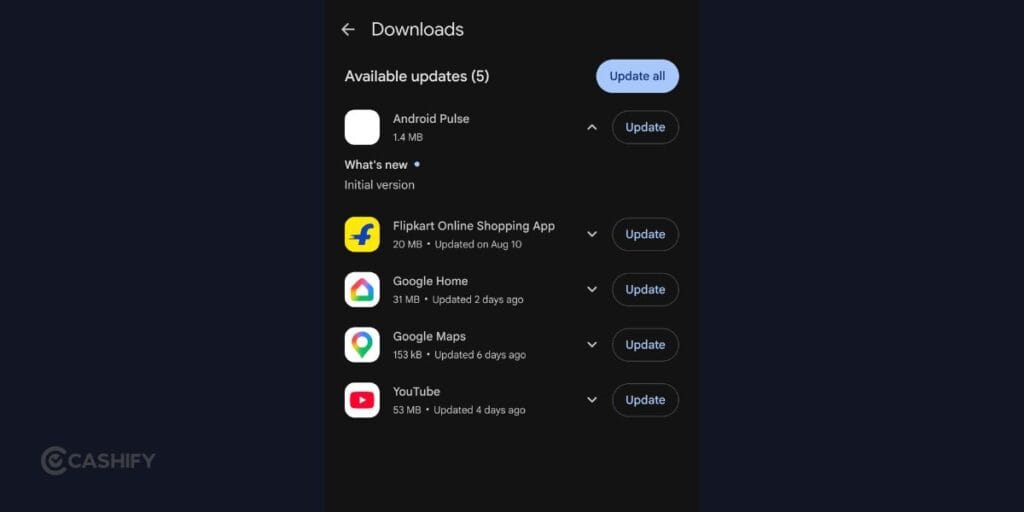
The Android Pulse app is a Google system component that works in the background to help Android detect unusual use of important system resources. If you recently noticed it in the Google Play Store, you may be wondering whether you installed it, what it does, and whether it is safe. Here is a simple explanation of everything you need to know.
Also Read: Vivo Phones Android 17 Update: Eligible Devices, Features And Rollout Timeline
What Is Android Pulse App?
The Android Pulse app is a Google system component connected to Android’s ability to detect unusual behaviour.
Your phone is constantly using resources. The processor handles tasks, memory keeps apps running, and other system resources are used whenever you browse the web, watch videos, play games or use apps.
Usually, this happens without any problem.
But sometimes an app or system process may start using far more resources than expected. That can affect your phone’s performance, battery life or overall stability.
Pulse is designed to help Android identify this kind of unusual behaviour.
Google describes the component as helping with the distribution of rules used to detect unusual consumption of important system resources by Android and installed applications.
In simple terms, it gives Android another way to recognise when something does not look normal.
You do not need to open it, set it up, or regularly check it.
What Does Android Pulse Do?
The main job of the Android Pulse app is related to detecting unusual resource usage.
Think about your phone when everything is working normally. You might have WhatsApp running in the background, a browser open and a few other apps installed. Your phone manages all of them without you having to think about it.
Now imagine one app suddenly starts using much more processing power than usual. Or a background process keeps using an unusually large amount of memory.
Android needs a way to recognise that behaviour. That is where Pulse comes into the picture.
Google says it helps distribute rules that can be used for anomaly detection. These rules can help Android identify behaviour that is outside expected patterns.
It is important to understand what that means.
Pulse is not necessarily fixing the problem itself. Its role is connected to identifying unusual behaviour and making detection rules available to Android.
So, if an app is behaving strangely, Pulse does not mean that Google will automatically repair that app.
It is more like one of the tools Android can use to understand what is happening in the background.
What Does “Rule Distribution” Mean?
The phrase “rule distribution” makes the Android Pulse app sound more complicated than it actually is.
A simple way to understand it is to think of a rule as an instruction.
Android can use certain instructions to decide whether a particular type of behaviour looks unusual.
For example, if a particular process normally uses a small amount of a system resource but suddenly starts using much more for an extended period, that could be treated as unusual.
The rules used to identify such behaviour can change over time.
Google may learn more about how Android and different apps behave. As that happens, the rules used for detection may also need to be updated.
A system component such as Pulse can help distribute those rules. This is also why you may see it receive updates even though there is no new feature for you to try.
You are not expected to see or manage these rules yourself. They work in the background as part of Android’s software environment.
Google has not publicly explained every technical detail about how the rules work, so it is better to stick to the information that has been confirmed rather than assume that Pulse is responsible for every type of Android monitoring.
Does Android Pulse Monitor Your Apps?
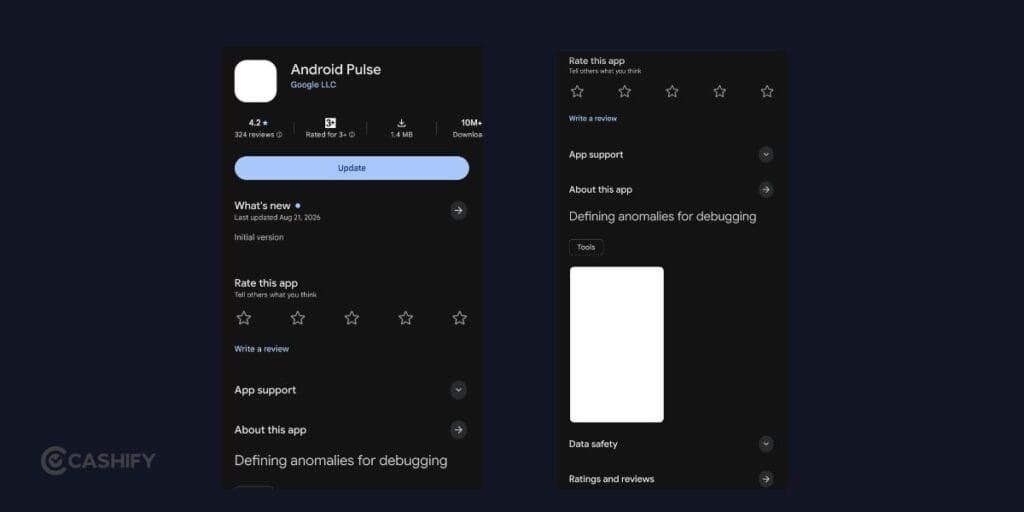
The Android Pulse app is connected to detecting unusual resource usage by Android and installed applications.
The word “monitor” can sound worrying, but there is an important difference between monitoring how an app behaves and monitoring what you do inside that app.
For example, checking whether an app is using an unusually large amount of processing power is one thing.
Reading your private messages inside that app is something completely different.
The information currently available about Pulse points towards the first type of activity.
Google’s description focuses on the consumption of important system resources. It does not describe Pulse as an app for reading your personal messages, photos or conversations.
That means you should not assume that seeing Pulse on your phone means Google is suddenly reading everything on your device.
At the same time, Google has not published every technical detail about the component. So it is better to avoid making claims about exactly what information it can or cannot access beyond what Google has publicly described.
Also Read: Top 5 Hello UI Features That Make Motorola Phones Better In 2026
Is Android Pulse Safe?
If you have the official Google version of the Android Pulse app, there is currently no reason to treat it as a suspicious application.
The official component is published by Google LLC and is associated with the package name:
com.google.android.apps.pulse
That information is useful if you are unsure whether the app on your phone is genuine.
The name “Pulse” alone is not enough to identify an app because other developers can use similar names.
If you are checking the app on your phone, look at:
- Developer: Google LLC
- Package: com.google.android.apps.pulse
- Purpose: Android system resource anomaly detection
- Type: System/background component
If these details match the official Google component, you are not looking at some random app that appeared on your phone.
You can generally leave it alone and allow Google to update it when required.
Is Android Pulse a Virus or Malware?
No evidence currently suggests that the official Android Pulse app from Google is a virus or malware.
The confusion is understandable. You may not remember installing it. It may not have a familiar icon. You may not be able to open it like a normal app. And its name does not immediately tell you what it does.
Those things can make it look suspicious. However, Android has plenty of background components that you never interact with directly.
Some manage updates. Others handle connectivity, security, notifications or other system functions. Pulse appears to be another background component rather than a conventional app designed for users.
If you ever see a different “Pulse” app from an unknown developer, do not assume it is the same thing. Always check the developer and app information before trusting it.
Does Android Pulse Drain Battery?
There is currently no strong evidence that the Android Pulse app itself causes noticeable battery drain.
This is important because users often connect a new app with a sudden battery problem.
For example, you might notice Pulse in your Play Store updates and then realise your battery is dropping faster than usual.
That does not mean the two events are connected. Battery drain can happen for many reasons, including:
- Apps running heavily in the background
- High screen brightness
- Gaming
- Video streaming
- GPS and location services
- Poor mobile network coverage
- Mobile data usage
- A recent system update
- An app stuck in the background
If your battery is draining quickly, check the battery usage section in your phone’s Settings.
That will give you a better idea of which apps or services are actually consuming power. Simply seeing Pulse on your phone is not enough to blame it for battery drain.
Can You Uninstall Android Pulse?
You may not be able to uninstall the Android Pulse app like you would remove a regular app.
That is because it is a system component rather than a typical app downloaded for everyday use.
Depending on your phone and Android version, you may see different options when you open its App Info page.
Some system components can be disabled or have their updates removed, while others cannot be changed by the user.
If your phone does not show an uninstall option, that is not necessarily a problem.
You also should not try to remove or disable system components simply because you do not recognise them.
Doing so without knowing what they control can sometimes cause unexpected behaviour. If your phone is working normally, leaving the official Google component alone is generally the simpler option.
Also Read: Samsung Galaxy S25 Ultra Battery Draining Fast? Top 5 Fixes You Can Try Today
Should You Update Android Pulse?
If the Android Pulse app appears as an update in Google Play and the developer is Google LLC, there is generally no reason to avoid the update.
You do not need to open the app after updating it. You do not need to configure settings. And you also do not need to keep checking whether it is running.
The component is designed to work in the background.
Like other system software, updates can include changes that improve how the component works or support newer Android functionality.
So, if it appears in your regular Google Play updates, you can treat it like other official Google system components.
How to Check If Android Pulse Is the Official Google App
If you are still unsure about the Android Pulse app on your phone, checking its details takes only a moment.
On most Android phones, you can:
- Open Settings.
- Tap Apps or App Management.
- Search for Pulse.
- Open its App Info page.
- Check the developer and package details.
- Look for Google LLC and com.google.android.apps.pulse.
The exact menu names can differ between Samsung, OnePlus, Xiaomi, Vivo, Motorola and other Android phones.
If the details do not match and the app came from an unknown source, do not assume that it is Google’s Pulse component.
Does Android Pulse Work on Samsung and Other Phones?
The availability of the Android Pulse app may differ between Android devices.
Android is used by many manufacturers, but each company adds its own software and changes to the operating system.
For example, a Samsung phone does not have exactly the same software setup as a Pixel phone. The same is true for OnePlus, Xiaomi, Vivo, Motorola and other brands.
As a result, a system component may appear on one device before another.
So, if your friend has Pulse and you do not, that does not automatically mean your phone is missing an important feature.
Likewise, seeing it on your phone does not mean that something is wrong.
Frequently Asked Questions
What is Android Pulse used for?
The Android Pulse app helps distribute rules that Android can use to identify unusual consumption of important system resources by Android and installed apps.
Is Android Pulse made by Google?
Yes. The official version is published by Google LLC.
Is Android Pulse a new app?
Not exactly. Earlier versions of the component were available before it became more noticeable through Google Play updates.
Why can’t I open Android Pulse?
It is designed as a background system component rather than a regular app with a user-facing interface.
Can Android Pulse access my photos and messages?
Google’s public description focuses on detecting unusual system resource usage. It does not describe the component as a tool for reading personal messages or photos.
Does Android Pulse affect battery life?
There is currently no strong evidence that the component itself causes noticeable battery drain. If your battery is dropping quickly, check your phone’s battery usage information to identify the actual cause.
Why is Android Pulse showing in Google Play?
Google can distribute and update certain system components through Google Play. Its appearance in the update list does not mean you manually installed it.
Should I be worried about Android Pulse?
If you have the official Google version, there is currently no reason to be concerned. Check that it is published by Google LLC and associated with com.google.android.apps.pulse.
Also Read: Love FIFA? Try These Best Consoles To Play FC 26
If you’ve just bought a new phone and don’t know what to do with your old phone, then here’s your answer. Sell old mobile to Cashify and get the best price for it. If you are planning to buy a new phone, check out Cashify’s refurbished mobile phones. You can get your favourite phone at almost half price with six-month warranty, 15 days refund and free delivery.