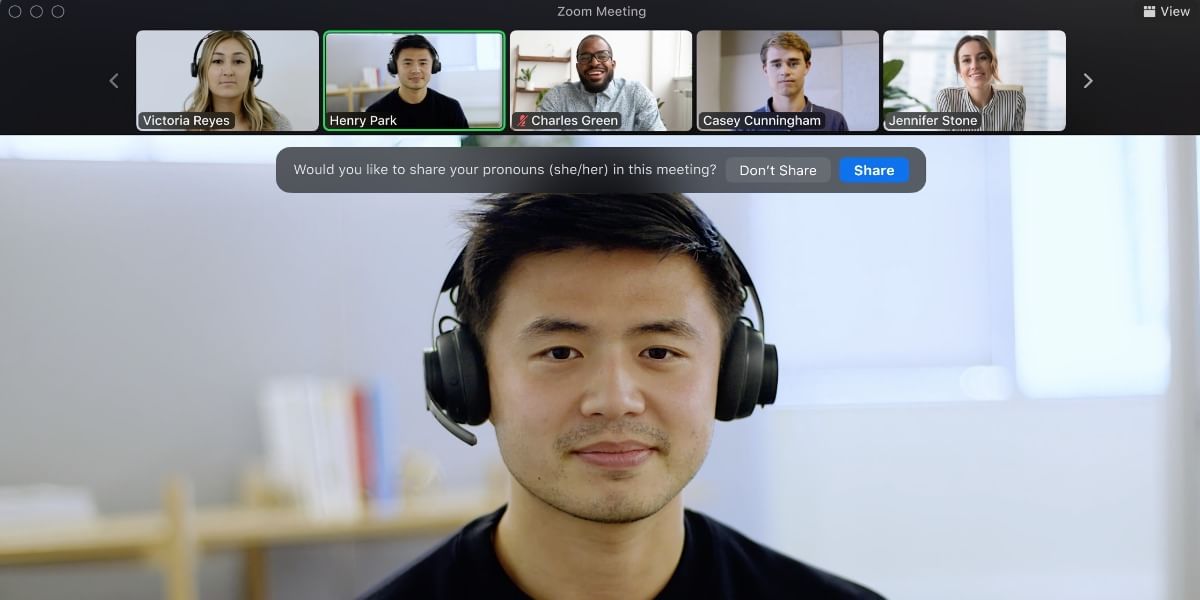
Zoom has added a new Pronouns feature that allows users to define their gender more clearly and be treated with more respect on the app. This feature displays a user’s pronoun option right beside their profile name, making it easier for others on a video conference to identify them properly. He/him/his, she/her/hers, and they/them/theirs are some kinds of pronouns. Pronoun sharing is very crucial for LGBTQ people, especially those who do not fall within the gender binary. Zoom’s new Pronouns feature strives to help all users express themselves accurately and respectfully.
Also read: Honor Earbuds 2 SE TWS Launched With Active Noise Cancellation
Zoom Pronouns Feature
After receiving feedback from educators, social organizations, diversity experts, and other Zoom users, the fresh Pronouns feature is being rolled out with the Zoom 5.7.0 update. A new Pronoun section should display on your profile page once you update to the latest version. Simply type your preferred pronoun in the custom text form, then select how and when they are communicated during Zoom Meetings and Zoom Video Webinars.

Also read: PUBG New State Reveals New Map: Troi
A user can decide to let Zoom ask if they want to share pronouns each time they participate in a conference or meeting. ‘Always Share’ and ‘Do not Share’ are other options. These pronouns appear beside the user’s profile name, allowing others to approach them correctly. Pronouns are now always visible on the Zoom profile card, although the sharing controls exist for meetings and webinars. A user can see this by floating the cursor over a person’s avatar in Zoom Chat or Contacts tab.
Also read: WhatsApp Chats Getting New Design For Android Users
For Basic accounts with a single licensed user, Zoom Pronouns Feature will be available by default on the profile page. For Zoom accounts with many users, pronouns will be off by default. Those accounts’ admins will have the ability to enable the Pronouns field in their account settings.