YouTube is apparently testing a new slide-to-seek feature on its Android and iOS apps to make forwarding and rewinding videos easier. Users will be able to skip to their favourite parts of a video by using a “drag-and-hold” gesture. Previously, users would either use the progress bar or skip 10 seconds of a clip with each tap on the left or right half of the video player. The new feature appears to be in the testing phase, and it might be part of a server-wide update or delivered to users on an account-to-account basis.
Also read: Mi Mix 4 Launch Date Set for August 10: Here’s What to Expect
According to Android Police, the new YouTube playback controls were discovered by a Reddit user (@u/FragmentedChicken). The slide-to-seek feature is accessible for users on the latest YouTube beta v16.31.34 app on Android, according to his experience. Some users reported that the feature was visible on their iOS devices as well. It appears that the feature is only available to users on an account-by-account basis.
Also read: iQoo 8 Series Launch Date Confirmed as August 17: Here’s What to Expect
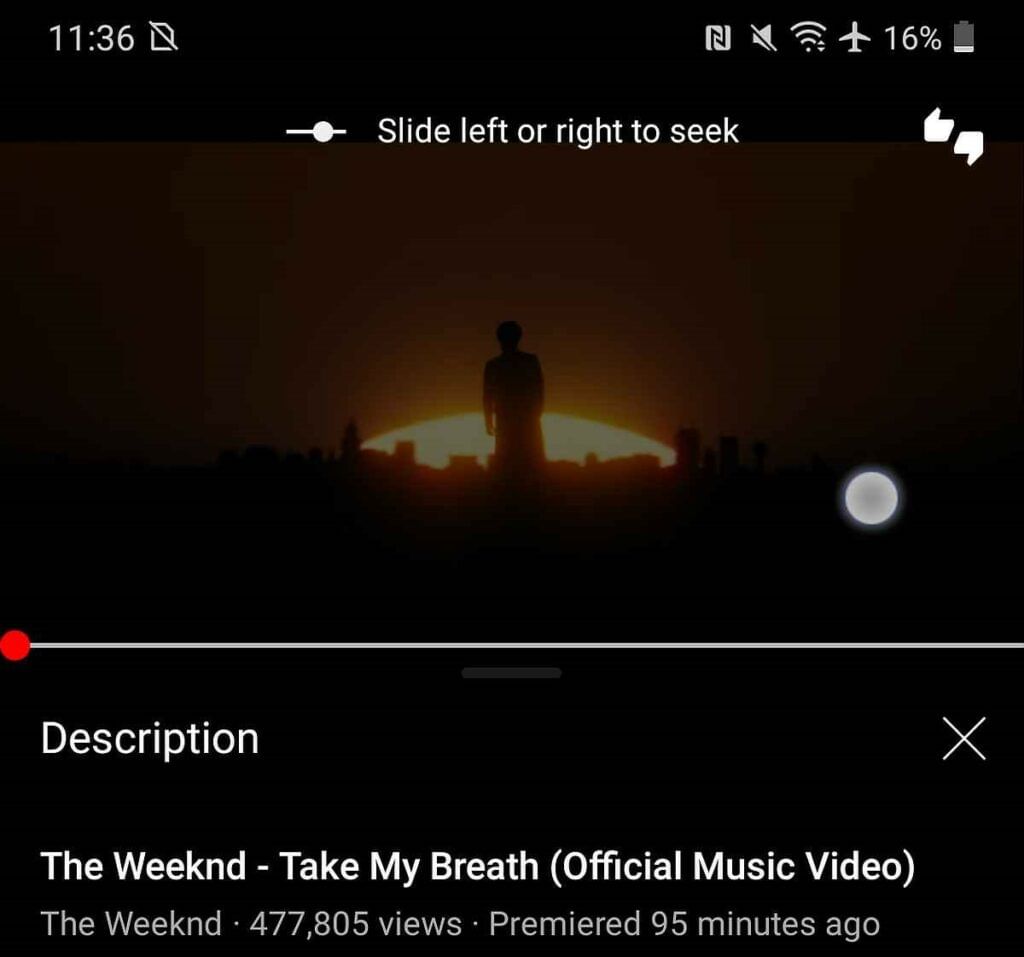
New Drag and Hold Feature in Youtube
While employing the drag and hold gesture; users will see a ‘Slide left or right to seek’ banner at the top of the screen, according to the Reddit post. To use this feature, tap and hold anywhere on the video screen, then slide left or right to rewind or skip the video. Along with this, YouTube will provide a small thumbnail of the video being skipped; making it quicker and easier to skip to the relevant part of the content.
Also read: Oppo Unveils Next Generation Under-Screen Camera technology
In a YouTube video, the standard method for rewinding or skipping parts works significantly differently. Users can use the slide-to-seek feature by touching the screen to bring up the progress bar. Users can move the red dot to the desired position once that is up and visible. People can skip video in 10-second increments by touching on the left or right half of the video player. The new feature is more simple, making it considerably easier to control video playback on YouTube.