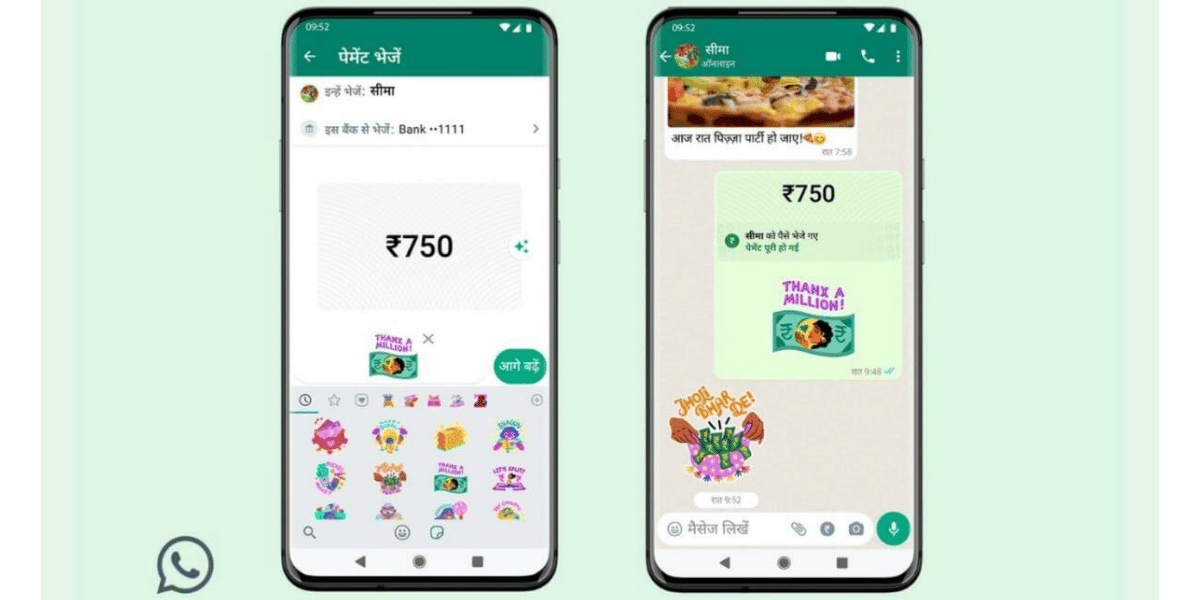
WhatsApp users have been able to share stickers with their friends and family members to express their ideas during conversations for quite some time now. According to recent reports, the company is working on a feature that would allow users to add customised stickers to payments made through WhatsApp Pay. After months of waiting, WhatsApp payments in-app Stickers have finally been launched.
Also read: WhatsApp May Introduce Cashback Benefit in its Payment Feature
WhatsApp Pay Stickers
These WhatsApp Pay stickers, according to WhatsApp, are based on various ethnic expressions relating to money exchange. WhatsApp has also teamed up with five well-known Indian female artists/illustrators to launch this new bundle of WhatsApp Payments stickers, particularly for Indian customers. WhatsApp added, “Furthermore, these sticker packs celebrate the Indian culture and the women artists behind their curation and the community of illustrators who bring alive stories through their signature art forms.”

Anjali Mehta, an artist and illustrator, created the first WhatsApp Pay sticker collection, titled ‘Pyaar aur Payments.’ Her sticker collection focuses on the sentimental value of money. You can find it here. The second sticker collection, titled ‘Pay OK Please,’ was created by a sketch artist and gif curator with the goal of conveying stories of positive payment experiences. It can be found here. ‘Pay Aadha or Zyaada’ is the name of the third sticker pack, which was created by independent illustrator and muralist Neethi. This sticker set is a wacky perspective on what people’s payment experiences can be. It can be found here. Osheen Silva, an illustrator and artist, created the fourth sticker pack, titled ‘Sabse Bada Rupaiya.’ You can find it here. Finally, Mumbai-based graphic designer Mira Felicia Malhotra created the ‘Apna Sapna Money’ sticker. It can be found here.
Also read: WhatsApp is Testing a New DP Privacy Feature For Android Users
Here’s How to Add Sticker to WhatsApp Payments:
On Android
- Open a chat with the person you want to send money to.
- Then tap the Payments icon.
- Enter the amount you would like to send.
- Tap the emoji icon in the Add a Note message bar.
- Then tap the Pick a Sticker icon.
- Choose a sticker.
- Tap Next > Send Payment.
- Enter your UPI PIN.
On iPhone
- Open a chat with the person you want to send money to > tap the Payments icon.
- Enter the rupee amount you would like to send.
- Tap the Stickers icon in the Add a Note message bar.
- Choose a sticker.
- Tap Next and then tap Send Payment.
- Enter your UPI PIN.
Also read: WhatsApp Working on Control Bar Feature and Collections Feature for Business Users