WhatsApp has been working for a very long time on an idea that could inculcate safer social media communication. And now, it has introduced a new feature that finally seems to work well! WhatsApp Parent management account is a new feature, which was introduced on 11 March 2026 globally. Through this feature, WhatsApp allows parents to set up an account of their children, where greater control is accessible only to parents. It’s like keeping in touch with what your child is watching, whom he/she is chsatting to, and what content is he/she consuming. So, these features seem to be interesting, controversial, and unique. Let’s explore all about this feature right here.
Also Read: How To Use 2 WhatsApp Accounts In iPhone: Simple Steps!
WhatsApp Parent Management Account: What Should You Know About This Feature
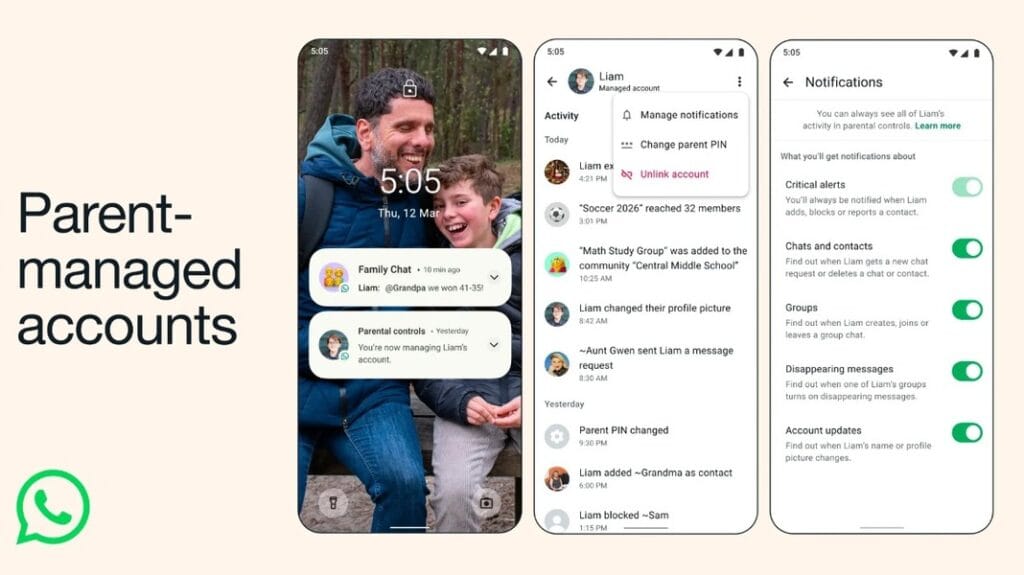
On 11 March 2026, WhatsApp introduced a new parent-managed accounts feature. This feature will allow parents and guardians to create supervised WhatsApp accounts for pre-teens (children under 13 years old, or below the minimum age required in their country/region). This feature addresses family feedback for safer messaging options for younger users. While it also preserves end-to-end encryption, no one, including parents, can read private messages or listen to calls.
Also Read: Looking to Buy iPhone 17 Under 50000? Flipkart Has A Great Sale Offer For You
Here are some key features of this new feature.
Key Features Of WhatsApp Parent Management Account Feature
- Core Communication Only: Accounts are limited strictly to messaging and voice/video calling; advanced features like Channels, Status updates, and Meta AI are disabled.
- Strict Default Privacy: Settings are locked so that only saved contacts can view profile details, last seen status, or initiate calls and messages.
- Parental PIN Protection: All privacy settings and contact management are gated by a six-digit parent PIN on the child’s device to prevent unauthorised changes.
- Contact & Group Oversight: Children cannot create groups; parents must approve all group memberships and review message requests from unknown contacts in a separate inbox.
- Real-time Activity Alerts: Parents receive optional notifications for significant actions, such as when the child adds, blocks, or reports a contact.
- End-to-End Encryption: While parents manage account-level permissions and safety settings, all chat content remains private and inaccessible to anyone except the participants.
How To Use This Feature?
To set up a parent-managed account, here are the steps:
- Enter the child’s birthdate during registration.
- Select the supervised option, and link both devices by scanning a secure QR code to finalise parental oversight.
- Verify and complete the procedure.
As of now, the WhatsApp Parent Management account feature is not available in India, but it will be available soon.
Also Read: Superwomen Of Recommerce: Cashify Celebrates Women’s Day With New Records
Are you still browsing through your broken screen? Don’t worry! Book an at-home mobile phone screen repair with Cashify—an affordable and one-stop destination for all your mobile phone needs. In case you break your screen within 1 month of repair, we will replace your screen again—for FREE.