Last month, Paytm launched their Vaccine Finder feature in the Paytm app. This allowed Paytm users to search for all the available COVID vaccination slots. This particular service was introduced as a vaccination slot searching made easy feature when compared to the CoWIN app.
Also read: Poco India Launches Poco Community For its Users
Additionally, the Paytm Vaccine Finder also gives live notifications to user whenever a slot is available in their area. This is very efficient and allows users to easily locate the nearest center to get their vaccination. By just tapping once or twice, users can find the nearest and most desirable COVID vaccination centres. Here is a step-by-step guide of how once can do so.
Also read: Flipkart Big Saving Days Sale Begins on June 13; Exciting Deals Revealed
Steps To Book COVID Vaccination Slot Via Paytm
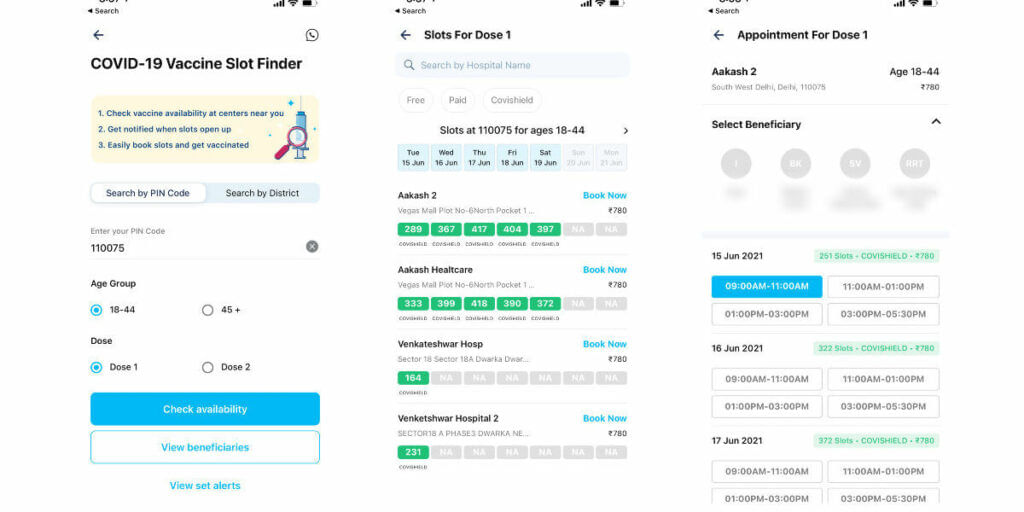
- Step 1: Open the Paytm app on your smartphone and scroll down to the ‘Featured’ section.
- Step 2: Tap on the ‘Vaccine Finder’ service button.
- Step 3: You will now be redirected to a window where you can find COVID vaccination slots.
- Step 4: Enter your PIN code, state or district alongside your age. Furthermore, you also have to select whetger this is going to be your first dose or second dose.
- Step 5: Once the details are entered, tap on ‘Check availability.’
- Step 6: The Paytm app will now ask you to enter the mobile number that you want to use for booking the COVID vaccination appointment. Moreover, you will get an OTP or a One-Time-Password on your device after that.
- Step 7: Type-in the OTP in the box and tap on the ‘Submit’ button.
- Step 8: Paytm will now show you a list of available COVID vaccination slots. Users will have to select a slot at their desired hospital on their desired date. You will be provided with a list of time slots on which you can take the vaccine. Choose the time slot of your choice and you are good to go.
- Step 9: Right on top of the time slots section, you can see your contact list. Select the person for whom you are booking the COVID vaccination slot. Tap on ‘Schedule Now’ and you are finally done with the process.
Also read: Instagram Reveals How Its Algorithms Work

Tech enthusiast, gamer and somebody for whom music acts as a life capsule. Nothing fascinates me more than catchy headlines and John Mayer's guitar mastery.