Google Meet’s new audio sharing feature is here, and it has brought a big problem-solving ability. This is the first time our meetings will look more sorted, and a better audio facility is all set to debut. But what is this Google Meet new audio sharing feature? And why has it trending all over the internet since yesterday? Well, let us find out inside this news story.
Also Read: Axis Bank’s UPI Credit Card Revolutionizes Digital Payments In India
Google Meet New Audio Sharing Feature Enables System Audio Sharing
Google Meet added a new system-audio sharing option: Users can now share the entire device’s audio (not just browser tab audio) during a presentation in Google Meet.
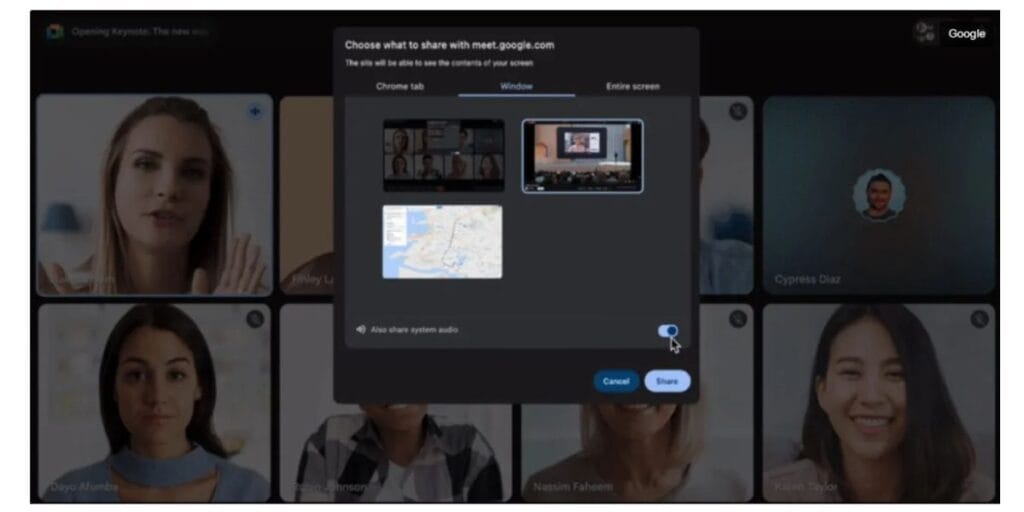
This means that when you present your screen or a window on macOS or Windows, there’s an “Also share system audio” switch you can turn on to send all device sound to call participants.
This change lets others hear audio from any application or media on your device like video players, DAWs, or background sound apps not just Chrome tab audio.
How To Enable Google Meet’s New System Sound Sharing Feature?
To enable it, start/join a Meet, click Present, choose window or screen, and then enable system audio sharing in the prompt. The feature is rolling out to Google Workspace customers and personal accounts, and it requires Windows 11 or macOS 14 and Chrome 142.
Also Read: Bharat Taxi App Benefits: New Ride-Hailing Service Launches In Delhi In January
Streaming And Engagement Get Better
The new Google Meet Audio Sharing Feature makes Google Meet a more engaging platform. We could not do cross-streaming earlier, we would not listen to sound-based presentations, and all the windows were just like mute PPTs coming up.
But these new features solve a big problem, and will bring an immense amount of engagement to the Meet platform.
Let’s wait and watch how the corporates and the regular users of Google Meet respond to this new feature.
Are you still browsing through your broken screen? Don’t worry! Book at-home mobile phone screen repair with Cashify—an affordable and one-stop destination for all your mobile phone needs. In case you break your screen within 1 month of repair, we will replace your screen again—for FREE.