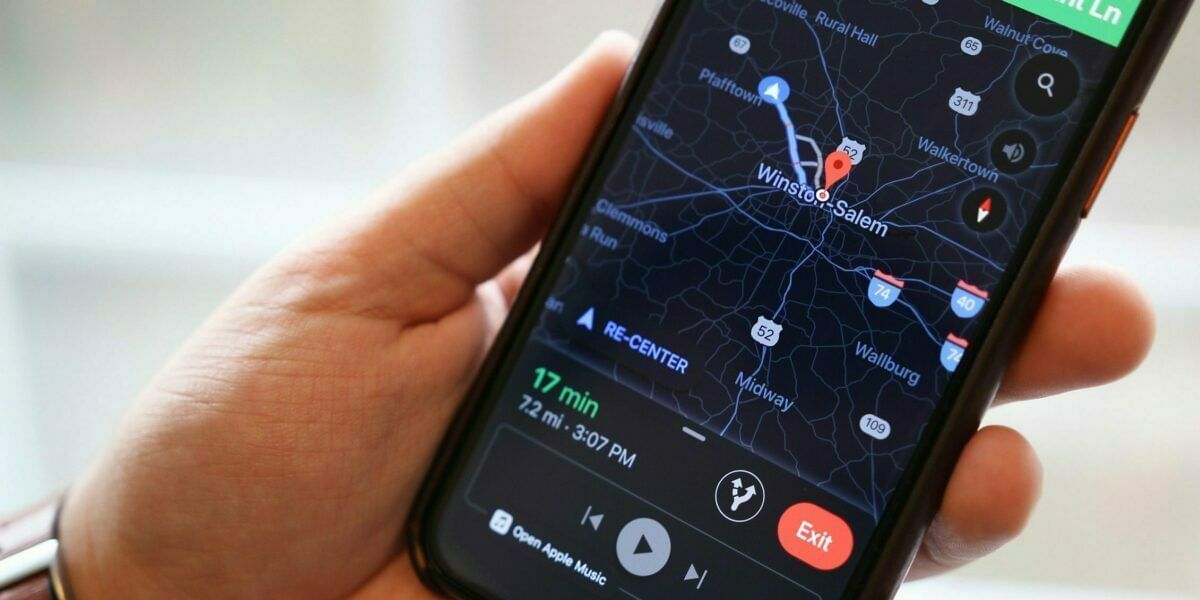
Google Maps is finally getting a dark mode that will save the battery of the device. This feature will roll out for all Android users globally. Google was testing the feature for several months. It is now available globally.
Almost 90% of major applications are available with dark mode. Google Map was the one left behind. Apart from dark mode, Google is also coming up with some new features.
Google Maps dark mode
The dark mode is a common display setting for smartphones and PCs. It changes the background screen to black or greyscale and the font color is white. The dark mode is also known as Black mode, dark theme, night mode, light on dark. Various Google apps have the dark mode setting.
Also read: Vivo X60 Global Launch Imminent As It Receives Spotted On BIS And Indonesia Telecom
Google Maps have background with white text. Also, the maps will have lighter colour where as the area will be displayed in dark colour. It will reduce the blue light emission of the display.
Also, Google Maps dark mode will save battery due to less brightness. It will also prevent dry eyes and eye strains. Some experts say that the dark mode can help people with light sensitivity and Visual impairment.
Other features by Google
Google is coming up with the password check-up feature. All the Android handsets will get the update very soon. Password checkup feature Google can assess all the saved passwords. Also, Google will categorize the redundant passwords. It can also show weak passwords.
Google is also coming up with the schedule messages feature. It will be available on the messaging app by Google. This will allow the users to schedule a message and send it later.
Also read: Galaxy A52 5G Will Feature IP67 Dust And Water Resistance: Leaks
Lastly, the dark mode in Google Maps is available right now. However, Google will soon release the other updates. The users can easily change to the dark setting by going to the settings on Google Map. Then the user can tap on the theme option and look for the always in dark theme option. Users can change back to light settings whenever they want.
Always on the quest to learn and share the knowledge. Big fan of books (but not the self help ones) specially fiction. A grammar Nazi who loves to eat, cook, travel and watching thunderstorms.