A pink line on your Galaxy S23 screen can be frustrating, especially when your phone otherwise works fine. The vertical line may appear suddenly, sometimes after a software update, and make everyday tasks less enjoyable. Before spending money on a screen replacement, it’s worth checking what caused the issue and whether the repair makes financial sense.
You have two main options: get the display repaired or sell your Galaxy S23 in its current condition. Start by checking whether Samsung offers a free or goodwill repair. If you have to pay for the replacement, compare the repair cost with your phone’s resale value. This will help you decide whether to keep your phone or move on to an upgrade.
Also Read: OnePlus Phone Green Line Issue? Here’s How To Sell It Without A Big Loss
Why Does Your Galaxy S23 Have A Pink Line?
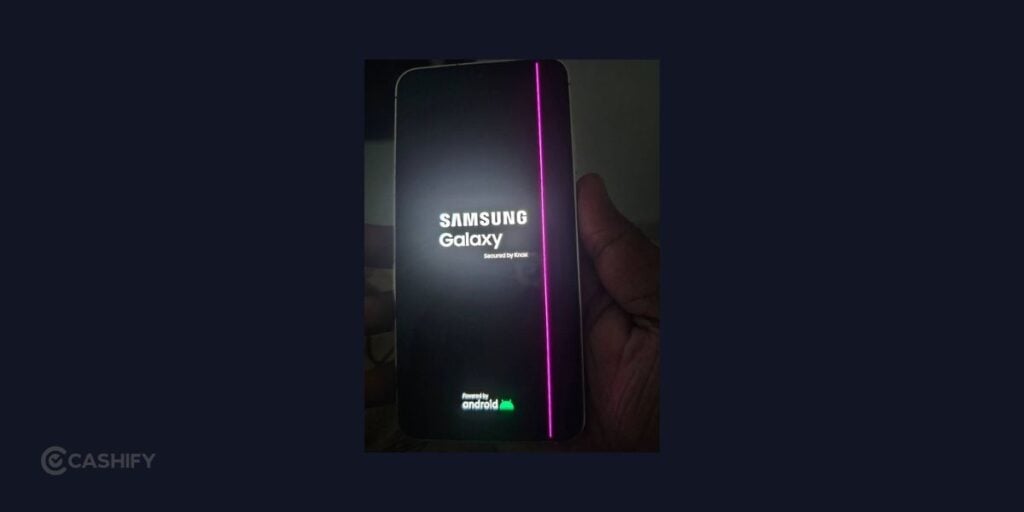
A pink line on your Galaxy S23 can indicate a display hardware issue. However, you’ll need a technician to identify the exact cause.
Here are some possible reasons:
- Display panel failure: A fault in the AMOLED display can cause a persistent vertical line.
- Display connector issue: A loose or damaged display connector or flex cable may affect how the screen works.
- Physical damage: A drop, impact, or pressure on the phone can damage internal display components, even if the glass remains intact.
- Heat-related stress: Repeated exposure to high temperatures may contribute to hardware problems.
- Software update coincidence: Some users notice the line after an update, but the timing alone doesn’t prove that the update caused it.
Restart your phone and check whether the line remains. If it does, visit an authorised Samsung service centre for an inspection before deciding to replace the display or sell the device.
Can You Get A Free Repair For The Galaxy S23 Pink Line?
Before paying for a screen replacement, check whether your Galaxy S23 qualifies for a free or goodwill repair.
Eligibility depends on Samsung’s current repair policy, your location, warranty status, and the phone’s physical condition. A pink line appearing after a software update does not automatically qualify your device for a free replacement.
Here’s what you should do:
- Visit an authorised Samsung service centre and explain when the line appeared.
- Carry your purchase invoice and available warranty details.
- Ask whether your device qualifies for a free or goodwill display replacement.
- Let the technician inspect the phone for scratches, dents, liquid damage, or other issues.
- Request a job sheet and a written estimate if the repair isn’t covered.
If Samsung approves a free repair, fixing the display may be the easiest option, particularly if you want to continue using your phone. If the replacement is chargeable, compare the cost with your Galaxy S23’s resale value before spending the money.
Should You Repair Or Sell Your Galaxy S23 With A Pink Line?
The answer depends on the repair estimate, your phone’s overall condition, and whether you plan to keep it.
| Your Situation | What Makes Sense |
| Samsung approves a free repair | Consider repairing the display and continuing to use the phone. |
| The repair is affordable | Compare the cost with the phone’s value after repair. |
| The display replacement is expensive | Check how much you could get by selling the phone as-is. |
| You already plan to upgrade | Compare the current resale estimate with the cost of repairing first. |
| Your phone has other faults | Calculate the total repair expense before investing more money. |
For example, if a screen replacement costs ₹12,000 but repairing the phone adds only ₹8,000 to its expected resale value, paying for the repair may not be worthwhile if you intend to sell it.
These figures are illustrative, not a quote for the Galaxy S23. Check the actual repair estimate and current resale value before deciding.
Also Read: Moto Edge Vs Moto G Series Resale Value: Which Pays More?
How To Sell Your Galaxy S23 With A Pink Line On Cashify

If the display repair is too expensive or you’re planning to upgrade, you can check whether your Galaxy S23 is eligible for resale through Cashify without repairing it first.
Here’s how to sell Galaxy S23 with pink line issue on Cashify:
- Visit the official website of Cashify or download the Cashify app.
- Go to the Sell Old Phone section.
- Head to Sell Old Samsung Phone section and choose your phone model.
- Next, answer some device related question and make sure to mention pink line issue there.
- You will then see the final estimated resale price of your phone.
- Then, enter your details like name, address and pickup date and time and schedule a free doorstep pickup service.
How To Prepare Your Galaxy S23 Before Selling It
Once you’ve decided to explore resale, prepare your phone before handing it over.
- Back up your data: Save your photos, contacts, documents, and other important files. Verify that the backup is complete.
- Check other functions: Test the cameras, speakers, microphone, charging port, buttons, and touchscreen wherever possible.
- Keep your invoice handy: Purchase details and repair records can help you explain the phone’s history.
- Remove your accounts: Sign out of your Google and Samsung accounts and disable relevant device-locking features.
- Factory-reset the phone: After confirming your backup, reset the device to remove personal information. Remove your SIM card and any memory card, if applicable.
- Disclose known issues: Mention the pink line and any other faults when requesting a selling estimate.
Being clear about the phone’s condition helps avoid surprises during inspection and makes it easier to evaluate the offer.
Is It Better To Sell Your Galaxy S23 Now Or Wait?
If the pink line is affecting everyday use, start by getting the phone inspected rather than immediately paying for a replacement display.
If Samsung offers a free repair, fixing the phone may be worthwhile. If the repair is expensive and you already want an upgrade, check Cashify’s current selling options and compare the estimate for your phone in its existing condition with the cost of repairing it first.
Your phone’s condition, repair quote, and resale value should guide the decision—not just the presence of the pink line.
Final Thoughts
A Galaxy S23 with pink line doesn’t automatically mean you need to replace the display. First, ask an authorised Samsung service centre whether your phone qualifies for a free or goodwill repair. If the repair is chargeable, compare the cost with the phone’s current resale value.
If you’d rather upgrade than invest in an expensive repair, check whether you can sell your Galaxy S23 through Cashify in its current condition. Share the display issue accurately, review the estimate, and consider the final offer before proceeding. That way, you can choose the option that makes the most financial sense for your phone.
Also Read: Selling Your Phone Without An Invoice: How Much Do You Lose?
Buying refurbished mobile phones was never this easy. Sell your old phone and get exclusive offers & discounts on refurbished mobiles. Every refurbished phone is put through 32-point quality checks to ensure like-new standards and comes with a six-month warranty and 15-day refund. Buy refurbished phone easily on no-cost EMI today!