Can a UPI payment screenshot be fake? Yes. Scammers can use edited or fabricated screenshots to make sellers believe that a payment has been completed. If you are selling an old phone, never hand over the device based only on a screenshot. Always verify the payment in your own UPI app or bank account.
In this guide, we explain how fake UPI screenshot scams work, how to identify a fake payment screenshot, what red flags to watch for, and what to do if you have already been scammed.
Also Read: How AI Pricing Works for Used Air Conditioners
What Are Fake UPI Screenshot Scams?
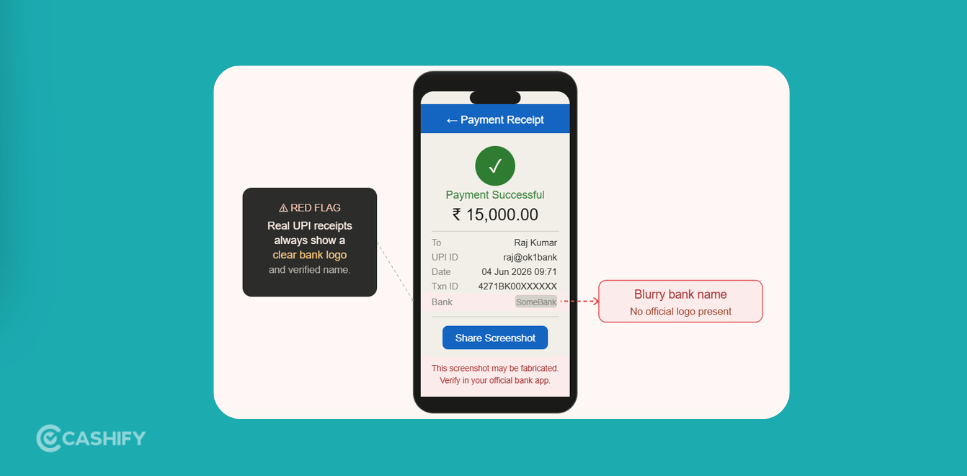
Fake UPI screenshot scams are where scammers use fabricated or edited payment confirmations to trick sellers into believing they have received money. They may share an image that looks like a genuine UPI payment confirmation, complete with transaction IDs, timestamps, bank logos, and other payment details.
These scams can occur in the resale market. This is where sellers may be focused on completing a deal quickly. A scammer may show a fake payment screenshot and pressure the seller to hand over the device before the payment is verified. The screenshot may show a successful payment, but no money has actually reached your bank account. Once the seller hands over the device, the scammer can leave or stop responding.
Always verify the payment directly through your bank or UPI app before handing over the device. A screenshot alone is not proof that the payment was successful.
Also Read: Why More Gamers Are Using Console Buyback Services
How Fake UPI Screenshot Scams Work?
Now, let’s quickly try to know how fake UPI screenshot scams function. It happens in these steps.
1. Contact With The Buyer
It starts with someone showing interest in buying your phone. They ask about the phone’s condition, storage or accessories. The conversation seems to move fast. They agree to the price you quoted without asking questions. It seems like a good sale. This is how many fake UPI screenshot scams begin.
2. A Screenshot Is Shown As Proof
After you agree on a price, the buyer says they’ve sent the payment. They quickly show you a screenshot to prove it. At first, it looks real. The screenshot has transaction details, payment amounts and timestamps that seem genuine. This is where many fake UPI screenshot scams start.
3. Pressure Starts to Build
To stop you from checking your account, the buyer creates a sense of urgency. They might say:
- The bank server takes time to update.
- The payment has been made. It will show up soon.
- Can I have the phone? I do not want to be late.
These excuses can be used to make you trust the screenshot of checking the payment yourself.
4. You Hand Over the Phone
You believe the payment has been made, so you hand over the phone. The screenshot looks real. The buyer seems trustworthy. There’s no reason to doubt the deal.
5. The Realisation
Later, when you check your bank account or UPI app, you find out no payment was made. The screenshot was fake, and the buyer is gone. This is how fake UPI screenshot scams work. By the time you realise the phone is gone. That’s why it’s crucial to understand fake UPI screenshot scams and verify every payment before handing over a device.
Also Read: Galaxy Tab S Series Vs Galaxy Tab A Series Resale
How Can You Avoid This Risk?
The safest approach is to use a trusted resale platform. Here you will independently verify the payment before handing over your phone.
Many online resale platforms claim to provide a safe and convenient selling experience. But it is important to check their payment, pickup, and device verification processes before choosing one.
One prominent name in India is Cashify. It is a resale platform for used devices. Cashify provides services such as doorstep pickup and payment after the device has been checked.
Selling Process Of Cashify
If you want to avoid all these scams and sell your phone to reliable platforms, here are the steps you can follow.
- First, visit the official website of Cashify, or you can download the app.
- Next, you can find the Sell Old Phone Section; just select it.
- After that, you can select the brand of your phone.
- Next, choose the model and RAM variant.
- On the next page, you will get an estimated price for your phone
- As a next step, some easy questions will be asked about the condition of the phone.
- After that, the final price of your smartphone will be given.
- Next, add your details like name, address, pick-up date, and time, and a Cashify pickup executive will then pick up the device from your doorstep.
How To Actually Verify A UPI Payment (And What To Do If You Got Scammed)
Finally, you’ve agreed to sell your old phone. The buyer sends a “payment done” screenshot. You may feel ready to hand over the device, but it is worth taking a moment to verify the payment.
Remember, a screenshot is only an image and can be edited. The safest way to confirm that you have received the money is to check the transaction directly in your own UPI app or bank account.
Do not rely on a screenshot, an SMS shown by the buyer, or a payment-success screen on the buyer’s phone as proof of payment. Verify the transaction yourself before handing over your phone.
Let’s see how to verify the payment:
You should forget the screenshot and instead of it do this:
Open your own UPI app.
Check GPay, PhonePe, or Paytm yourself. Don’t rely on what the buyer shows you.
Check your bank balance directly.
A quick balance check or SMS from your bank confirms money has actually landed.
Wait for the bank SMS.
Real payments trigger an SMS from your bank, not from the buyer’s phone.
Never trust “it’ll show up in a few minutes.”
UPI payments are instant. If it’s not there, it didn’t happen. Understand this clearly.
If the money isn’t in your account, you should not leave your hand. That’s the whole rule.
Extra Tips To Spot A Fake Screenshot Instantly?
Even if a payment screenshot looks perfect, remember that it is only a static image and can be manipulated. Here are some quick checks to help you avoid a scam:
- Ask the buyer to show their phone live if needed, but do not treat a live screen or animation as proof of payment. Screenshots, screen recordings, and simulated payment screens can all be manipulated.
- Do not rely on app animations, confetti, sounds, timestamps, or the presence of a transaction ID to confirm that you have been paid.
- Compare the transaction ID shown by the buyer against the transaction details in your own UPI app or bank account. If the transaction does not appear in your account, do not hand over the phone. Even a transaction ID that looks genuine is not enough unless the corresponding credit appears in your account.
- Never ask the buyer to enter your UPI PIN. Do not share your UPI PIN, OTP, or banking credentials with anyone. NPCI advises users not to share their UPI PIN.
These checks take only a few seconds. The most important rule is simple: trust the payment shown in your own account, not a payment screen shown by the buyer.
Other Tricks Scammers Use
Fake screenshots aren’t the only move. Watch out for these too:
- Fake payment apps: Some scammers use lookalike apps that show a fake “payment successful” screen along with a fake notification sound.
- QR code swaps: A scammer shows you a QR code to “receive” money, but it’s actually set up to send money out of your account.
- Spoofed SMS: Fake text messages that look exactly like a bank’s payment alert, sent from a random number.
- Deepfake or screen-recorded videos: Some advanced scammers now send short videos of “payment success.” Don’t fall for it. Always verify in your own app.
- Wrong receiver name tricks: Even if money is sent (rare in these scams), double-check that the name linked to your UPI ID matches exactly.
The pattern is always the same: something looks like proof, but nothing has actually reached your account.
Red Flags You Should Watch During Any Deal
You should keep these warning signs in mind during any deal.
- The buyer rushes you and won’t wait to complete the sale.
- They ask you to hand over the phone before you’ve confirmed the payment yourself.
- They give excuses like “the server is slow” or “it’ll reflect soon.”
- They avoid video calls or refuse to meet in a public place.
- The deal feels a little too fast, too easy, or too good.
One red flag alone isn’t proof of a scam, but if you experience two or three together? Stop the deal.
Why Transaction IDs Matter (And How to Use Them)
A successful UPI transaction generates a transaction reference number that can be checked in your own UPI app or bank records. If a buyer shares a transaction ID, don’t rely on the number alone. Check whether the corresponding payment actually appears in your account.
Things to Do Right Now If You’re Already Got Scammed
If you’ve realised the payment never came through:
- Call 1930 – This is India’s national cybercrime helpline. It works fastest within the first few hours.
- Report it on cybercrime.gov.in, the government’s official portal for online fraud.
- Inform your bank immediately, even if no money left your account. This creates a record.
- Save every screenshot, chat, and phone number the buyer used. This becomes evidence.
- File a local police complaint if the helpline advises you to.
In this situation, you need to act fast.
Final Thoughts
A UPI screenshot is not money. It’s just a picture, and pictures can be faked in seconds. The only proof that counts is what shows up in your own bank account. Before you hand over your phone to anyone, check it yourself. Don’t trust anyone’s words blindly. And if things do go wrong, don’t panic. Report it fast, and let the right authorities take it from there.
FAQs
Can a UPI screenshot be faked?
Yes. Screenshots can be edited to show false amounts, transaction IDs, times, or payment status. Never treat one as proof of payment.
How do I know I’ve received the money?
Check your own UPI app or bank account. Do not rely on screenshots, SMS messages, or the buyer’s payment screen.
What number do I call if I get scammed?
Call 1930 as soon as possible. You can also report the fraud through the National Cyber Crime Reporting Portal
Is it safe to sell my phone to a stranger online?
It can be, but verify the payment yourself and meet in a safe public place. A trusted buyback platform can reduce some risks.
What if the buyer says the payment is “still processing”?
Do not hand over the phone until the payment appears in your own UPI app or bank account.
How can I verify a UPI payment?
Check your own account for the actual credit. A screenshot or payment confirmation shown by the buyer is not enough.
Buying refurbished mobile phones was never this easy. Sell your old phone and get exclusive offers & discounts on refurbished mobiles. Every refurbished phone is put through 32-point quality checks to ensure like-new standards and comes with a six-month warranty and 15-day refund. Buy refurbished phone easily on no-cost EMI today!