Planning to sell your old phone? Before you hand it over to its next owner, there’s one important step you shouldn’t overlook- erasing your personal data.
From photos and videos to banking apps, passwords, and personal documents, your smartphone stores a lot of sensitive information. Simply deleting files or uninstalling apps isn’t enough to keep your data safe. That’s why it’s important to understand the difference between a factory reset vs secure wipe.
While both methods help remove your data, they don’t offer the same level of protection. Knowing which option to choose can help safeguard your privacy and prepare your phone for a smooth buyback experience.
In this blog, we’ll explain the key differences, why secure data wiping is often the better choice, and how Cashify helps you sell your old phone with confidence. So, let’s begin.
Also Read: Why Battery Replacement Timing Affects Resale Value: Detailed Analysis
Factory Reset Vs Secure Wipe: Key Differences
A factory reset vs secure wipe may seem like they do the same thing. Both remove your personal information and restore the phone to a clean state. However, the way they erase data is quite different.
What Is a Factory Reset?
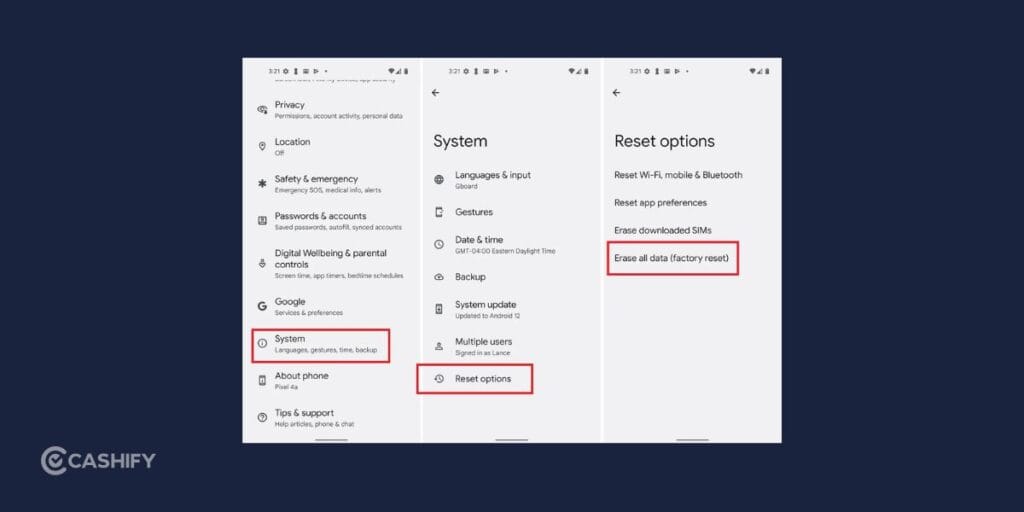
A factory reset restores your smartphone to its original settings by removing your apps, accounts, photos, messages, and other personal data. It’s commonly used before selling a phone or when fixing software issues.
On modern smartphones, which use encrypted storage by default, a factory reset provides strong protection for most users. However, on some older devices or improperly configured phones, traces of deleted data may still be recoverable using specialized recovery tools.
What Is a Secure Wipe?
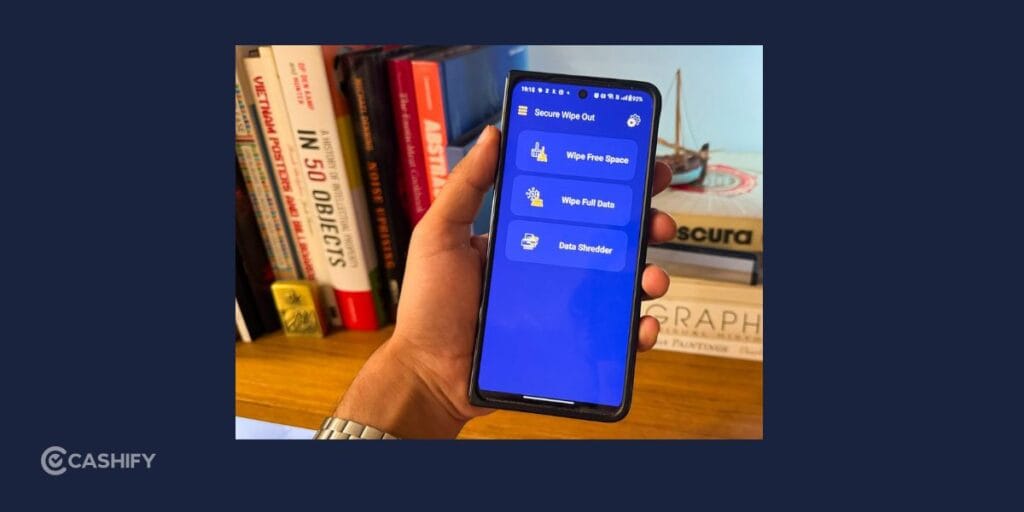
A secure wipe goes a step further. Instead of simply removing access to your files, it permanently overwrites the stored data, making recovery extremely difficult or nearly impossible.
This method is commonly used by businesses and professionals who handle confidential information. If your phone contains sensitive financial records, work documents, or personal files, a secure wipe provides greater peace of mind before selling or recycling the device.
| Feature | Factory Reset | Secure Wipe |
| Removes personal files | Yes | Yes |
| Deletes installed apps | Yes | Yes |
| Signs you out of accounts | Yes | Yes |
| Permanently overwrites data | No | Yes |
| Makes data recovery extremely difficult | Limited | Yes |
| Best for selling devices with sensitive information | Good | Better |
Why a Secure Data Wipe Is a Better Choice Before Selling Your Phone
When you’re selling your phone, protecting your data should be just as important as getting a good resale price. A secure data wipe helps ensure that your personal information doesn’t end up in the wrong hands.
Here are a few reasons why it’s the better option whenever available.
Better Privacy Protection
Your smartphone stores much more than contacts and photos. It may contain banking details, saved passwords, emails, work files, health information, and personal conversations.
A secure wipe permanently erases this data, giving you greater confidence before handing over your phone.
Reduces The Risk Of Data Recovery
Although modern smartphones are highly secure, older devices may still allow deleted files to be recovered using specialized software.
A secure wipe minimizes this risk by overwriting the stored data instead of simply marking it as deleted.
Prepares Your Phone For Resale
A properly wiped phone is easier to inspect and prepare for its next owner. It also shows that you’ve taken the necessary steps to remove your personal information responsibly.
Gives You Peace Of Mind
Once your phone leaves your hands, you no longer have control over it. Taking a few extra minutes to erase your data securely helps you avoid worrying about what might still be stored on the device.
Also Read: Selling Your Old Phone? Watch Out For These Used Electronics Scams
How Cashify Helps
When you sell your old phone, protecting your personal data is just as important as getting the right value for your device. That’s why Cashify follows a factory-grade data wipe process to help ensure your information is securely erased before the phone is refurbished or resold.
Unlike a standard factory reset, a factory-grade data wipe is designed to permanently remove data from the device, making it extremely difficult to recover using conventional recovery methods. This adds an extra layer of security for your personal information, giving you greater peace of mind after selling your phone.
To make the process even smoother, it’s still recommended that you back up your important files, sign out of your Google or Apple account, turn off Find My iPhone or Factory Reset Protection (FRP), and remove your SIM card before handing over the phone.
These simple steps, combined with Cashify’s factory-grade data wipe process, help keep your information protected throughout the buyback journey
How To Sell Old Phones On Cashify?
Selling your phone through Cashify is quite easy.
- Go to the official Cashify website or Cashify app.
- Head to the Sell old phone section.
- Select your phone’s brand and model.
- Get an estimated resale price and share device-specific details.
- Get the final quote and schedule a free doorstep pickup.
Final Thoughts
Both a factory reset vs secure wipe help remove your personal information before selling your smartphone, but they aren’t exactly the same. While a factory reset is sufficient for many modern devices, a secure wipe offers an extra layer of protection by making your data much harder to recover.
If your phone contains sensitive personal or professional information, choosing a secure wipe is a smart decision whenever your device supports it. It helps protect your privacy while ensuring your phone is ready for its next owner.
Once your data has been erased and your phone is prepared, selling it becomes much easier. With Cashify, you can get an instant price estimate, schedule a convenient pickup, and enjoy a smooth buyback experience from start to finish.
Also Read: Google Pixel 6A Vs Pixel 7 Resale: Which Offers More Value?
FAQs
Is a factory reset enough before selling my phone?
For most modern smartphones with encrypted storage, a factory reset is generally sufficient. However, if your phone contains highly sensitive information, a secure wipe offers additional protection.
What is the main difference between a factory reset and a secure wipe?
A factory reset removes your personal data and restores the phone to its default settings. A secure wipe permanently overwrites the stored data, making recovery much more difficult.
Will a factory reset remove all my personal data?
It removes your files, apps, and accounts from the device. However, depending on the phone and storage type, traces of deleted data may still be recoverable on some older devices.
Should I remove my Google or Apple account before selling my phone?
Yes. Always sign out of your accounts and disable Activation Lock or Factory Reset Protection (FRP) before handing over your device.
Why should I back up my data before resetting my phone?
A factory reset or secure wipe permanently removes your files from the device. Creating a backup ensures you don’t lose important photos, contacts, documents, and other personal data.
How can I sell my old phone on Cashify?
Simply check your phone’s value, answer a few questions about its condition, schedule a doorstep pickup, prepare your phone by erasing your data, and receive payment after the device inspection.
Buying refurbished mobile phones was never this easy. Sell your old phone and get exclusive offers & discounts on refurbished mobiles. Every refurbished phone is put through 32-point quality checks to ensure like-new standards and comes with a six-month warranty and 15-day refund. Buy refurbished phone easily on no-cost EMI today!