As you know, AI is growing rapidly, and everyone is posting AI-generated images on their social media. Just a few months ago, we saw Ghibli images crash the whole internet. But this trend was from ChatGPT. Today, I will share the best Google Gemini AI Photo Editing prompt. I found that Google’s Nano Banana is significantly better than ChatGPT for image creation. I’m using the Gemini 3 Pro model for today’s article. If you do not have the Pro model, you might get different image results. Let’s read below
Also Read: Vivo V60e Review: Looks Premium, Shoots Punchy, Plays Safe
However, before diving deep into how to give a prompt, let’s first give you a quick overview of what Google Gemini is.
What is Google Gemini?
If you’ve never used Google Gemini before, it’s Google’s AI model that is specifically built to handle text, images, code, and more. You can consider it as Google’s version of ChatGPT but with tighter integration into Google’s ecosystem, such as Gmail, Google Photos, and Docs.
To create images, all you need to do is describe what you want in plain English, and Gemini builds it. But the detail you put in directly affects what you get out. It means Garbage in, Garbage out applies here too.
For prompts and advanced image creation, you should use the pro version, as it provides more consistent results. Of course, Free-tier works, but sometimes it gives you weird output.
A Best Google Gemini AI Photo Editing Prompt can help create polished edits with instructions.
How to Get Started With Gemini Image Creation
Before you start dropping prompts, here’s the actual process.
- Go to gemini.google.com and sign in with your Google account.
- Choose the pro model to create better images.
- To generate an image, describe text in the chatbox.
- If you’ve any reference photo, click on the attachment icon and upload it before typing your prompt.
- Once the upload is complete, paste your prompt and click on Send.
I would recommend that you always upload the photo first and then paste the prompt. If you do it backwards, sometimes it causes Gemini to ignore your reference image entirely.
How To Give a Prompt
To begin, open the Gimin application on your laptop or mobile phone. Once it’s open, select “Nano Banana” to create the image. Next, upload the photo that you would like to use for the creation. If you simply paste my prompt, Gimin will generate an image using its own imagination.
The right Best Google Gemini AI Photo Editing Prompt can turn an image into a creative visual.
Prompt 1: Designing an Adorable Claymation Creator Avatar
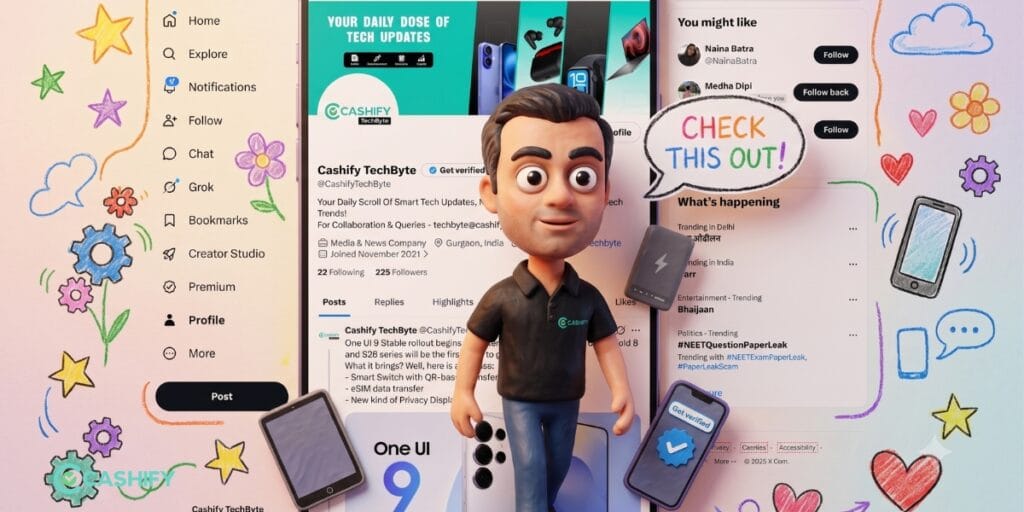
Create a cute 3D miniature crayon-style version of me standing outside my Instagram profile page like a toy character coming out of the screen. Keep the Instagram Ul recognizable with profile picture, follower count, posts grid, and verification tick.
Character should have oversized head, expressive eyes, tiny body proportions, and soft wax-clay texture.
Use hand-drawn crayon outlines around the entire scene with colorful doodles like stars, flowers, clouds, hearts, and speech bubbles.
Add a pastel paper background with childlike sketch aesthetics.
Include props related to my niche. Lighting should be warm, soft, cinematic, and Pinterest aesthetic. Ultra detailed 3D render, collectible figurine look, claymation + crayon mixed style, adorable and vibrant composition.
2. Best Google Gemini AI Photo Editing Prompt For Foodies
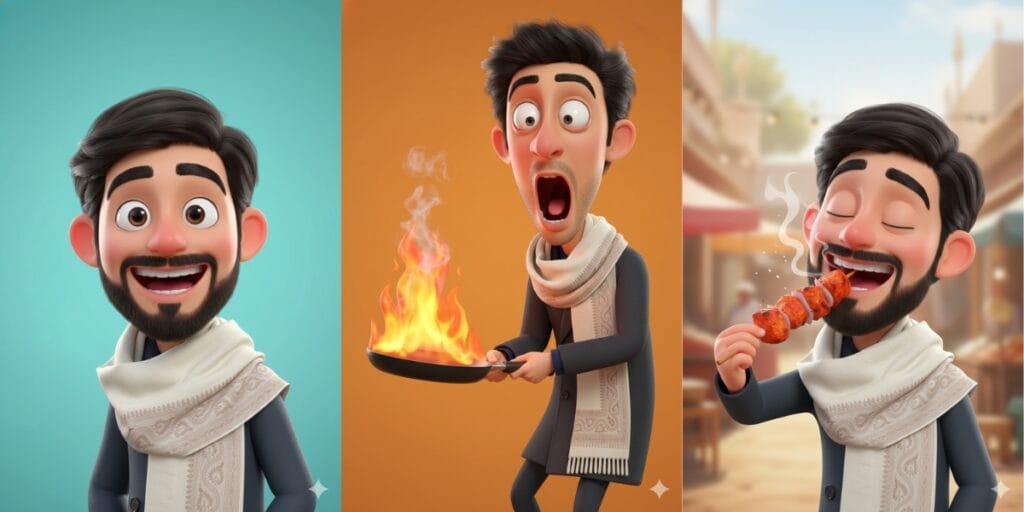
So, the 1st prompt will be about a slightly more illustrious style, and the latest one.
(Prompt A)
“Create a 3D digital caricature of me holding a burning frying pan, rendered in a highly stylized and exaggerated cartoon form.
My facial expression is extreme and expressive, with popping wide-open eyes, a dramatically dropped jaw, and an intense look of shock and surprise. The proportions are intentionally grotesque and over-the-top, pushing caricature limits while retaining visually clean art and polished.
The character is rendered in a Pixar-inspired 3D style, but with exaggerated facial distortion for comedic impact rather than realism. Skin appears smooth and slightly plastic-like, with clean, simplified textures. Prosters.
The frying pan is tilted forward, engulfed in bright, stylized Flames with visible smoke rising upward, enhancing the sense of chaos and humour.
The background is a solid vibrant orange, creating strong contrast and keeping full focus on the character and expression.
Lighting is bright, even studio lighting, with soft highlights and minimal shadows to maintain a clean, high-quality 3D look.
The overall mood is humorous, intense, and expressive, designed to feel playful, dramatic, and meme-worthy while maintaining professional 3D render quality.”
(Prompt B)
“High-quality 3D CGI render of me in a charming cartoon style, portrait composition showing head and shoulders. Highly stylised caricature with exaggerated, expressive features that are both playful and humorous. Smooth, polished rendering with clean materials and soft ambient lighting, creating gentle shadows. Moreover, a dynamic camera angle with a stylish perspective. Minimalist bright [add your favourite colour name] background that makes the character pop and stand out. Professional Pixar-like quality with glossy finish and cheerful mood.
(Prompt C)
“Now create a new one, enjoying chicken tikka.”
After giving your main prompt, you can directly say something to create in followup. Gimin will take reference from your given prompt and image.
Also Read: Vivo X300 Pro Review: The Phone That Changed Camera Standards
3. Best Google Gemini AI Photo Editing Prompt For Editorial Style
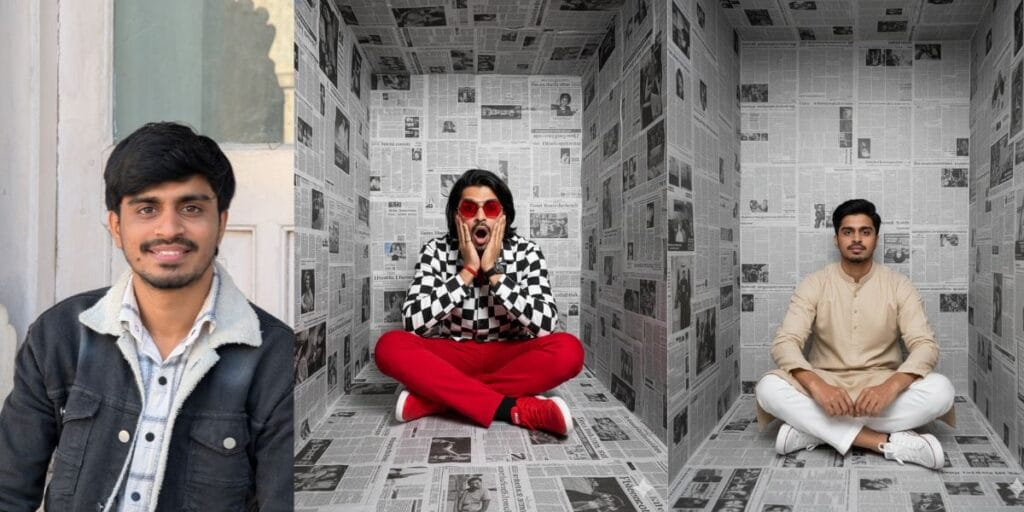
(Prompt A)
“Create A high-fashion, editorial-style portrait of me sitting cross-legged inside a small, box-shaped room completely covered with black-and-white newspaper pages on the walls, floor, and ceiling. The setting feels surreal and claustrophobic, like an art installation.
The person is centred in the frame, facing the camera directly. I’m wearing bold red pants, red sneakers, and red geometric sunglasses, creating a strong contrast against the monochrome newspaper background. My jacket is a black-and-white checkered jacket, adding graphic visual interest. I hold my face with both hands, fingers pressed to my cheeks, mouth open in a dramatic expression of shock or surprise. My hair is loose and neatly styled, falling naturally around my shoulders. Lighting is soft but directional, highlighting her face and outfit while keeping the background evenly lit. The composition is symmetrical, clean, and cinematic, with a strong editorial fashion photography aesthetic. Ultra-high resolution, sharp focus, professional studio photography, modern conceptual art style, high contrast, crisp textures, premium fashion shoot look.”
(Prompt B)
“A minimalist editorial portrait of me wearing a beige kurta set, seated cross-legged on the floor inside a narrow, box-shaped room, completely lined with newspaper pages on the walls and floor. The environment feels clean, conceptual, and modern, resembling an art installation or editorial fashion set.
I’m centred in the frame, facing the camera with a calm, confident expression and soft, natural makeup. My outfit contrasts strongly with the background: white trousers and white low-top sneakers, creating a striking black-and-white colour balance. My posture is relaxed and symmetrical, hands resting naturally in my lap, but with shorter hair.
Lighting is soft and diffused, evenly illuminating her face and outfit while keeping the newspaper background clearly visible but not overpowering. The composition is symmetrical and balanced, with a shallow depth of field that keeps the subject sharply in focus.
Ultra-high resolution, professional studio photography, editorial fashion style, clean aesthetic, crisp textures, modern conceptual portrait, premium quality.”
5. Best Gemini Prompt For Hair Cut Suggestion
If you are one of those who depend on a barber to suggest a hairstyle, or do not know which hairstyle suits you. Then take the help from Gemini for the best hairstyle suggestion.
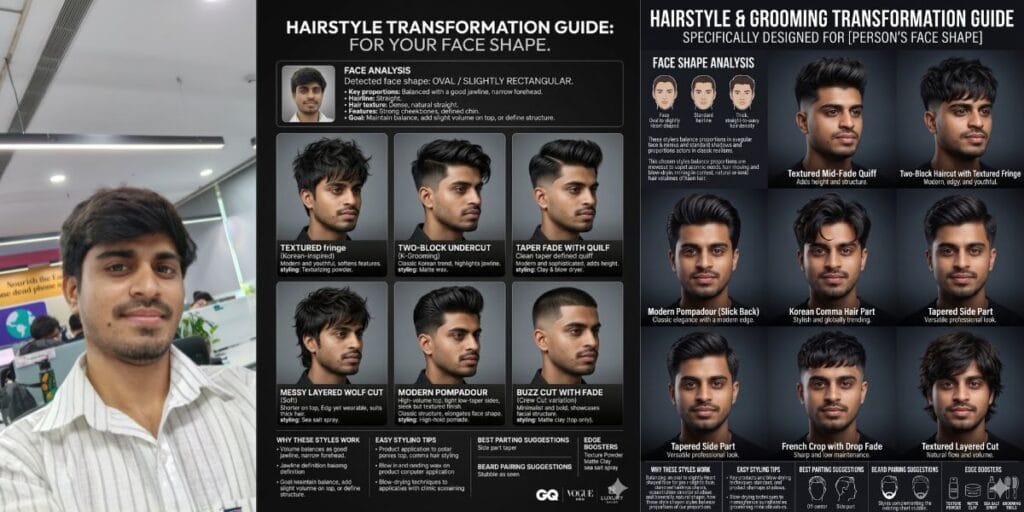
Prompt for Men
Create a high-resolution hairstyle transformation infographic poster using the uploaded reference image as the base.
IMPORTANT:
First, carefully analyse the man’s actual facial structure, proportions, jawline, cheekbones, forehead width, chin shape, hair density, natural hair texture, hairline, and overall aesthetic from the uploaded image. DO NOT assume the face shape beforehand.
Determine:
Actual face shape
Face proportions
Hairline structure
Hair texture and density
Features that should be enhanced or balanced
Most flattering haircut lengths, fades, and silhouettes
Then create ONLY hairstyle and haircut variations that genuinely suit the analyzed face shape and features of the uploaded person.
The hairstyles should:
Enhance facial harmony
Add masculine structure where needed
Balance proportions naturally
Improve overall style and visual impact
Feel modern, stylish, edgy, fashionable, and realistic
Suit the person’s natural vibe, hair density, and texture
Avoid cuts that visually widen or flatten the face unnecessarily
Complement beard potential and jawline shape where appropriate
Preserve:
Exact facial identity
Skin tone
Expression
Pose
Body proportions
Realistic lighting
Original realism of the uploaded image
Create a premium editorial grooming infographic poster with multiple hairstyle transformations applied directly to the same person.
Design aesthetic:
High-end barber + salon campaign
Korean men’s grooming + Pinterest + GQ + Vogue Men editorial vibe
Modern men’s hairstyle infographic layout
Cinematic grooming retouching
Luxury typography
Clean panel/grid arrangement
Dark gradient studio background
White minimal typography with subtle metallic accent colors
Ultra-realistic hair rendering
4K grooming poster quality
Generate multiple hairstyle variations that are specifically selected based on the analyzed face shape. Possible examples include:
Textured fringe
Korean comma hair
Two-block haircut
Taper fade
Low fade with textured top
Mid fade quiff
Modern pompadour
Messy layered cut
Curtains hairstyle
Slick back
Bro flow
French crop
Ivy League cut
Buzz cut with fade
Crew cut
Faux hawk taper
Wolf cut for men
Modern mullet
Side-part taper
Medium layered surfer cut
Only include styles that genuinely flatter the analyzed face shape, hairline, and density.
Each hairstyle panel should include:
Hairstyle title
Short styling description
Realistic barber/salon-quality texture
Different lengths and styling approaches
Natural shadows and blending
Consistent facial realism
Also include:
A small face-shape analysis section explaining:
Detected face shape
Key facial proportions
Hairline observations
Why the chosen hairstyles work
- “Why These Styles Work”
- “Easy Styling Tips”
- “Best Parting Suggestions”
- “Beard Pairing Suggestions”
- “Edge Boosters” (texture powder, sea salt spray, matte clay, accessories, subtle highlights, grooming tricks)
Overall mood:
Stylish but believable
Trend-forward but wearable
Editorial yet practical
Modern Gen-Z / fashion-forward male grooming aesthetic
Highly realistic transformations
Viral Pinterest barber-guide energy
Premium masculine grooming campaign feel
Prompt for Women
Create a high-resolution hairstyle transformation infographic poster using the uploaded reference image as the base.
IMPORTANT:
First, carefully analyze the person’s actual facial structure, proportions, jawline, cheekbones, forehead width, chin shape, hair density, natural hair texture, and overall aesthetic from the uploaded image. DO NOT assume the face shape beforehand.
Determine:
Actual face shape
Face proportions
Hair texture and density
Features that should be enhanced or balanced
Most flattering haircut lengths and silhouettes
Then create ONLY hairstyle and haircut variations that genuinely suit the analyzed face shape and features of the uploaded person.
The hairstyles should:
Enhance facial harmony
Add structure where needed
Balance proportions naturally
Improve overall style and visual impact
Feel modern, chic, edgy, fashionable, and realistic
Suit the person’s natural vibe and hair type
Avoid cuts that visually widen or flatten the face unnecessarily
Preserve:
Exact facial identity
Skin tone
Expression
Pose
Body proportions
Realistic lighting
Original realism of the uploaded image
Create a premium editorial beauty infographic poster with multiple hairstyle transformations applied directly to the same person.
Design aesthetic:
High-end salon campaign
Korean salon + Pinterest + Vogue editorial vibe
Modern beauty infographic layout
Cinematic beauty retouching
Luxury typography
Clean panel/grid arrangement
Dark gradient studio background
White minimal typography with subtle accent colors
Ultra-realistic hair rendering
4K beauty poster quality
Generate multiple hairstyle variations that are specifically selected based on the analyzed face shape. Possible examples include:
Butterfly cut
Korean hush layers
Wolf cut
Soft shag
Long layers
Collarbone cut
Textured bob
Blunt bob
Wispy bangs
Curtain bangs
Side-swept layers
Razor-cut layers
Midi layered cut
Sleek lob
Air bangs
Face-framing layers
Soft mullet-inspired cut
Only include styles that genuinely flatter the analyzed face shape.
Each hairstyle panel should include:
Hairstyle title
Short styling description
Realistic salon-quality texture
Different lengths and styling approaches
Natural shadows and blending
Consistent facial realism
Also include:
- A small face-shape analysis section explaining:
Detected face shape
Key facial proportions
Why the chosen hairstyles work - “Why These Styles Work”
- “Easy Styling Tips”
- “Best Parting Suggestions”
- “Edge Boosters” (accessories, texture spray, highlights, styling tricks)
Overall mood:
Stylish but believable
Trend-forward but wearable
Editorial yet practical
Modern Gen-Z / fashion-forward beauty aesthetic
Highly realistic transformations
Viral Pinterest beauty-guide energy
The best results often come from a Best Google Gemini AI Photo Editing Prompt with specific visual details.
Also Read: OPPO Reno 14 Review: Flagship Feel At A Mid-Range Price
5. Best Google Gemini AI Photo Editing Prompt For Creative:
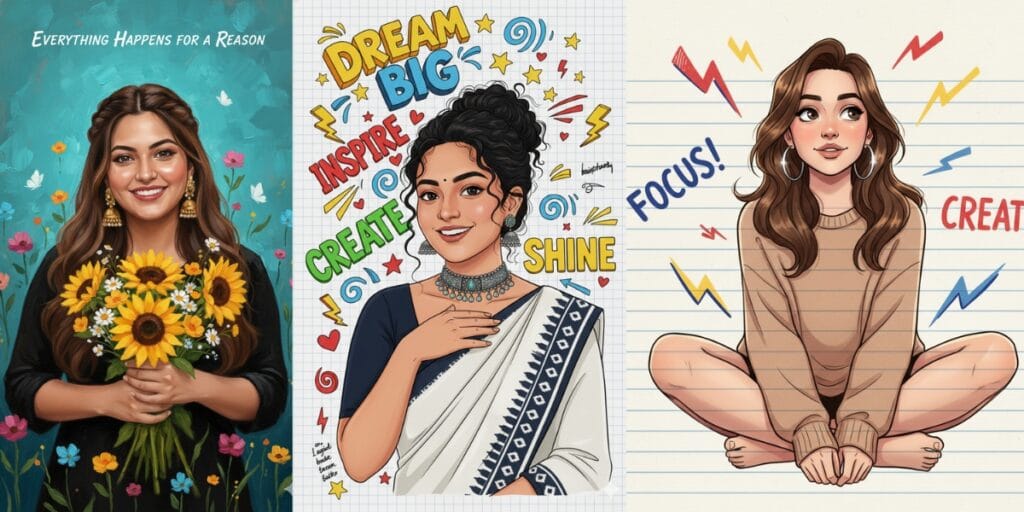
(Prompt A)
“A high-quality semi-realistic digital illustration of a smiling young Indian woman with a radiant expression, resembling actress Anupama Parameswaran. She has dark curly hair pulled back into a messy bun with loose tendrils framing her face, a small black bindi and distinct dark eyebrows. She is wearing a dark navy blue half-sleeve blouse and a white saree with a darkikat-patterned border. And, she wears a chunky oxidized silver and turquoise choker necklace with hanging beads and matching earrings. Her left hand is gently raised, resting on her upper chest/collarbone area.
The background is a white grid notebook paper texture filled with colorful, hand-drawn motivational typography and doodles. Key elements include the text “Dream Big” in yellow and blue 3D bubble letters, “Inspire” in red, “Create” in green, and “Shine” in yellow. Surrounding the woman are doodles of yellow stars, red hearts, lightning bolts, blue swirls, and arrows drawn in a marker style. There are small sections of handwritten notes and “brainstorming” scribbles in the margins.
The overall style is a mix of realistic portraiture and vibrant scrapbook art, bright lighting, soft shading, and 8K resolution. I want an exact woman with the same face as I uploaded, no alteration, 100 percent same. Ratio 9:16.”
A clear Best Google Gemini AI Photo Editing Prompt gives Gemini direction for the desired result.
(Prompt B)
“A high-quality digital oil painting of a beautiful young woman with a warm, beaming smile. She has long, wavy brown hair styled with a center part and braided twists on the sides. She is also wearing large, traditional gold jhumka earrings and a solid black top, and she is holding a lush bouquet of bright yellow flowers close to her chest with both hands.
The background is a textured teal-blue color. Surrounding the woman are vibrant, painted wildflowers in shades of pink, orange, and blue, along with small fluttering white butterflies. The art style features visible, thick brushstrokes (impasto) and soft, glowing lighting to create a joyful, wholesome atmosphere. At the top center, elegant white cursive text reads: “Everything happens for a reason”. I want an exact woman with the same face as I uploaded, no alteration, 100% same. Ratio 9:16.”
(Prompt C)
“Illustrated portrait of a thoughtful young woman sitting cross-legged on a ruled notebook background. Bold hand-drawn doodles, arrows, sparks, scribbled words like “Focus” and “Create!” float around her. Soft warm shading on her face, loose wavy hair, and silver earrings catching the light as well. Casual earthy-toned outfit, relaxed posture, expressive eyes looking upward as if forming an idea. Clean, modern comic-sketch style.
6. Best Google Gemini AI Photo Editing Prompt For Car Enthusiasts:
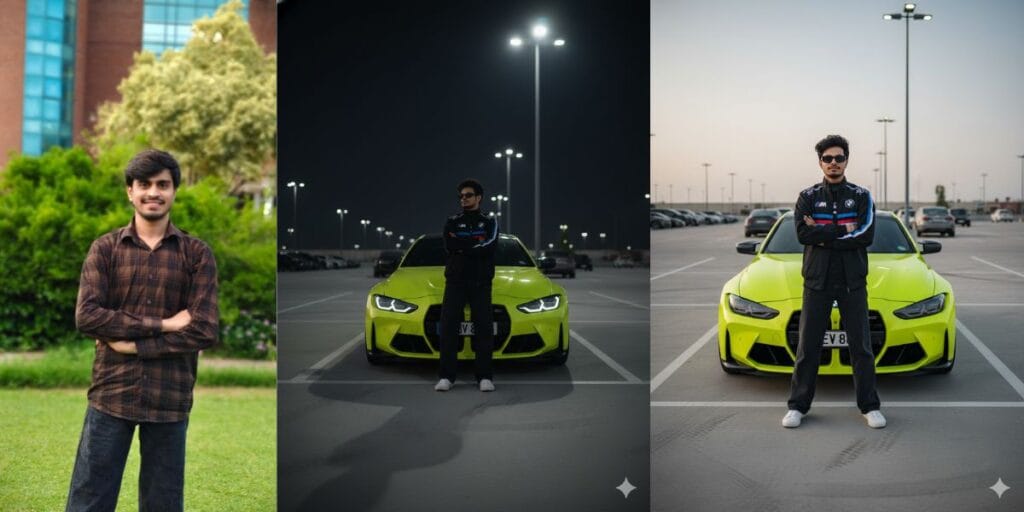
A stylish young man standing confidently in front of a neon-yellow. A
BMW sports car in an outdoor parking lot. He is wearing a black BMW racing jacket with blue and white detailing, black baggy pants, white sneakers, and trendy rectangular sunglasses. His hair is also messy, giving a cool street-style vibe. The car behind him is bright lime-yellow with black accents and a sporty design. The overall aesthetic is modern, high-end, bold, and automotive street fashion.
Prompt 7: Best Google Gemini AI Photo Editing Prompt For Horse Riding
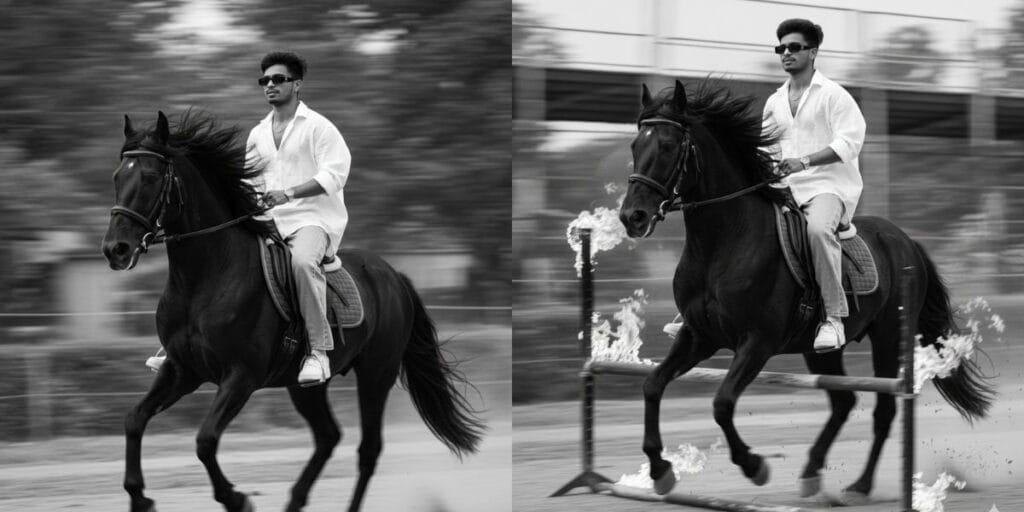
A slim 5.7 young man riding a powerful black horse, captured from a low frontside
Three-quarter angel. He sits upright, holding the reins naturally, glancing slightly to the side with a calm, fearless expression, face fully visible and sharp.
The horse is muscular with a thick, flowing mane, captured mid-stride.
Subject and horse are in focus while the background is heavily motion -blurred with streaking lines and dust for dynamic speed.
He wears an oversized white linen shirt (open buttons), light blue baggy jeans, white Nike Air Force 1 sneakers, a silver wristwatch, and narrow rectangular sunglasses. Face must remain 100% identical to the reference, no facial changes, smoothing, beautification, or face swap. Monochrome black-and-white, deep Contrast, cinematic lighting, subtle film grains, Shallow depth of field, Leica M11-style vintage editorial look. Ultra – realistic, cinematic.
Also Read: Samsung Galaxy S25 FE Review: A Well-Balanced Phone That Nails the Essentials
8: Best Google Gemini AI Photo Editing Prompt For Northern Lights
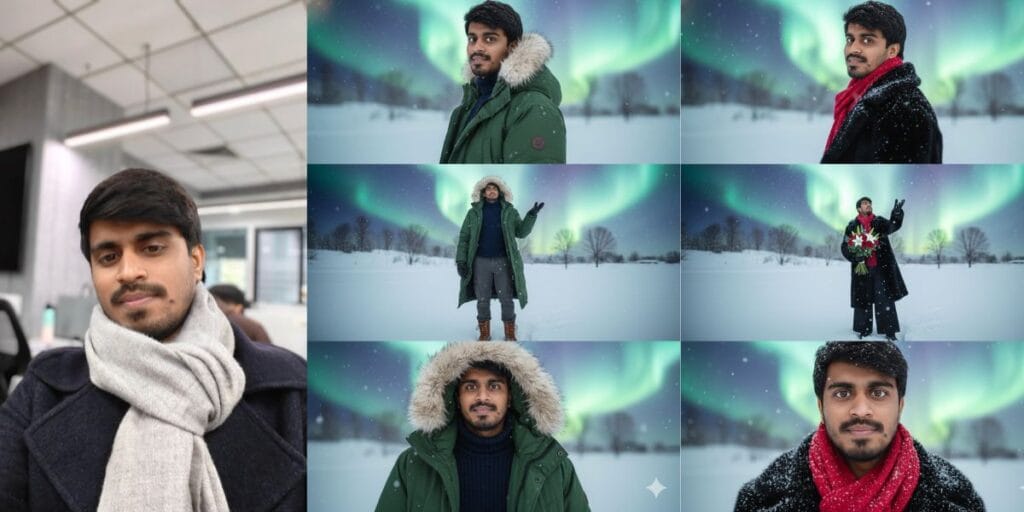
“Northern light- Vertical 4K image, three horizontal sections, featuring the provided face, hairstyle, and body, don’t change the face. expressing joy and nostalgia. Scene 1 (Top – Portrait): Character with, looking back with an editorial gaze, blurred snowy background, and northern light in the sky. Scene 2 (Middle – Full Body): Character with real looking bouquet in a vast snowy field, overhead shot, reaching for snowflakes, bare trees in the distance.
Also, Scene 3 (Bottom Close-up): Face close-up, beautiful, bright eyes, looking at the camera, no smile. Outfit: long Loose black winter fur jacket, wide-leg pants, red scarf. Atmosphere: White snow, cool color palette, and northern lights in the sky evoking melancholy and solitude. The photo filter should be light, not dark, and aesthetic.
High-quality definition photo, negative prompt: no grain, no cartoonish pic. No plastic flowers, no plastic.”
Try this Best Google Gemini AI Photo Editing Prompt to change backgrounds, lighting, colours, or details.
9. Best Google Gemini AI Photo Editing Prompt For Cinematic Illusion
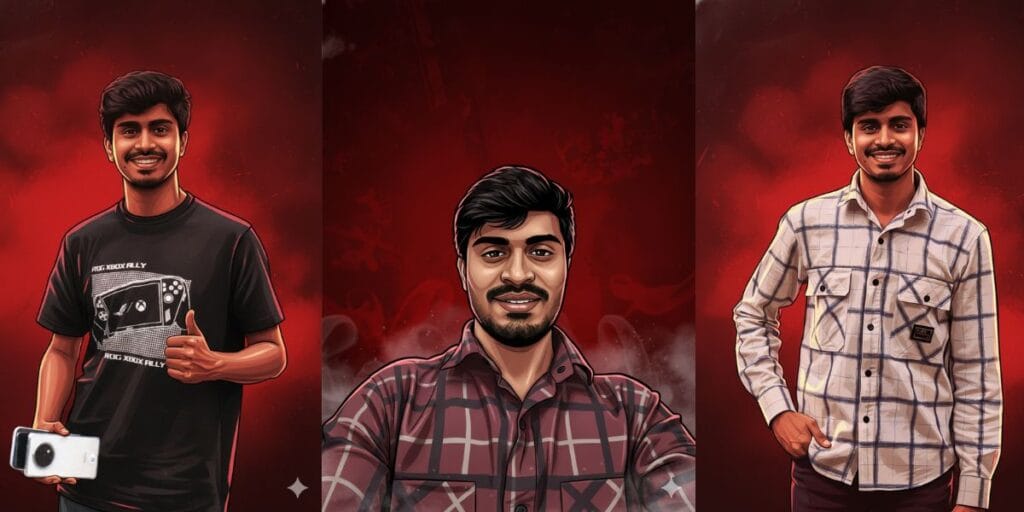
Create a cinematic digital illustration of the person in the reference photo. Maintain the exact face, identity, hairstyle, expression, skin tone, and pose with zero distortion.
Transform the entire scene into a deep red high-contrast Tamil gangster movie poster style. Replace the background with red gradients, smoky atmosphere, and subtle textures. Add bold comic-book shading, thick outlines, strong black shadows, and glossy highlights on the skin and clothes.
Stylize the outfit with richer tones, clean folds, and dynamic lighting while keeping the original clothing design. Add intense highlights to the jawline, cheekbones, and edges of the body.
Maintain the original pose and attitude. Create a gritty, powerful, cinematic mood with dramatic lighting and high contrast. Ultra-detailed, sharp lines, vibrant red atmosphere, action-movie poster energy, 4K illustration
10. Best Google Gemini AI Photo Editing Prompt For Realistic Shots
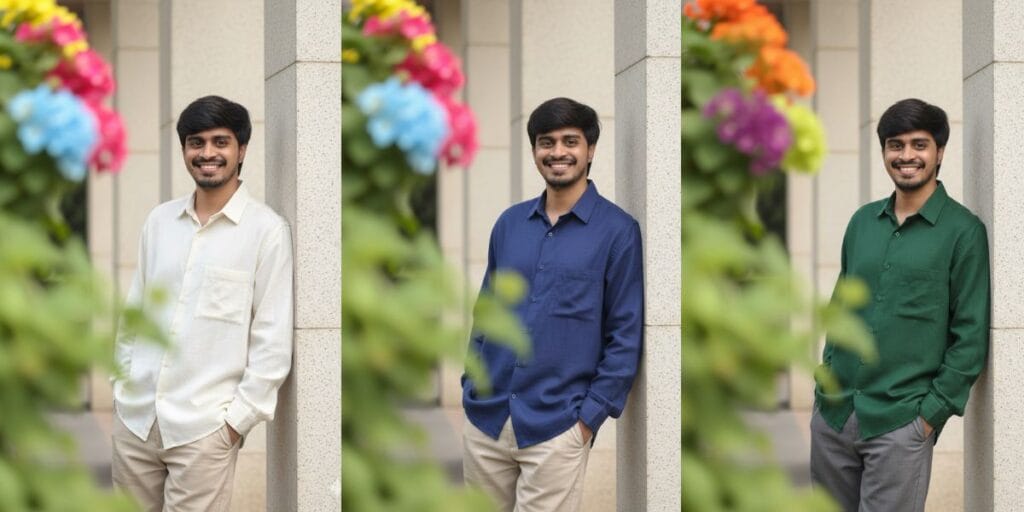
Photorealistic medium shot of me, leaning casually against a light-colored pillar with a warm, friendly smile.
My dark, styled hair and trimmed beard are visible. I’m wearing an aesthetic oversized off-white linen shirt with beige trousers, both slightly loose for a relaxed fit. My hands are in my pockets.
Moreover, the top-left corner features vibrant pink, blue, and yellow flowers, and the foreground shows blurred green leaves. Capture the scene with soft daylight, cinematic bokeh, natural facial tone, and perfect 8K detail.
11. Best Google Gemini AI Photo Editing Prompt For Saree Trend
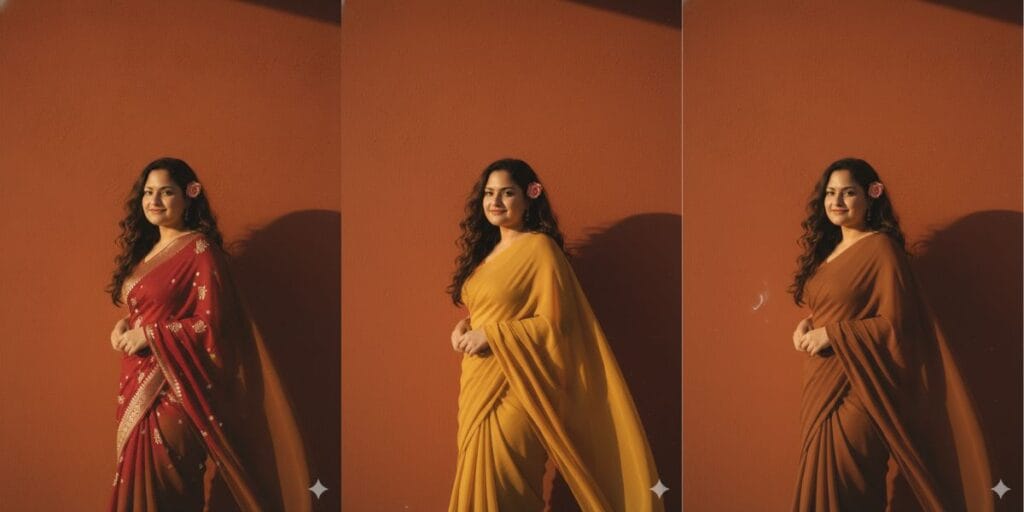
“Create a retro vintage grainy yet bright Pinterest-inspired image based on the reference picture. The girl is draped in a perfect plain chiffon saree – either warm yellow or earthy brown, giving a 90s movie vibe with a romantic, dreamy aesthetic. Her dark brown or soft red, wavy, curly hair flows naturally in the windy environment, with a small, delicate flower tucked visibly into her curls, adding a soft, feminine touch.
She is also standing against a solid wall with deep shadows and dramatic contrast, creating a mysterious, artistic atmosphere. The lighting is warm, infused with golden-hour tones, evoking a sense of nostalgia and romance.
The background is also minimalist and slightly textured, keeping the focus on her. Her expression is moody, calm, yet happy and introspective, perfectly capturing the essence of a vintage cinematic moment.”
Also Read: OPPO Find X9 Review: Flagship Performance Meets Real-World Camera Challenges
12. Prompt For Restore Your Low Quality Or Old Photo To HD
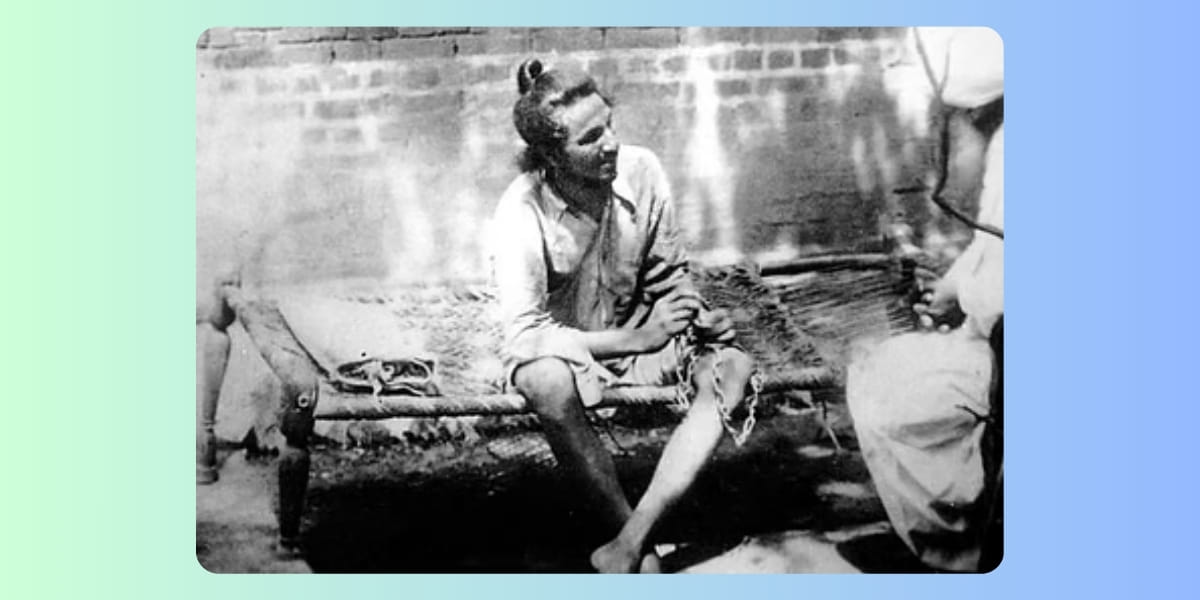
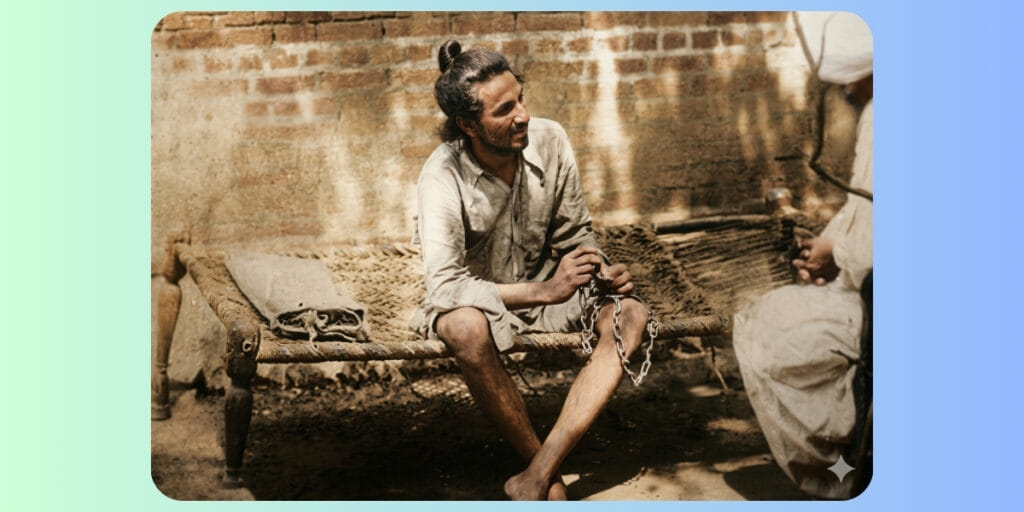
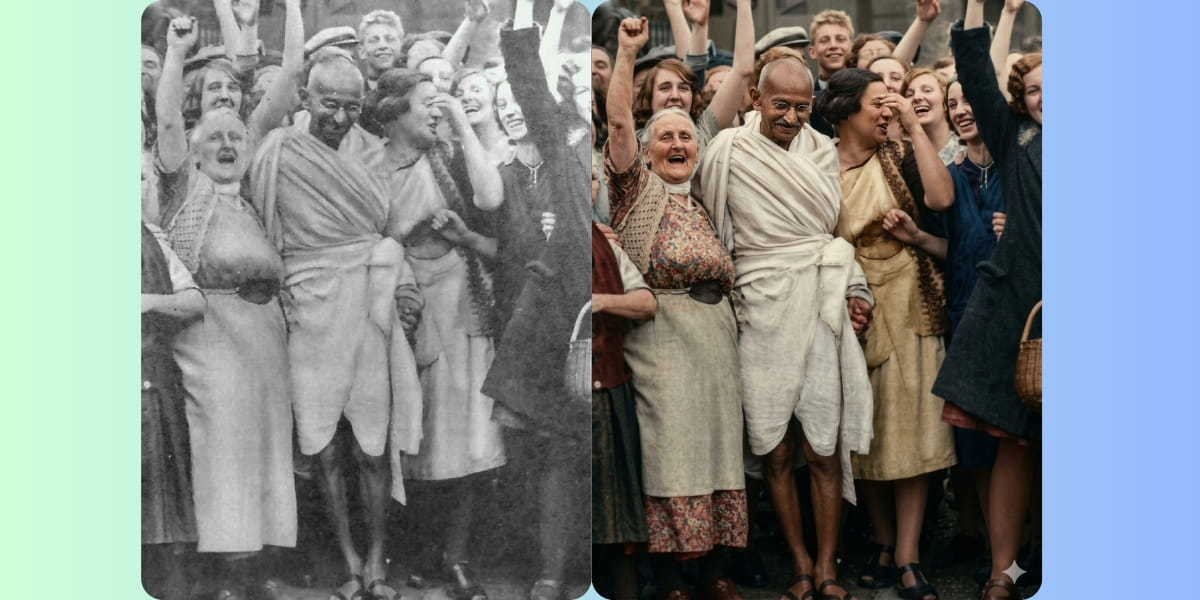
“Enhance this image naturally while keeping the original framing, angle, composition, and facial proportions exactly the same. Do not crop, zoom, or convert to a close-up. Improve overall clarity and sharpness subtly, focusing on the eyes, keeping the full face intact. Refine focus for better definition without over-sharpening. Apply soft, natural cinematic lighting correction while preserving realistic shadows and depth. Increase brightness slightly if the image is dark, and make the image pop with vivid yet natural colours.
Enhance natural skin texture with visible pores and fine details — no beauty smoothing or skin softening. Remove digital noise and compression artefacts while retaining organic texture. Improve dynamic range and contrast subtly, with muted highlights and rich mid-tones. Maintain accurate, organic skin tones and realistic colour balance. Add very subtle cinematic film grain for a professional movie-still look. Keep the background exactly as it is; only slightly clean noisy areas — no artificial blur. Preserve all facial features, expressions, hair strands, and natural imperfections. Output photorealistic, professional-camera-quality enhancement only — no stylisation.”
Negative Prompt:
“Close-up, zoomed-in, cropped face, changed framing, face alteration, reshaped features, beauty filter, oversmoothed skin, plastic skin, waxy texture, AI face, cartoon, anime, CGI, illustration, painting, artificial blur, fake bokeh, harsh lighting, flat lighting, over-sharpening, halos, HDR look, distorted eyes, asymmetry, extra details, digital artifacts, smartphone filter look.”
Recommended Settings:
Image-to-Image Strength / Denoise: 0.15 – 0.30
CFG / Guidance: 5 – 7
Steps: 25 – 35
Face Restoration: OFF
Upscale: After final result only (2× max)
Seed: Fixed (for consistency)
Tips: Copy the complete prompt and paste it into Gemini for the best results
13. Best Google Gemini AI Photo Editing Prompt For Stylish Portrait
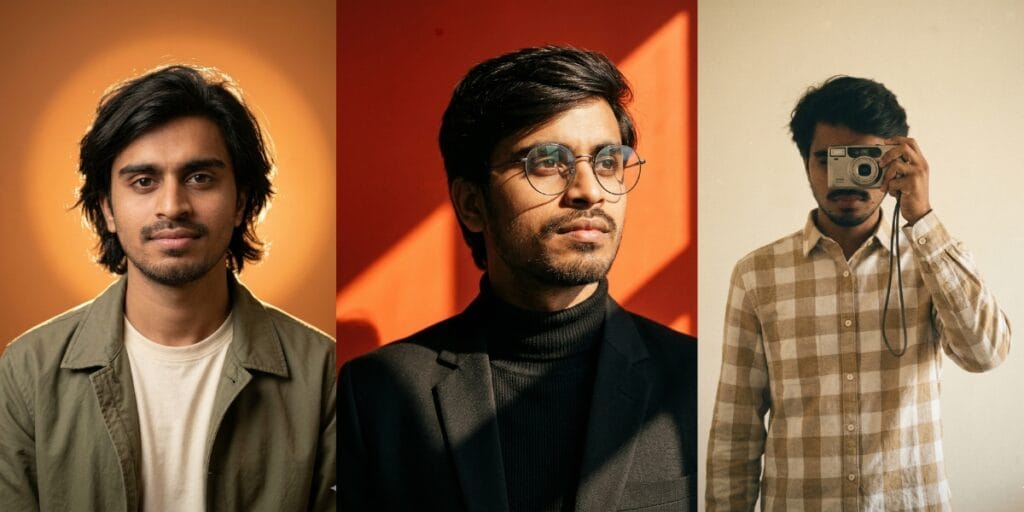
(Prompt A)
“Create a Medium chest-up portrait in a 3:4 vertical aspect ratio, shot at eye level with a short telephoto look equivalent to an 85mm full-frame lens. The subject stands approximately 1.2-1.5 meters from the camera, with a shallow depth of field creating a smooth, soft background blur and gentle falloff. Composition is centred, with relaxed shoulders slightly angled, the head gently tilted to camera-left (subject’s right), chin slightly lowered, and direct eye contact into the lens.
Lighting consists of a single dominant warm backlight combined with soft frontal fill. A diffused frontal key light is positioned slightly above eye Level, low contrast, warm colour temperature around 3800-4200K. Directly behind the subject, a large circular backlight forms a soft-edged glowing halo centred behind the head, with a smooth gradient falloff. The backlight is strong enough to create clear separation and a warm glow around the hair and shoulders. Shadows are soft and minimal, naturally forming under the chin and along the jawline.
Overall
Contrast is moderate-cinematic but realistic. The background is a smooth matte studio wall featuring a warm orange-to-amber gradient. A large circular glowing halo is perfectly centred behind the head, creating strong subject-background separation through luminous rim glow rather than artificial effects. Wardrobe includes a casual matte-texture jacket worn over a simple light-colored t-shirt, with a relaxed fit and natural drape.
Hair is shoulder-length, natural, slightly tousled, with soft organic strands subtly catching the rim light. No visible accessories. Makeup is minimal and natural, non-glamorous. The visual style must be fully photorealistic with a cinematic studio aesthetic and a warm monochromatic palette dominated by amber tones. Preserve natural skin texture, micro-details, and realistic pores-no smoothing or beautification. Maintain high detail and realistic micro-texture rendering.
Use the uploaded image strictly as the face identity source. Preserve exact facial proportions, bone structure, micro-expressions, natural asymmetrif 382 and authentic skin texture. Do not stylise, beautify, idealise, alter facial structure, or change age, ethnicity, or expression. All scene elements-Lighting, pose, camera, wardrobe, and background must follow this template exactly. The uploaded image contributes to facial identity only. No pose alterations, no camera or lens changes, no lighting colour shifts, no halo repositioning, no background replacement, and no style drift. No ani24,4 illustration, caricature, plastic skin, HDR look, over-sharpening, beauty filters, face distortion, resemblance drift, or expression exaggeration. Output must be 4K UHD resolution with minimal film-like grain, natural sharpness focused on the eyes, and a final look that feels editorial, cinematic, and warm.”
(Prompt B)
“Create an Ultra-realistic cinematic portrait with bold geometric light and shadow across a vivid red-orange background. The backdrop should be a saturated but refined warm red, intersected by strong diagonal sunlight, creating sharp triangular highlights in bright orange tones. Keep the red rich but controlled – no neon oversaturation, no colour bleeding onto skin.
Lighting: hard directional sunlight coming from camera-right, casting defined shadow edges across the face and background. High contrast but clean – bright highlights on one side of the face, deep sculpted shadow on the opposite side. Natural highlight roll-off, no HDR glow. Subtle warm rim light along the hairline where light hits.
Outfit: black structured blazer layered over a black ribbed turtleneck sweater. Matte textures with visible fabric detail. Clean tailoring, minimalist styling. Accessories: round, thin metal-framed eyeglasses with lightly reflective lenses catching the sunlight. No heavy glare.
Pose: chest-up framing. Head slightly turned and tilted upward toward the light source, gaze directed off-camera. Strong, confident posture with elongated neck and squared shoulders.
Camera & lens: full-frame camera, 85mm lens, aperture around t/2, shallow depth of field while keeping facial details crisp. High,382 micro-detail in skin texture and beard. No smoothing, no artificial sharpening.
Composition: vertical 4:5 ratio. Subject positioned slightly off-centre to allow geometric light shapes to dominate part of the244 frame.
Editorial fashion aesthetic with bold contrast, clean colour separation, and subtle film grain. No excessive warmth, no plastic skiry, no stylisation – purely realistic, high-end magazine look.”
14: Best Google Gemini AI Photo Editing Prompt For Retro Illustration
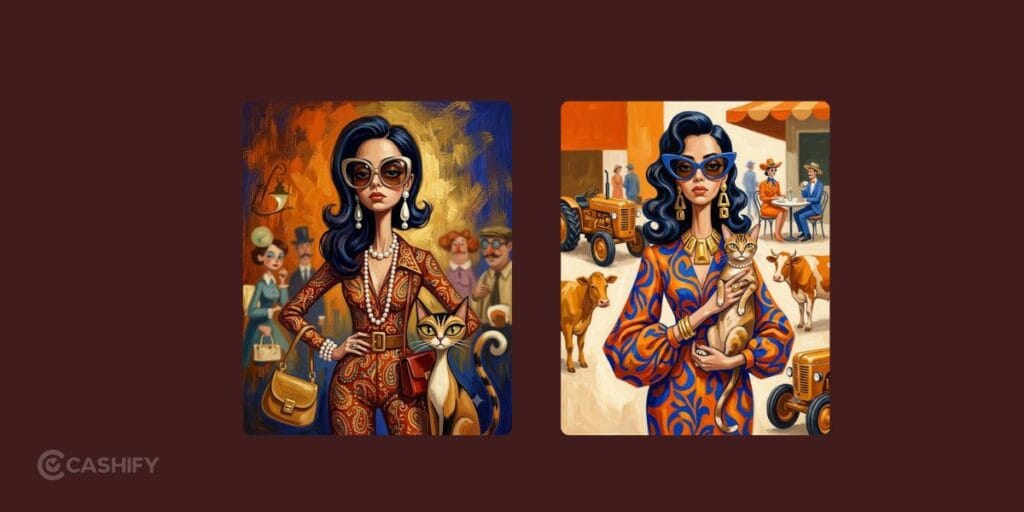
Prompt:
“Surreal mid-century editorial illustration of an eccentric version of the person in the photo and a [Animal] inside a stylish [Location], elongated proportions, exaggerated narrow faces, deadpan expressions, oversized accessories, bizarre fashionable atmosphere, painterly brush textures, distorted anatomy, subtle lowbrow surrealism, sophisticated absurdity, vivid retro color palette dominated by [Colour], [Colour], and [Colour], expressive oil-painted strokes, fashionablevintage clothing, dramatic jewelry and eyewear, whimsical background characters softly blurred in distance, elegant café culture energy, cinematic composition, textured painted background, contemporary art gallery meets 1960s Riviera illustration, highly stylized editorial aesthetic, vertical composition 4:5”
For animal, I used Cat and for dominant colours I used golden, orange and royal blue.
Customise your Best Google Gemini AI Photo Editing Prompt for portraits, travel photos, products, or social media images.
Find Words
If you’ve only used AI image generators for quick edits or fun experiments, Nano Banana and Gemini 3 Pro might surprise you. I think these models do a much better job when you give them clear, detailed prompts instead of a simple one-line instruction. That’s where the real difference shows rather than the best Google Gemini AI Photo Editing Prompt.
The 13 prompts shared above are a great starting point, but don’t be afraid to tweak them based on your own style or project. In my experience, even small changes to the prompt can completely transform the final image. So, keep experimenting, refine your ideas, and you’ll be able to create visuals that look polished enough for social media, blog posts, creative projects, or even your portfolio.
If you’ve just bought a new phone and don’t know what to do with your old phone, then here’s your answer. So, Sell old mobile to Cashify and get the best price for it. If you are planning to buy a new phone, check out Cashify’s refurbished mobile phones. You can also get your favourite phone at almost half price with a six-month warranty, 15-day refund, and free delivery.