Searching for which Realme phones are eligible for Android 16 update and find out whether your phone makes it to the list or not? Well, it’s 2026 and the Android 16 rollout is in its final turn. Therefore, Realme’s Realme UI 7.0, which is based on Android 16 is also in full swing. Realme has shifted its policy, offering up to 4 years of OS updates for flagships and 3 years for the premium “Number” and “P” series. There are granular data protections like Material 3 Expressive Design for more fluid interfaces. Android 16 makes multi-tasking tools smarter. So, the everyday interactions feel effortless and intuitive. For Realme users, they have been arriving via Realme UI 7.0. But the big question is: which phones will get it? Which phones among the best mobile phones under 35000 or 20000 from Realme make it? Which old phones will make it? So, let us see which Realme phones are eligible for Android 16.
Also Read: These Redmi Phones Will Get Android 16: Is Yours on the List?
What Android 16 Is All About?
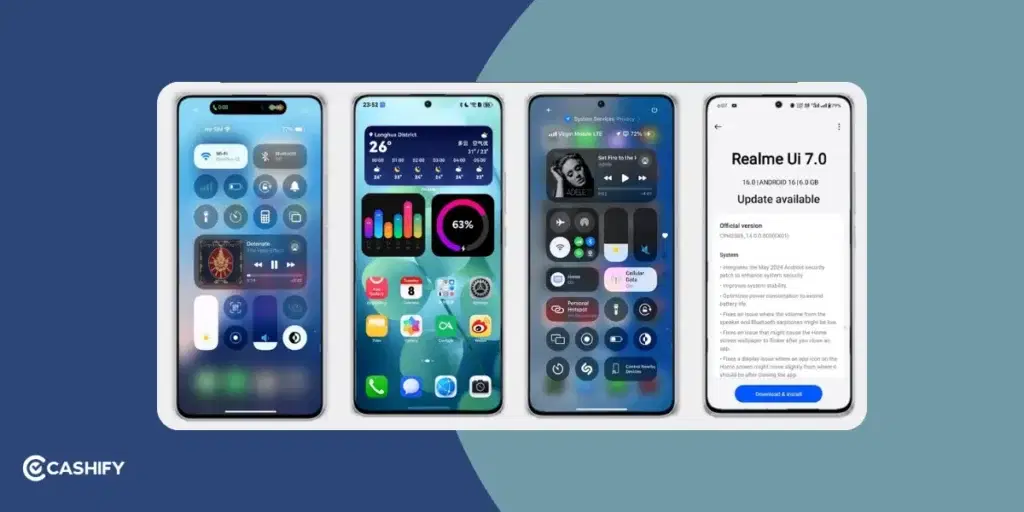
Android 16 is going to be one of the most significant updates in years! It will bring new features, change the UI, and give you nice upgrades! Here are the main highlights!
Android 16 is going to be one of the most significant updates in years! It will bring new features, change the UI, and give you nice upgrades! Here are the main highlights!
| Feature | What It Does |
|---|---|
| New Look (Material 3 Expressive) | You can change colours, fonts, and style to fit your taste, with enhanced icon layouts, lock-screen depth effects, and adaptive dark mode. |
| Gemini AI | A new smart helper that listens, talks, and works offline. |
| Live Updates | Shows real-time info (like music or deliveries) on your screen. |
| More Privacy & Safety | Helps protect your data and stop scams using smart tools, including scam-call detection, online threat blocking, and improved permission controls. |
| Faster Performance | Smoother scrolling (up to 29% improvement), better gaming graphics, and up to 15% faster responsiveness via Flux Engine. |
| Updated Design | Home screen and settings look cleaner and are easier to use. |
Also Read: Xiaomi HyperOS 3.0 Release Date, Eligible Devices, Features!
What’s New in Realme UI 7.0 Based on Android 16?
Here are some key features that make Realme UI 7.0 compelling.
Light Glass Design and New UI Visuals
The user interface received a major makeover with a glass-inspired look. You can expect a “Misty Glass Control Center,” an animated “Breathing Dock” for apps, and completely redesigned “Ice Cube Icons.”
Live Wallpapers and Customisation
You can enjoy customised lock screens, select live photos or video wallpapers, enjoy dynamic themes, change icon layouts, and fingerprint animations for a personalised feel.
AI-Powered Tools and Smart Features
There are some smart tools and features that you will get with Realme UI 7.0. The first one is AI Notify Brief, which automatically summarises non-urgent notifications into clear morning and evening briefings. Another innovative feature is the AI Framing Master, which offers framing suggestions while you take photos. It is very useful for casual photographers wanting better shots. AI gaming coach optimises performance for games.
Performance Optimisation
Android 16 will offer speed enhancements, quicker touch response, smoother app loading and transitions, improved stability, and multitasking.
Enhanced UX and System-Level Upgrades
You can expect crystal clear animations, an updated control centre, improved privacy features, and enhanced background task handling.
Also Read: Xiaomi HyperOS Vs MIUI 14: Which Is A Better OS For You?
Which Are The Realme Phones Eligible for Android 16?
Now, it’s time for us to give you the latest list of all the Realme phones eligible for Android 16. So, this table will help you out:
Realme Phones Eligible for Android 16
| Series | Models Eligible for Android 16 | Status (as of March 2026) |
| GT Series | GT 8 Pro, GT 8, GT 7 Pro, GT 7, GT 7T, GT 6, GT 6T, GT Neo 6, GT Neo 6 SE | Stable Available (GT 8/7 series) / Beta (GT 6/Neo 6) |
| Number Series | 16 Pro+, 16 Pro, 15 Pro, 15, 15T, 15x, 14 Pro+, 14 Pro, 14, 14x, 14T, 13 Pro+, 13 Pro, 13+, 13 (5G), 12 Pro+, 12 Pro | Stable Available (16/15 series) / Rolling Out (14/13 Pro) |
| P Series | P4 Pro, P4, P3 Ultra, P3 Pro, P3, P3x, P2 Pro, P1 Speed, P1 Pro | Stable Available (P4/P3 series) / Rolling Out (P2/P1 Pro) |
| Narzo Series | Narzo 80 Pro, 80x, 80 Lite, 70 Turbo, 70 Pro, 70x, 70, N65 | Stable Available (80 series) / Beta (70 series) |
| Neo Series | Neo 7, Neo 7 SE, Neo 7 Turbo, Neo 7x | Stable Available |
| C Series | C85 Pro, C85, C75, C75x, C73, C71, C67, C65 (5G) | Rolling Out (C85/C75) / Upcoming Q2 2026 (C71/C67) |
| Note Series | Note 70T, Note 60x, Note 60 | Upcoming Q2 2026 |
Realme Devices Not Getting Android 16
- Realme GT 2 Pro
- Realme 11 Pro+ 5G
- Realme 10 Pro+ 5G
- Realme 10 Pro 5G
You May Also Like This
How to Check and Install Realme UI 7.0 Beta?
Here are a few steps that you need to follow to install Realme UI 7.0 Beta.
- Go to Settings -> About Phone -> Software Updates
- Now, check for the “Top realme UI card.”
- If your device is eligible and the build is available for your region, you will see the Beta update option.
However, before installing it, you should back up your data, especially when switching major OS/firmware versions. Once you have installed the update, it’s time to enjoy new themes, live wallpapers, refreshed UI, and AI-powered tools.a
Should You Update Now? What Things to Keep In Mind?
You should update if you desire a fresh look and feel, as the Realme UI 7.0 comes with the Light Glass Design and customization options. If you love multitasking, smoothness, and performance, you should definitely update. It makes everyday tasks more fluid and snappier. You should update if you enjoy AI-powered conveniences. There are a few features, such as AI Framing Master and AI Notify Brief, that add smart touches without much effort.
Here are some things that you should keep in mind.
- It is a beta rollout, so it might happen that you encounter bugs or minor glitches. Therefore, it is better that you backup important data before updating.
- There are some features that are completely dependent on hardware support. Therefore, the older or budget devices might not get the full experience.
- It takes time to get the stable build because global rollout times vary, so you need to be patient for your region to get the stable build.
Beta Vs Stable: Which Update Should You Install?
Before diving deep into which update you should install first, understand what these two updates mean. Beta means the test version, and stable means the final, polished version for everyone. The beta has all the new features of Realme UI 7.0. However, it comes with bugs. Your battery might drain faster, and the app might crash randomly. It might happen that the fingerprint sensor feels sluggish but that’s the point of a beta. Before the full release, the beta version catches these issues.
So, if you’re wondering whether you should install the beta or not, read on to get the answer.
You should install the beta if you love trying new features early and don’t mind occasional glitches. All you need to keep in mind is to back up your data. You should skip installing the beta if your phone is your main device for calls, banking, or work, because the stable update usually arrives 4 to 6 weeks after the beta. Same features with fewer bugs.
If you want to check whether a stable or beta version is available, go to Settings -> About Phone -> Software Updates. If you see the word “Beta” next to the update, it is still in the testing phase. So, wait for a few more weeks for the stable version if you want a smoother experience.
Update Not Showing? What to Do?
If your phone is on the eligible list and you’re still not getting the update notification, here are a few reasons and fixes.
- It might be possible that you’re in the later wave. Realme don’t push updates to all phones at once. They first release it to a small batch, monitor the issue, and then expand gradually. So, check back every 3 to 4 days.
- Android updates are large. Usually of 2 to 4 GB. So, if your phone’s internal storage is almost full, you won’t be able to download at all. So, first, free at least 5GB of space and try again.
- Major updates cannot be downloaded on mobile data by default. Connect to the stable Wi-Fi network before checking for updates.
- You can also manually trigger an update. Go to Settings -> About phone. Click on the version number. If you won’t be able to see the updates, visit Realme’s official community forum at community.realme.com. Now, search for your exact model number. If the update is live for your region, someone will have posted about it. If it is not listed there, it genuinely has not reached your batch yet. So, waiting is the only option for you.
What Happens to Phone Which are Not Getting Android 16?
If your phone is not getting Android 16 it doesn’t stop working overnight. It keeps running on its current Android version, depending on your model. All your apps, calls, photos, and data stay exactly as they’re. You will also get security updates for a while. Even if your phone stops getting new Android versions, you will receive security patches for another 1 to 2 years. Once the security support ends, your phone still works, but it becomes a softer target over time. Phones without the recent security patches are more vulnerable to UPI payments, banking apps, and anything storing personal data.
So, to stay safe, you should follow the tips below.
- Keep all your apps updated via the Play Store.
- Enable Google Play Protect (Settings -> Security -> Play Protect)
- Avoid installing apps from outside the Play Store
- Never click on suspicious links in messages or emails.
In A Nutshell
That’s it from this guide on the Realme phones eligible for Android 16. It’s almost the end of time for Android 16 in 2026, and the brands are now gearing up for the Android 17 update too. So, make sure you get the latest Android 16 version on your Realme phones, and make them ready for the future. Stay tuned for more such informative guides.
FAQs
1. Which is the Realme UI variant for Android 16?
Realme UI 7.0 is the official variant for Android 16. It introduces a fresh design, enhanced Flux Engine animations, and a suite of smart AI-powered systems.
2. Will Realme get Android 16?
Yes, Realme is currently rolling out Android 16 through the Realme UI 7.0 beta program. Supported devices include the Realme 16 series, 13 Pro series, and Narzo 80 and 70 lineup.
3. When will Android 17 come to Realme phones?
With Android 17’s stable release expected in June 2026, Realme will likely begin rolling out its corresponding Realme UI 8.0 beta updates in late 2026 to eligible flagship smartphones.
4. Does Realme UI have AI features?
Yes. Realme phones eligible for Android 16 receive AI tools like AI Dynamic Depth wallpapers, AI Text Generation, AI Eraser 2.0, AI Clear Face, AI Instant Clip, and AI Edit Genie.
5. Which Realme phones have received Android 16 till now?
Realme’s latest 16 and 14 series phones, 13 series, P4 and P3 series, and the Narzo 80 and 70 series have started to receive the latest Android 16 update.
6. Which is the best Realme phone for Android 16?
The newly launched Realme 16 Pro+ 5G is the top choice. It offers Android 16, a 200MP multi-focal camera, Snapdragon 7 Gen 4, and robust battery life.
7. Is Android 17 released for Realme phones?
Android 17 has not come till now. It is currently in the Beta 3 testing phase as of early 2026, with the official stable version scheduled for June 2026.
8. How can I check if my Realme phone is eligible for Android 16?
You can refer to the official Cashify list or Realme’s announcements. If your model matches the ones listed (flagship, mid-range, or budget groups), it’s likely eligible.
If you’ve just bought a new phone and don’t know what to do with your old phone, then here’s your answer. Sell old mobile to Cashify and get the best price for it. If you are planning to buy a new phone, check out Cashify’s refurbished mobile phones. You can get your favourite phone at almost half price with six-month warranty, 15 days refund and free delivery.