If you are facing situation like holding your phone near a payment machine, and nothing happens then, you have fouund the right blog. If your NFC has stopped working, it’s natural to wonder how much that hurts your phone’s value. The good news is that it usually hurts less than you’d think. You can sell phone with NFC not working and still get a fair price. Let’s look at what NFC does, why it fails, and how to protect your price.
Also Read: 5 Laptops That Could Still Hold Strong Resale Value Years Later
What Does NFC Actually Do
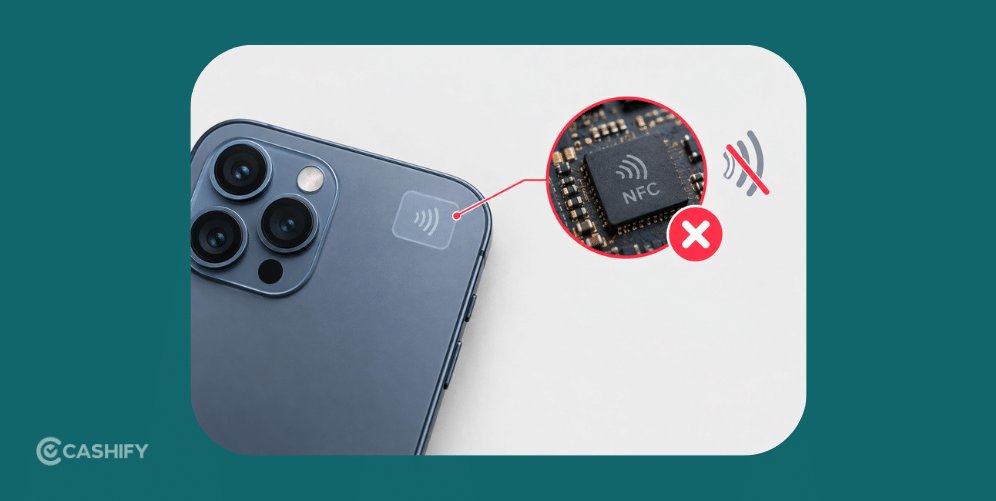
NFC stands for Near Field Communication. It’s a small chip that lets your phone talk to other devices when they’re very close. You use it for tap-to-pay at shops, for transit cards in some cities, and for quick pairing with speakers or earbuds. That said, many people still pay with UPI QR codes and never use NFC at all. This is a big reason why you can sell phone with NFC not working without a huge price cut, since not every buyer depends on it.
Also Read: iPhone 17e vs Pixel 9a: Which One Holds Its Value Better?
Is It Really Broken, Or Just Blocked
Before you assume that the NFC chip is dead take a moment to check a simple items. NFC problems are often not faults.
- The first thing to check is whether NFC is simply turned off. Open the settings menu. Make sure that NFC is turned on. The toggle can be easy to miss.
- Another common culprit is a phone case. A thick case, a metal plate or even a magnetic mount behind the phone can block the NFC signal. Take the case off. Try again.
- You might also be tapping the spot. The NFC antenna sits in an area usually on the back of the phone. Try tapping that part.
- Sometimes the problem is a software glitch. A quick restart or a fresh software update can bring the NFC back.
If NFC still does not work after all of these steps the issue may be physical. A fall, water damage or a back panel or battery repair can damage or disconnect the NFC antenna. Knowing this is helpful because it helps you explain the problem clearly when you sell a phone, with NFC not working.
Also Read: How to Sell Your MacBook Air 2025 Safely and Quickly
How Much It Affects The Price
The effect is usually small to moderate. NFC is a handy feature, but it matters less to buyers than the screen, battery, camera, or processor. A phone with a good display and a healthy battery still holds solid value.
It can matter a bit more on premium phones. Buyers paying for a flagship often expect every feature to work, tap to pay included. On a budget phone, a dead NFC chip is a much smaller issue.
So when you sell phone with NFC not working, your honesty and the rest of the phone’s condition matter more than this one chip.
What To Do Before You Sell
A few simple steps can help you before you sell phone with NFC not working:
- Check that NFC is turned on in settings
- Remove the case and any metal plate, then test again
- Restart your phone and install any pending update
- Try tapping a card or tag to see if anything reads
- Be honest about it when you list your phone
Cashify: Best Place To Sell Your Phone
Once you’ve checked all that, the next step is picking where to sell. Cashify is one of India’s most trusted names for selling old phones, laptops, and other gadgets, and it gives you a fair, AI-based price, even for phones with small issues.
Along with that, Cashify also offers:
- Free doorstep pickup in over 1,500 cities
- Fair pricing based on your phone’s real condition
- A simple, honest process from quote to payout
- No pressure to fix anything yourself first
How To Sell On Cashify
Now, if you find it interesting, let’s look at the next step. How to sell it.
- At first, go to the official website of Cashify, or download the app and open it.
- Next, in the top left corner, you can find the Sell Old Phone Section.
- After that, select the brand of your phone brand among the various brands.
- After selecting the brand, select your device model, and immediately you will get an estimated price for your phone.
- Next, some easy questions will be asked about the condition of the phone. Be truthful and accurate about it.
- The final price of your smartphone will be given after this process.
- As the final step, fill in the details, and a Cashify pickup executive will pick up the device.
Buying refurbished mobile phones was never this easy. Sell your old phone and get exclusive offers & discounts on refurbished mobiles. Every refurbished phone is put through 32-point quality checks to ensure like-new standards and comes with a six-month warranty and 15-day refund. Buy refurbished phone easily on no-cost EMI today!