If you’re waiting for the ColorOS 17 release date for OnePlus, the update is already in beta testing for select OnePlus phones in India. However, OnePlus has not confirmed an exact stable rollout date for its devices. The update is based on Android 17 and introduces a refreshed interface, smoother animations, and new AI features.
The transition also marks a major change for OnePlus software. Eligible devices are moving towards ColorOS instead of receiving the next OxygenOS version. Here’s what you need to know about the release timeline, supported phones, new features, and how to check for the update.
Also Read: Everything To Know About Apple HomeView: Release Date, Price And Features
ColorOS 17 Release Date For OnePlus: What Is The Latest Update?
The ColorOS 17 rollout has started with beta testing, but beta availability does not mean the stable update is ready for everyone.
- August 6, 2026: Closed beta registrations opened for select devices, including the OnePlus 15 and OnePlus 15R in India.
- August 11–13, 2026: The first beta builds were scheduled to reach selected testers in batches.
- October 2026: ColorOS 17 has been officially unveiled globally, and its beta programme has expanded to more eligible OnePlus devices in India.
- Stable release: OnePlus has not announced a confirmed stable rollout date or a complete official schedule for all eligible models.
If you own a supported OnePlus phone, the timing of your update will depend on your model, region, and beta eligibility. Don’t assume that the stable version will arrive as soon as the beta becomes available.
ColorOS 17 Release Date For OnePlus: What’s New?
The ColorOS 17 release date for OnePlus also brings several interface, performance, and AI improvements. Here are the main features to look out for:
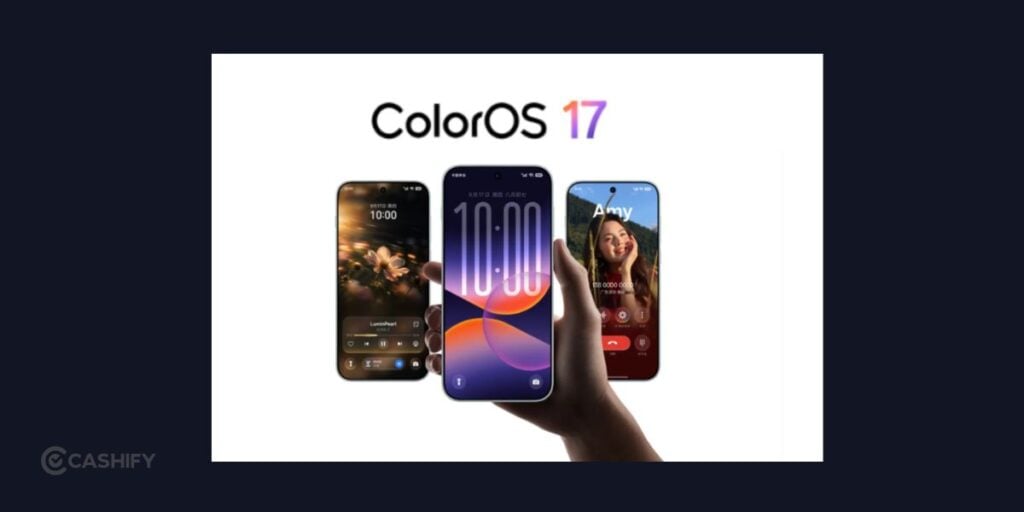
- Living Flow Design: A refreshed interface with translucent elements, smoother transitions, and more responsive animations.
- Flux Clocks: Customisable clock styles that give you more control over your lock screen.
- Faster performance: The updated system is designed to improve app launches, scrolling, and multitasking.
- AI photo editing: AI-powered editing tools help you make changes to photos with less manual effort.
- AI Mind Space: Helps organise useful information so you can save and find content more easily.
- Live translation: AI-powered translation features aim to make conversations across languages easier.
- Enhanced call security: AI Call Guard is designed to help detect potential voice and face-swapping scams.
- Improved privacy: Private Computing Cloud supports privacy-focused processing for compatible AI features.
Not every feature will necessarily be available on every OnePlus device. Some tools may depend on the hardware, software version, language, or region.
Which OnePlus Phones Are Eligible For ColorOS 17?
Let us know talk about the ColorOs 17 release date for OnePlus phones. The full official device-wise rollout list for OnePlus has not been confirmed. However, beta testing provides a clearer picture of which phones are receiving early access.
The following OnePlus models have been reported as part of the beta programme in India:
| OnePlus phone | Update status |
| OnePlus 15 | Closed beta launched; included in the expanded beta programme |
| OnePlus 15R | Closed beta launched; included in the expanded beta programme |
| OnePlus 13 | Open beta reported |
| OnePlus 13s | Open beta reported |
| OnePlus 13R | Open beta reported |
Beta availability can change as the programme expands. Check the update section on your phone or the official OnePlus community for the latest eligibility details.
Other recent OnePlus flagships, Nord phones, and tablets may be considered for Android 17-based software updates, but you should not treat an expected device list as an official confirmation. Wait for OnePlus to publish the final upgrade scope before assuming your phone will receive ColorOS 17.
Also Read: 5 Best OnePlus 16 Alternatives Worth Considering In 2026
Why Is OnePlus Switching To ColorOS 17?
OxygenOS and ColorOS have shared much of their underlying software foundation for several years. The move towards ColorOS with Android 17 represents a further consolidation of software across OnePlus and OPPO.
For you, the practical impact will be visible in the interface, system features, and future software updates. ColorOS 17 introduces its own design language and AI tools, while eligible OnePlus devices will follow the new software direction.
However, the transition does not mean every OnePlus phone will receive the update at the same time. Eligibility and rollout timing will depend on the device and region. OnePlus has also stated that eligible users in certain markets will have a choice about moving to ColorOS, with rollback options subject to future announcements.
How To Check For The ColorOS 17 Update On Your OnePlus Phone?
If you want to see whether ColorOS 17 is available for your device, follow these steps:
- Open Settings on your OnePlus phone.
- Select About device.
- Tap the software version or system update section.
- Check whether a new update is available.
- Follow the on-screen instructions if your device is eligible.
If you want to join a beta programme, look for the beta or trial-version option in the system update menu, where available. Follow the instructions provided for your particular device and region.
Before installing a beta build, back up your important files, photos, and messages. Beta software may contain bugs, affect battery life, or cause some apps to behave unexpectedly. If you rely on your phone for work or daily tasks, waiting for the stable release may be the safer choice.
ColorOS 17 Release Date For OnePlus: Should You Install The Beta?
Whether you should install the beta depends on how you use your phone.
Consider the beta if:
- You want to try the new interface and AI features early.
- You are comfortable testing unfinished software.
- You can report bugs and tolerate occasional performance issues.
Wait for the stable version if:
- You need reliable performance throughout the day.
- You use your phone for work, banking, or other important tasks.
- You don’t want to deal with bugs, app compatibility issues, or possible battery problems.
A beta programme is primarily intended for testing, not for delivering the same reliability as a public stable release. Read the programme’s instructions carefully before enrolling.
Conclusion
The ColorOS 17 release date for OnePlus marks an important change in the brand’s software roadmap. Beta testing is underway for select phones, and the update brings a redesigned interface, smoother animations, and new AI-powered tools. However, the stable rollout date and complete eligible-device list are still unconfirmed.
If you own a OnePlus 15, 15R, or a supported OnePlus 13 series phone, check the official update channel for beta availability. If stability matters more to you than early access, waiting for the public stable release is the better option.
Also Read: Which Phones Get The Biggest Discount In Big Billion Days 2026?
FAQs
When will ColorOS 17 be released for OnePlus?
ColorOS 17 beta testing began for select OnePlus devices in August 2026, and the programme has since expanded. As of October 21, 2026, OnePlus has not confirmed an exact stable release date for all eligible phones.
Will OnePlus phones get OxygenOS 17?
Eligible OnePlus devices are transitioning towards ColorOS with Android 17 rather than following the previous OxygenOS release path in markets covered by the transition. The final update options depend on the phone model and region.
Is ColorOS 17 based on Android 17?
Yes. ColorOS 17 is based on Android 17 and brings interface changes, performance improvements, and new AI capabilities. Feature availability can vary by device and region.
Which OnePlus phone will get ColorOS 17 first?
The OnePlus 15 and OnePlus 15R were among the first OnePlus devices included in the closed beta programme in India. The expanded beta programme has also included the OnePlus 13, OnePlus 13s, and OnePlus 13R.
How can I download ColorOS 17 on my OnePlus phone?
Open Settings, go to About device, and check the system update section. If your device is eligible for a beta, follow the official enrolment instructions. Back up your data before installing any beta software.
If you’ve just bought a new phone and don’t know what to do with your old phone, then here’s your answer. Sell old mobile to Cashify and get the best price for it. If you are planning to buy a new phone, check out Cashify’s refurbished mobile phones. You can get your favourite phone at almost half price with six-month warranty, 15 days refund and free delivery.