Score
Apple iPhone 8 Plus


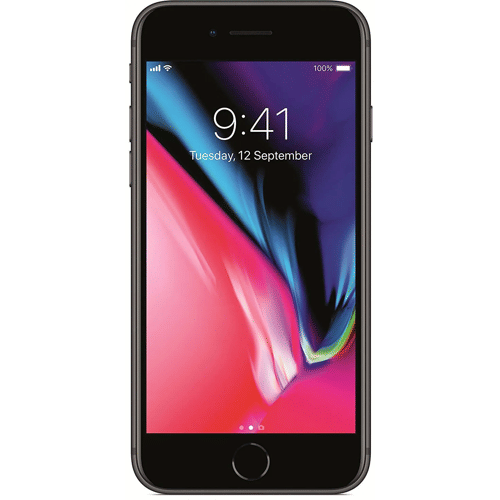
iPhone 8 Plus Launch in India
Obviously, if you compare the iPhone 8 Plus to the newer iPhone X and iPhone XS, it falls short in many regards. Hell, it wasn’t even the go-to flagship at its launch event, upstaged by the launch of the iPhone X along with it. As time passes, the 8 Plus is getting cheaper, and if you are looking to pick up an Apple handset for a bit less than what the iPhone X or iPhone XS retails for, then the 8 Plus is pretty much your best option.
With strong upgrades from the Apple iPhone 7 Plus, the 8 Plus certainly presents itself as a value for the extra money that you shell out. A better battery, a far more vibrant screen, and an enhancement to what was already a terrific mobile camera have made the iPhone 8 Plus a worthy upgrade. In contrast, Apple launched its latest lineup a few months ago, which includes Apple iPhone 17, Apple iPhone Air, Apple iPhone 17 Pro, and Apple iPhone 17 Pro Max.
Apple iPhone 8 Plus Price in India
Apple iPhone 8 Plus price in India is Rs. 49,999. This is for the 128GB storage variant. There is also a 256 GB variant priced at Rs. 84,900. This is the latest iPhone 8 Plus price according to Flipkart.
If you’re seeking Apple’s top-tier offering, consider the iPhone 17, their latest flagship. This premium device boasts cutting-edge features, making it an ideal choice for those seeking the pinnacle of Apple technology.
FAQs
Where can I buy the Apple iPhone 8 Plus in India?
Apple discounted the Apple iPhone 8 Plus. If you are looking to buy a refurbished unit, then buy it from Cashify.
When was the Apple iPhone 8 Plus officially released?
Apple iPhone 8 Plus was officially released in India on September 5, 2017.
What are the main features of the Apple iPhone 8 Plus phone?
The Apple iPhone 8 Plus boasts several key features, including a Super Retina OLED display, 3D Touch technology, a home button, iOS 11, and compatibility with iOS 16.7.12, as well as an IP67 rating for water resistance and an Apple A11 Bionic (10 nm) chipset.
When is the best time to buy the Apple iPhone 8 Plus in India for the lowest price?
Apple has discontinued the iPhone 8 Plus and is not avilable to buy a new model. But Cashify periodically offers sales, allowing you to purchase the refurbished Apple iPhone 8 Plus at its lowest price of 12,899 rupees. So, enjoy a quality-checked, almost-new device with a six-month warranty.
.
Where can I buy the Apple iPhone 8 Plus at the best price?
You can purchase the Apple iPhone 8 Plus at its best with a selected bank credit, offering huge discounts on Cashify.
What is the current price of the Apple iPhone 8 Plus in India?
The Apple iPhone 8 Plus price in India starts at Rs. 49,999 for the 64GB storage variant.
Does the iPhone 8 Plus support wireless charging?
Yes, the iPhone 8 Plus supports wireless charging. It is compatible with Qi-enabled wireless chargers, allowing you to charge your device by simply placing it on a compatible charging pad.
Is the iPhone 8 Plus water-resistant?
The iPhone 8 Plus is rated as IP67 water and dust resistant. This means it is designed to withstand being submerged in up to 1 meter (approximately 3.3 feet) of water for up to 30 minutes, but it is not completely waterproof. It is advised to avoid prolonged exposure to water or submerging the device in water.
What is Apple iPhone 8 Plus battery mAh?
Apple iPhone 8 Plus has a 2,691mAh battery.
About the Product Overview
iPhone 8 Plus Highlights
The iPhone 8 Plus is a bigger version of the iPhone 8, having a larger screen and battery, extra RAM, and a rear-facing secondary telephoto camera. It has the same A11 Bionic chipset as the iPhone X, which has been demonstrated to be incredibly powerful, particularly in tests that use all six cores simultaneously. True Tone, which changes the colour temperature to match the ambient illumination, is now supported by the display. The standard edition comes with 64GB of storage, but you can upgrade to 256GB for a higher price. This time around, your only colour options are Space Grey, Silver, and Gold. The iPhone 8 models also have redesigned glass backs that facilitate wireless charging while still preserving the IP67 water and dust-resistant classification. Fast wired charging is supported, however, only a basic charger is included in the package. Because of the huge battery, you can go through a full day of operation with minimal power left over.
iPhone 8 Plus Pros & Cons
Pros
- 256GB internal storage
- Rear camera with OIS
- Powerful chipset
- Fast charging support
Cons
- Only 2675 mAh battery
- No 5G connectivity
- Normal refresh rate
Detailed Specs
Exclusive Deals
Recent Articles


Follow





New Launches




Karbonn Rebel Pro 5G

Xiaomi Redmi M100 Pro 5G

OnePlus Turbo 6Vs

Karbonn Rebel 4G
Latest Reviews







Related Reviews
Recent Articles
Product QNA
How to set custom ringtone on Apple iPhone 9 Plus ?
If are willing to set an MP3 file for use as custom ringtone system-wide, do the following: Copy the MP3 files to your phone. Go to Settings ; Sound ; Device ringtone. Tap the Add button to launch the media manager app. You will see a list of music files stored on your phone. Your selected MP3 track will now be your custom ringtone.
How to hide or protect apps on Apple iPhone 9 Plus ?
You need to simply launch your Settings app with a tap, then head into the General section. Scroll down to the Auto-Lock and Passcode Lock section and tap on Restrictions. If you’ve previously set up a password for this, tap it in now. If not, type in a memorable passcode twice to enable Restrictions.Once in there, tap the toggle switch to OFF for all the apps you want to hide. You can hide Safari, Camera, FaceTime, iTunes, or the iBookstore here. To get them back showing up on your home screen, youll need to head back into Restrictions and set them to ON. The second, more extreme way to hide stuff is to use the Allowed Content area in Restrictions. Scroll down to the Allowed Content section in Restrictions, and tap on Apps. Here, you can set the iPhone to only show specifically rated apps (kind of slick if you have kids), or you can tap the Dont Allow Apps button to disallow anything you’ve ever downloaded to your phone.
How to hide or protect apps on Apple iPhone 8 Plus ?
All you have to do is launch your Settings app with a tap, then head into the General section. Scroll down to the Auto-Lock and Passcode Lock section and tap on Restrictions. If you’ve previously set up a password for this, tap it in now. If not, type in a memorable passcode twice to enable Restrictions.Once in there, tap the toggle switch to OFF for all the apps you want to hide. You can hide Safari, Camera, FaceTime, iTunes, or the iBookstore here. To get them back showing up on your home screen, youll need to head back into Restrictions and set them to ON. The second, more extreme way to hide stuff is to use the Allowed Content area in Restrictions. Scroll down to the Allowed Content section in Restrictions, and tap on Apps. Here, you can set the iPhone to only show specifically rated apps (kind of slick if you have kids), or you can tap the Dont Allow Apps button to disallow anything you’ve ever downloaded to your phone.
Latest Products