The Apple iPhone 13 Mini Screen Line Issue After Battery Replacement is something many users face, especially after changing the battery. Now that the battery is new, you can’t help but feel confused when lines suddenly appear on the screen. It feels like fixing one problem created another one, exactly. This article explains why this happens, what went wrong, and what you can do next in a simple and clear way.
Also read: Don’t Overpay For iPhone Repair: Get Fair Price, Expert Service From Cashify!
Understanding the Problem
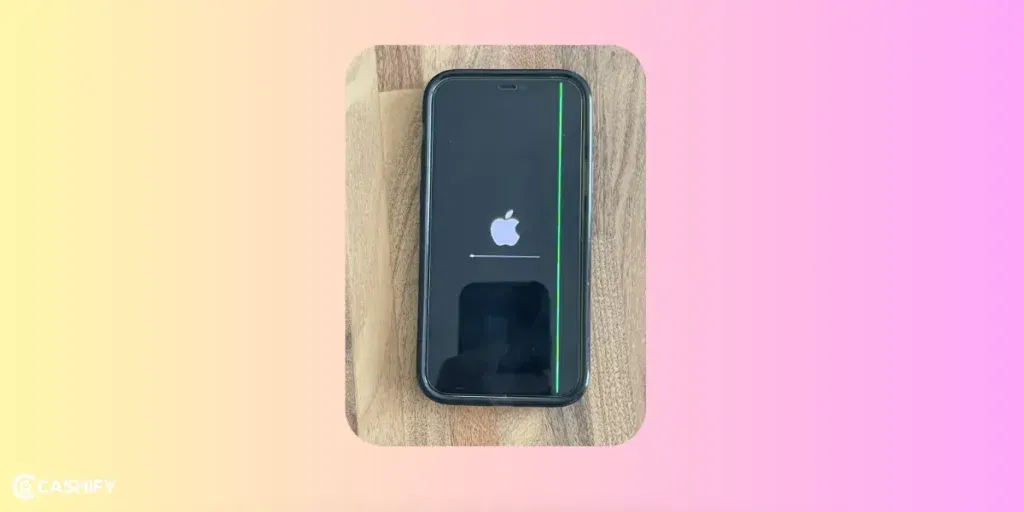
The Apple iPhone 13 Mini uses an OLED screen, and it is very sensitive, absolutely. When the phone is opened for battery replacement, even a small mistake can cause screen issues. That’s why lines like green, white, or purple may appear.
Now that the problem shows up right after the repair, it makes sense actually that the issue is related to hardware, not software. The phone usually still works fine, touch works, apps open, but those lines just won’t go away, which feels frustrating for sure.
What Went Wrong? Common Causes
The Apple iPhone 13 Mini Screen Line Issue After Battery Replacement can happen due to these reasons:
- Damaged Screen Cables: Inside the phone, thin cables connect the screen to the main board. During battery removal, these cables can get damaged easily. You can’t help but notice lines when this happens, totally.
- Loose Screen Connection: If the screen connectors are not fitted properly, the screen signal becomes unstable. It feels like the phone works, but the display is not happy, you know.
- Screen Damage While Opening: Using too much force or wrong tools can damage the OLED screen. That’s why lines appear and stay there permanently.
- Dust or Static Damage: Dust on connectors or static electricity from hands can harm the screen parts. This is common in DIY repairs, for sure.
- Low-Quality Battery: Sometimes, a non-original battery causes power problems. This can affect the screen and create lines, absolutely.
Also Read: Broken iPhone Screen? Get It Fixed By Cashify At A Cheaper Price!
How to Diagnose the Issue
To check the Apple iPhone 13 Mini Screen Line Issue After Battery Replacement, you can try:
- Restarting the phone.
- Changing brightness or screen position.
- Checking for software updates.
- Go to Settings > Battery > Battery Health.
If the lines are still there, now that you’ve tried everything basic, it clearly means it’s a hardware issue.
Step-by-Step Fixes
Be careful, you know, because opening the phone again can cause more damage.
Reconnect the Screen Cables
- Turn off the phone.
- Open it carefully.
- Disconnect the battery first.
- Reconnect the screen cables properly.
- Close and test the phone.
- Check for Physical Damage: If cables are torn or bent, the screen needs replacement, exactly.
- Replace the Screen: If reconnecting does not help, the screen is damaged. Replacing it is the best solution for the Apple iPhone 13 Mini Screen Line Issue After Battery Replacement, for sure.
- Try Another Battery: A better-quality battery can also solve the problem sometimes, absolutely.
Also read: How Can Cashify Smart Repair Service Enhance Your Mobile Repair Experience?
Cashify’s 100 percent In iPhone Battery Replacement!
If nothing works, or you are not confident, it makes sense actually to go to a professional phone repair service. They know exactly what to do and can fix the issue safely, for sure.
Cashify’s certified mobile repair service exists exactly for this. You don’t need to worry about getting suspicious quality replacement parts. We keep it transparent, using only high-quality compatible repair parts. If at all it comes to battery replacement in your iPhone 13 Mini, Cashify will ensure the most compatible battery that is also internally tested.
For extra assurance, Cashify also provides a 3-month warranty on the battery repair. Just book the service online from wherever you are put up. Or visit the nearest Cashify. Convenience is present in every step. If you happen to call the technician home, there’s no extra charge for that. The agent will either repair it right there or pick up the device for repair and drop it back to the same address. You pay for only the repair amount after the process is complete.
The best part is that, there’s price transparency for all mobile phone repair components. You get to see it on the website or app without asking for a quotation. Top it up with some discount coupons, and you get an even better deal.
Check out these coupon codes while booking your mobile phone repair service via Cashify online:
RPR50: Get up to 50 per cent off on a minimum order value of Rs. 1000
TECH25: Discount of up to Rs. 300 by using the code on the minimum order value of Rs. 2499.
Also Read: How To Book A Doorstep Service For Mobile Repair? Cashify Explains!
In The End
The Apple iPhone 13 Mini Screen Line Issue After Battery Replacement mostly happens because of loose connections or screen damage during repair. With careful handling, this problem can be fixed. You can’t help but learn that prevention is better than an iPhone repair. Handle your phone carefully, and everything will be fine, absolutely. Or else, Cashify is there to back you up.
(*Repair warranties are subject to discretion based on Cashify’s terms and conditions. Please refer to our warranty policy for detailed information.)
If you’ve just bought a new phone and don’t know what to do with your old phone, then here’s your answer. Sell old mobile to Cashify and get the best price for it. If you are planning to buy a new phone, check out Cashify’s refurbished mobile phones. You can get your favourite phone at almost half price with six-month warranty, 15 days refund and free delivery.