Xiaomi released the HyperOS 3.1 beta on January 22, 2026, introducing small but solid changes to the UI and Privacy. This makes phones faster and smoother. Also, HyperOS 3.1 update improves battery life using AI.
It refines the user interface with better app switching and customisable settings. Moreover, it brings stronger privacy and security, smoother animations, and better multitasking.
HyperOS 3.1 gives a more stable, polished, and connected experience. Moreover, it includes Android 16 security changes and iOS call support. Let’s see in detail the HyperOS 3.1 features below:
Also Read: HyperOS 3 vs iOS 26: See All Comparisons And Which OS Is Better
Xiaomi HyperOS 3.1 Features At A Glance
| Category | Feature | What It Does (Simple Explanation) |
| iOS Integration | AirPods Native Pop-Up | Let users hide unlock pattern traces |
| iOS Integration | Spatial Audio Support | Enables 360-degree immersive audio on Xiaomi phones |
| iOS Integration | ANC & Transparency Control | Manage noise cancellation and sound modes easily |
| iOS Integration | Find My AirPods | Locate lost AirPods without needing an Apple ID |
| UI & Animations | New System Animations | Smoother, more fluid transitions across the system |
| UI & Animations | iOS-Style Recent Apps | Card-like multitasking view inspired by iOS |
| Apps Overhaul | New Gallery & Weather Apps | Faster apps with rewritten code for better performance |
| Accessibility | New “Assistance” Menu | Easier access to vision, hearing, and control tools |
| Accessibility | Active Visual Perception | Helps users better understand on-screen content |
| Motion & Comfort | Motion Sickness Feature | Reduces visual motion to prevent dizziness |
| Super Island | Live Update Support | Real-time updates from apps like Uber and Spotify |
| Super Island | Todo Notes & QR Access | View tasks, QR codes, and maps directly on Island |
| Lock Screen | Card Swipe Support | Swipe payment and transit cards on lock screen |
| Media | Music Progress Bar | iOS-style glowing progress bar on media player |
| Ecosystem | Xiaomi + iPhone Call Support | Answer Xiaomi calls directly on an iPhone |
| System Core | Biometric Redesign | Improved fingerprint and unlock settings |
| System Core | Quick Gestures | Faster gesture shortcuts on select premium phones |
| Security | New Password App | Stores passwords, Wi-Fi logins, and passkeys |
| Security | Password Breach Alerts | Warns if your passwords are compromised |
| Privacy | Shake Permission Update | Limits app access to camera, mic, or location |
| Privacy | Hidden Pattern Trail | Lets users hide unlock pattern traces |
| Performance | Faster & Smoother System | Improved speed and stability |
| Battery | AI Battery Optimization | Smarter power saving using AI |
| Android Core | Android 16 Security Patches | Latest system-level security improvements |
Xiaomi HyperOS 3.1 Features
iOS Integration
If you have Apple AirPods with a Xiaomi phone, you might have missed a lot of Apple-exclusive features along the way. Previously, you could see the AirPods battery level, but after Xiaomi HyperOS 3.1 was released. It emerged as a native brother, like Apple AirPods, Xiaomi phones will never be lonely.
In the new release, HyperOS 3.1 includes key features, such as native Pop Up support similar to Apple. When you open the AirPods case, it now shows a quick card on your screen that has information about the battery and connection.
One of the most eclusive feater of Apple, Spatial Auido now unlocked. Now, Xiaoimi users can experience 360-degree immersive audio natively. Plus, you can manage Transparency mode, ANC, and the connection period from the HyperOS club.
Moreover, it shows only the correct AirPods model icon rather than showing the common Bluetooth icon. Notably, if you lost your AirPods, you can find them using Xiaomi Online Search because of Xiaomi’s “Find My” Integration, without even using an Apple ID.
Also Read: Samsung One UI 8.5: Release Date, Features & Eligible Devices
New Visual Animation And App Overhaul
Xiaomi changes its animations and rewrites Gallery and Weather. All old code has been removed to improve system performance. Because of this change, the new APK files will crash when installed on older HyperOS 3 devices.
Moreover, the brand copied the recent app animation from iOS 26. The new design looks like the cards you see in iOS, which makes switching between apps feel more modern.
The white bar at the bottom of the screen, which shows when you are in full-screen mode, has been improved. Now, it moves more smoothly and responds better when you touch it.
Xiaomi added a new Motion Sickness feature to HyperOS 3.1. This feature helps reduce visual motion cues that can cause motion sickness.
Also Read: Vivo V60e Review: Looks Premium, Shoots Punchy, Plays Safe
“Super Island” Similar To iOS Dynamic Island
Super Island is totally inspired by iOS Dynamic Island, but now it supports native Android 16 “Live update” API. So, global apps like Uber, Spotify, or other food delivery apps will no longer need to Xiaomi spacific code to show live updates on Super Island.
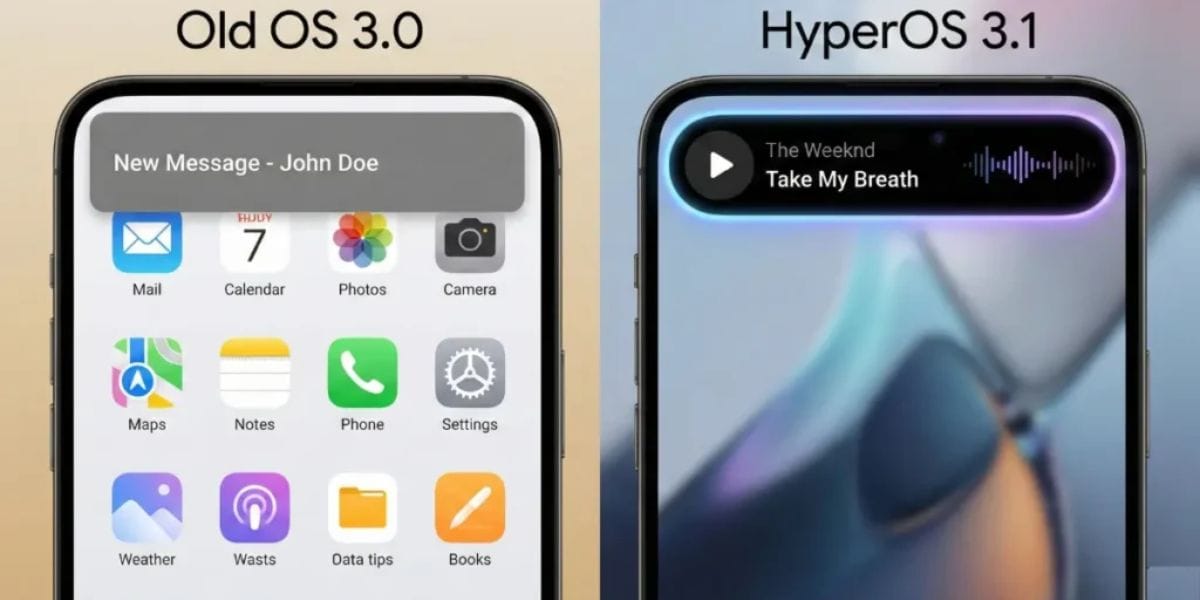
After this update, Xiaomi integrated a Todo Notes. Now, you can see many notifications, QR codes, and map directions in Island directly, without having to open the app landing page. It also adds a feature called Lock Screen Card Swipe. This lets you easily swipe through your cards, like payment and transit cards, right on the lock screen. You won’t need to go to a separate wallet page anymore.
One of my favourites is the new Music Progress Bar, which was totally copied from iOS. A simple but nice change adds a glowing progress bar to the media player on the Island.
Also Read: Samsung Galaxy S25 FE Review: A Well-Balanced Phone That Nails the Essentials
System Core And Ecosystem Enhancements
HyperOS 3.1 added a new “Assistance” Menu feature (Accessibility Settings Change). It means Xiaomi has renamed and moved Accessibility settings into a new main menu called “Assistance. These settings help people with vision problems, hearing difficulties, or those who need easier phone controls.
For example, features moved there. Active Visual Perception helps users see or understand what’s on the screen more clearly. Text size control, Screen readers, and visual and hearing support tools.
You can also see that the redesigned biometric section provides a more reflective experience. Xiaomi also added Quick Gestures control, which is exclusive to newer premium models like the Redmi K90 Pro Max, Poco F8 Ultra, etc.
As I mentioned earlier, Apple AirPod integration is making a huge impact in deep ecosystems. Plus, iPhone Cross-Compatibility (Xiaomi + iPhone) is the most important brick. Now, if you own a Xiaomi phone and an iPhone, you can receive and answer calls from your Xiaomi phone directly on your iPhone. In simple terms:
Your Xiaomi phone rings, but you can pick up that call on your iPhone. So, you don’t need to touch your Xiaomi phone every time. Apple and Xiaomi usually don’t work closely together, so this feature connects two rival ecosystems, which is rare.
Also Read: OPPO F31 Pro Plus Review: Solid, Sturdy, And Surprisingly Smart
Security Improvements And New Password Manager
Now one of the essential HyperOS 3.1 feature adding The Passwprd App like iOS. This is a new app that helps you keep track of your app logins, Wi-Fi passwords, and Passkeys similar to Apple.
It can check whether your passwords have been stolen and notify you. It also combines your passwords from different web browsers so you can manage them in one place. Moreover, it provides an easy way to automatically fill in your passwords across the system.
In the new update, there are changes to how you can use fingerprints and patterns. You can now hide the pattern trail again. Also, the fingerprint unlock no longer depends on the privacy password settings, making it easier to choose your security options.
You can now adjust your privacy with a new feature called Shake Permission Update. This lets you deny permissions, like access to your location or camera, only when your screen is on. You can also limit these permissions to just eight seconds after you open an app. This helps prevent apps from tracking you when you’re not using them.
Also Read: OPPO Reno 14 Review: Flagship Feel At A Mid-Range Price
Other Notable Improvements In HyperOS 3.1
Apart from the headline AI and UI upgrades, HyperOS 3.1 also introduces several smaller but highly useful improvements. This makes the overall experience smoother and more polished.
One of the biggest additions is the new Super OTA system. Xiaomi has redesigned the update process. The purpose is to reduce download sizes, speed up installation time, and minimise the number of restarts required for smaller updates. This makes software updates feel much less intrusive compared to previous versions.
HyperOS 3.1 also improves the lock screen and home screen experience.
Users now get
- enhanced depth effects,
- more dynamic wallpaper interactions,
- improved widget styling,
- additional customisation options.
- better folder resizing,
- cleaner icon management
- blurred background effects while opening app drawer
The update further enhances Xiaomi’s HyperConnect ecosystem. Beyond cross-device calling support, users can expect smoother file sharing, better continuity between Xiaomi devices, and improved multi-device connectivity features for a more seamless ecosystem experience.
The update further enhances Xiaomi’s HyperConnect ecosystem. Beyond cross-device calling support, users can expect smoother file sharing, better continuity between Xiaomi devices, and improved multi-device connectivity features for a more seamless ecosystem experience.
Better Performance
Here’s another area Xiaomi has focused on. HyperOS 3.1 brings better RAM management, smoother background app handling, and gaming optimisations aimed at improving frame stability and reducing unnecessary resource usage during extended gaming sessions.
There are also several smaller refinements across the system. like
- smoother gesture navigation hints,
- more polished Control Center animations,
- improved Quick Settings customisation options.
Some features that appeared in early beta builds were either modified or removed in the final stable rollout for better stability and performance consistency.
Latest Update On HyperOS 3.1
HyperOS 3.1 is finally out in its stable version. The rollout started with the Xiaomi 17 series (17, 17 Pro, 17 Pro Max, and even the 17 Ultra). Some other phones and tablets got it too, like Redmi K90, K90 Pro Max, Xiaomi Pad 8, and Pad 8 Pro.
This update is built on Android 16. They fixed:
- Better gesture navigation (no more messy prompts)
- No crashes when sharing stuff from the system
- Files upload properly now
- Location display glitches fixed
- Black screens after factory reset? Gone
- SIM card detection problems? Fixed
- Issues in cloned apps like WhatsApp? Also fixed
The rollout started March 11, 2026 for the top flagships in China. These include devices like Xiaomi 15 series, MIX Flip 2, Pad 7 series, Redmi K80 series. After that, it’ll spread to older phones like Xiaomi 14 series, Redmi K70, and more. Global versions might take a little longer, but the updates are coming soon.
HyperOS 3.1 Rollout Details
While Xiaomi initially started testing HyperOS 3.1 in select regions, the broader global rollout began gradually from April 2026 onwards. Availability still depends on device models and regional update schedules.
It is also worth noting that not every Xiaomi, Redmi, or POCO device is expected to receive HyperOS 3.1. Some older and mid-range smartphones may skip this update entirely and move directly to Xiaomi’s next major HyperOS version instead.
Final Words
Overall, HyperOS 3.1 features focus on polish rather than a major redesign, improving smoothness, battery efficiency, privacy, and ecosystem connectivity. With Apple-inspired integrations and Android 16 security upgrades, this beta feels more refined, stable, and future-ready than previous HyperOS versions.
FAQs
What are the main HyperOS 3.1 features?
HyperOS 3.1 features include smoother animations, iOS-style UI changes, AirPods integration, AI battery optimisation, a new Password app, and improved privacy controls.
Does HyperOS 3.1 support Apple AirPods better?
Yes, HyperOS 3.1 features native AirPods pop-ups, Spatial Audio, ANC controls, and Find My integration.
Is HyperOS 3.1 faster than older HyperOS versions?
Yes, HyperOS 3.1 features improved system speed, smoother transitions, and rewritten apps for better performance.
What privacy improvements are included in HyperOS 3.1 features?
HyperOS 3.1 features a new Password manager, Shake Permission controls, hidden pattern trails, and Android 16 security updates.
Can Xiaomi users answer calls on an iPhone with HyperOS 3.1?
Yes, one of the standout HyperOS 3.1 features allows users to answer Xiaomi calls directly on an iPhone.
If you’ve just bought a new phone and don’t know what to do with your old phone, then here’s your answer. Sell old mobile to Cashify and get the best price for it. If you are planning to buy a new phone, check out Cashify’s refurbished mobile phones. You can get your favourite phone at almost half price with a six-month warranty, 15-day refund, and free delivery.