If you use Snapchat regularly, you probably enjoy sharing moments through your Story- whether it’s a quick selfie, a fun outing, or something you just felt like posting at the moment. But sometimes, after posting, you might change your mind. Maybe you uploaded the wrong photo, shared something too personal, or simply want to keep your Story clean and updated. The good news is that you can delete a Snap/ Snapchat story quite easily.
In this guide, you’ll learn exactly how to delete your Snap Story step by step, along with helpful tips, common issues, and privacy advice to help you stay in control of what you share.
Also Read: How To Delete A WhatsApp Group: Step-By-Step Guide
What Is A Snapchat Story?
Before you delete a Snap/ Snapchat story, it helps to understand what a Story is.
Your Snapchat Story is a collection of photos and videos you post that stay visible to your friends (or the public, depending on your settings) for 24 hours. After that, they disappear automatically. However, during those 24 hours, anyone who can view your Story can see it multiple times.
That’s why deleting a Snapchat Story can be important if you post something by mistake.
Why You Might Want To Delete A Snap Story?
There are many reasons you might want to delete a Snap Story on Snapchat. You might relate to one of these:
- You posted the wrong photo or video.
- You shared something too personal.
- You noticed a typo or mistake.
- You changed your mind about sharing.
- You uploaded duplicate content.
- You want to maintain a certain image or privacy level.
Also Read: How To Recall/ Undo An Email In Gmail: Step-By-Step Guide
How To Delete Your Snapchat Story?
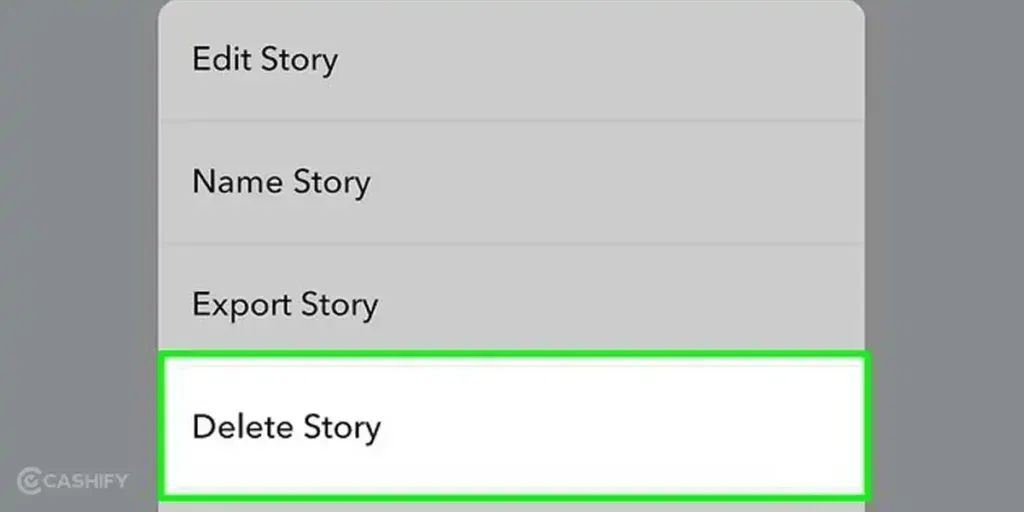
Follow these simple steps to delete a Snap from your Snapchat Story.
- First, open the Snapchat app on your phone and log into your account if you aren’t already.
- Tap your Bitmoji or profile icon in the top-left corner of the screen. This will take you to your profile page.
- Under the “My Story” section, you’ll see the snaps you’ve posted.
- Tap on My Story to view all the snaps currently live.
- Scroll through your Story and tap the specific photo or video you want to remove.
- In the top-right corner of the snap, tap the three dots (⋮) icon to open more options.
- Tap Delete Snap and confirm when prompted.
That’s it- the snap will be removed immediately from your Story.
How To Delete An Entire Snapchat Story?
If you want to remove multiple snaps, you’ll need to delete each one individually. Snapchat does not currently offer a “delete entire Snap story” button.
Quick Tip: If you posted many snaps, open your Story and delete them one by one- it only takes a few seconds per snap.
What Happens After You Delete A Snap Story?
Once you delete a snap story on Snapchat:
- It disappears immediately from your Story.
- Friends can no longer view it.
- Any replies tied to that snap may also disappear.
- If someone already viewed or saved it, they may still have it.
Important Reminder: Deleting a Story does not remove screenshots or screen recordings others may have taken.
Also Read: Best Mobile Phones Under 25000 To Buy In 2026 (Top Picks)
Can You Delete A Story After 24 Hours?
After 24 hours, your Story disappears automatically. However, if you have Memories enabled, the snaps may still be saved privately in your account.
To delete from Memories:
- Go to your profile.
- Tap Memories.
- Find the snap.
- Tap and hold → Delete.
This ensures the content is removed permanently from your account.
How To Control Who Sees Your Story (Privacy Tips)?
If you often delete Snap Story due to privacy concerns, adjusting your settings can help.
Customize Story Visibility
- Go to your profile.
- Tap Settings (gear icon).
- Scroll to Privacy Controls.
- Tap View My Story.
- Choose:
- Everyone
- My Friends
- Custom
Using Custom lets you hide your Story from specific people.
Common Problems And Solutions When Deleting Your Snapchat Story
Here are a few issues you might encounter when trying to delete a Story.
1. You Can’t Find the “Delete Snap” Option
You open a Story but don’t see any option to delete it.
Why This Happens
Most of the time, this means you’re not viewing your Story from the correct place. If you open the Story from chat or notifications, the delete option may not appear.
How You Fix It
- Tap your profile icon.
- Open My Story.
- Select the snap.
- Tap the three dots (⋮) → Delete Snap.
Also Read: Vivo X200T Vs Motorola Signature: Which One Is Worth Your Upgrade?
2. The App Freezes Or Doesn’t Respond
You tap delete, but nothing happens, or the app freezes.
Why This Happens
- Temporary app glitch
- Outdated app version
- Low device storage or memory
How You Fix it
- Close and reopen Snapchat.
- Update the app from your app store.
- Restart your phone.
- Clear cache (Android users).
3. Your Friend Can Still See The Story
You deleted the snap, but someone says it’s still visible.
Why This Happens
Snapchat sometimes takes a moment to sync changes across devices. Your friend’s app may still be showing a cached version.
How You Fix It
- Ask them to refresh or reopen the app.
- Wait a few minutes for the update to sync.
In most cases, the Story disappears shortly after.
4. You Deleted The Wrong Snap By Mistake
You accidentally removed a snap you wanted to keep.
Important to know: Once a snap is deleted from your Story, it cannot be restored unless it was saved in Memories.
What You Can Do
- Check Memories for a saved copy.
- Re-upload the snap if available.
Also Read: Oppo K14x Vs Vivo T4x: Which Is The Better 5G Phone Under 20000?
5. Delete Action Doesn’t Work Without Internet
You tap delete, but the snap stays in your Story.
Why This Happens
Snapchat needs an active internet connection to process deletions.
How You Fix It
- Turn on Wi-Fi or mobile data.
- Switch to a stronger network.
- Try deleting again.
6. Someone Saved Your Story Before You Deleted It
You removed the Story, but someone still has a copy.
Why This Happens
They may have taken a screenshot or screen recording before deletion.
What You Should Remember
Deleting a Story removes it from Snapchat, but it cannot erase copies saved by others.
How To Protect Yourself
- Share sensitive content with trusted friends only.
- Use custom privacy settings.
7. Your Story Is Already Gone
You can’t find the Story to delete.
Why This Happens
Snapchat Stories automatically disappear after 24 hours.
What You Can Do
- Check Memories to see if it was saved.
- If not saved, it’s permanently removed.
Tips To Avoid Posting By Mistake
If you frequently delete Snap Story, these habits can help:
- Double-check before posting.
- Preview snaps carefully.
- Use “My Eyes Only” in Memories for private content.
- Adjust privacy settings before sharing.
Final Thoughts
Deleting a Snapchat Story is simple, quick, and gives you control over what you share. Whether you posted something by mistake or just changed your mind, you can remove it in seconds and protect your privacy.
Remember, social media should feel comfortable and fun- and you’re always allowed to rethink what you share. When you learn how to manage and delete your Stories, you stay in charge of your online presence.
If you found this guide helpful, consider reviewing your privacy settings today and making sure your Stories are shared exactly the way you want.
Also Read: Oppo Reno 15c Vs Vivo V60: Best Mid-Range Phone To Buy
Frequently Asked Questions
1. Can someone still see my Story after I delete it?
No, once you delete your Snapchat Story, it disappears immediately from your profile and others cannot view it anymore. However, if someone took a screenshot or screen recording before you deleted it, that saved copy will still remain on their device.
2. Will deleting a Story notify my friends?
No, Snapchat does not send notifications when you delete a Story. Your friends will not receive any alert or message about it. They will simply no longer see the Story if they check your profile after it has been removed.
3. Can I recover a deleted Story?
No, once you delete a Story from Snapchat, it cannot be recovered or restored. The only exception is if the snap was previously saved in Memories. In that case, you can re-upload it, but the original deleted Story cannot return.
4. Can I delete someone else’s Story?
No, you cannot delete another person’s Snapchat Story. You only have control over the content you post on your own account. If you have concerns about someone’s Story, you can mute, block, or report the account instead.
If you’ve just bought a new phone and don’t know what to do with your old phone, then here’s your answer. Sell old mobile to Cashify and get the best price for it. If you are planning to buy a new phone, check out Cashify’s refurbished mobile phones. You can get your favourite phone at almost half price with six-month warranty, 15 days refund and free delivery.