Your Android phone has several features that you may not find in its regular Settings menu. One of them is the 4636 code, which can open a hidden Testing menu on compatible devices. This menu lets you check the information about your phone, mobile network, and Wi-Fi connection. The 4636 code in Android phones is particularly useful when you want to check network details or understand why your phone is having connectivity issues.
However, it does not work on every Android device, and some options in the menu can affect how your phone connects to a mobile network.
In this blog, you will learn what the 4636 code does, how to use it, what information it shows, and what you should avoid changing.
Also Read: Android 13 Google’s New Features
Before diving deep into the 4636 secret short code, let us first understand what this secret short code is.
What are Android Short Codes?
Android short codes are numbers that you dial to access hidden menus or actions on your Android smartphone. When you dial them, you can test some functions, troubleshoot problems, or check information about your phone. Each secret code serves a different function.
These Android short codes work on two protocols – the USSD and MMI. USSD refers to the Unstructured Supplementary Service Data protocol, and the MMI stands for Man Machine Interface. You need to dial codes to access secret menus for both protocols to function.
Both protocols share the same structure. USSD and MMI both start with the * sign and end with the hash #, and in between, they use numbers, asterisks, and hash symbols.
Usually, most Android short codes run automatically when you enter the hash symbol. However, some require you to click on the call button to execute them.
Both USSD and MMI protocol’s purpose is different. The USSD protocol lets your phone communicate with your service provider’s computers. On the other hand, the MMI protocol supports a secret code that can take you to your phone’s internal settings and functions.
Generally, most secret codes run on all Android devices, while some are manufacturer-specific. So, if any short code is not working on your phone, its manufacturer does not support it. Some codes do not even work with custom dialer options. You need the default phone app for it.
What is **4636** Code in Phone?
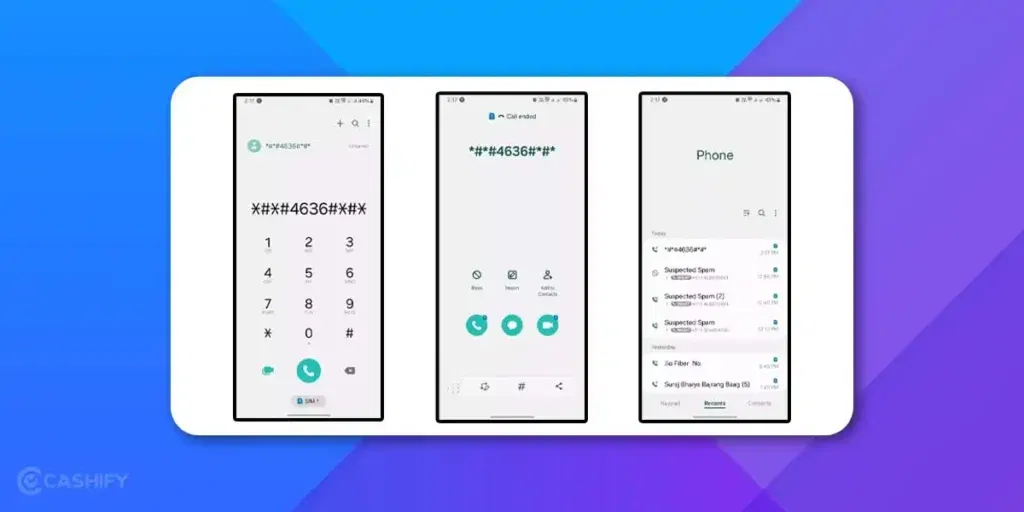
The 4636 code is a special dialer code that can open the Android Testing menu on supported phones. The full code is *#*#4636#*#*.
Unlike a regular phone number, this code does not connect you to another person or a customer support service. Instead, your phone recognises the code and may open a system menu containing technical information.
Depending on your phone’s software, you may find options such as:
- Phone information: Details about your mobile network, service status, and signal.
- Usage statistics: Information about app usage.
- Wi-Fi information: Technical details related to your Wi-Fi connection.
The options you see depend on your phone’s manufacturer, Android version, and software configuration. Some devices may show additional information, while others may not open the menu at all.
You should also know that the 4636 code is primarily a diagnostic tool. It helps you inspect your phone’s current status, but it does not automatically repair network problems or improve your internet speed.
Why Would Anyone Actually Use **4636** Code?
Your phone has a lot going on under the hood that you never get to see. Like, way more than just your apps and settings. The **4636** code is basically a secret door into all of that. And once you know it exists, you’ll find yourself using it more than you’d expect.
Here’s when it actually comes in handy.
Your internet is slow, and you don’t know why. Is it your phone? Your SIM? Your network? Open this menu and check your signal strength. If the number’s really low, your phone’s barely catching a signal, and that’s your answer right there.
You’re buying a second-hand phone and want to make sure it’s legit. Use this code to pull up the IMEI number, then match it to what’s printed on the box. Don’t match? Walk away from that deal.
Your phone keeps randomly switching between 4G and 3G and it’s driving you crazy. From inside this hidden menu, you can lock it to 4G only. Problem solved.
You want to know if you’re about to hit your data limit. The menu shows exactly how much mobile data and Wi-Fi data you’ve used. Way faster than digging through your settings app.
It’s a free tool that’s been sitting inside your phone this whole time. You just didn’t know about it.
How to Enable **4636** Code in Android Phone?
The code **4636** is an inbuilt feature of an Android phone and is hidden from the regular menu. A user cannot enable it on their Android phone. One can enable the menu using the steps mentioned below.
Step 1: Open the Phone app on your Android phone, where you usually make calls
Step 2: Look for the keypad where you dial numbers. Don’t search for contacts or use the speed dial option
Step 3: Instead of dialling a number, type in the code 4636 on the keypad
Step 4: You won’t see the code you’re typing displayed on the screen. Just type it all in at once and press the “Send” button at the bottom.
Why Do Some Phones Need ##4636## Instead of Just 4636?
You’ll see this code written two ways across the internet. Sometimes it’s just 4636. Sometimes it’s the longer version, *#*#4636#*#*.
Let’s understand the real reason behind it. Both do the same thing. Some phones auto-detect the code the moment you finish typing the digits. Others need the full pattern, stars and all, to recognise it as a proper MMI command instead of a regular phone number.
If typing 4636 and hitting send doesn’t do anything, don’t assume it’s broken. Just try the longer version, *#*#4636#*#*, instead. It’s the safer bet on Samsung, Xiaomi, and a few other brands that are stricter about code formatting.
Basically, if the short version doesn’t work, the long version usually will. So, there is no harm in trying both.
What Details Can be Checked Using **4636** Code in Phone?
The **4636** code in phones grants access to a hidden menu that primarily focuses on checking phone information and network details. Here is a complete breakdown of the specific details you can check using this code
- Phone Number.
- IMEI (International Mobile Equipment Identity) Number
- Cellular Data Usage
- Wi-Fi Data Usage
- Network Type
- Signal Strength
- Connected Network SSID
- IP Address
If you don’t know what an IMEI number is, read on.
Wait, Where’s the Battery Info?
You might have noticed something. The 4636 code is often said to show battery health too, but on most phones today, it doesn’t. That feature used to exist on older Android versions, tucked inside a section called “Battery Information.”
On newer phones, Google removed this. If you want to check battery health now, you’re better off using your phone’s built-in Settings > Battery section, or a Cashify diagnostic check before selling your phone. It’s more accurate anyway, since it tracks battery health over time instead of just showing a one-time snapshot.
So if you dialled 4636 hoping to see battery health and found nothing there, you’re not doing anything wrong. It’s just not there anymore.
What is an IMEI Number?
The full form of IMEI is – International Mobile Equipment Identity. Every phone in the world has a unique IMEI number. You can think of it like a fingerprint for your phone. No two phones share the same one, ever. It’s 15 digits long and looks something like this: 354689114562890.
If you’re wondering why it matters, here is the answer.
If your phone gets stolen, you give that number to the police or your network provider. They can block it so the phone becomes useless on any network, even if someone swaps in a new SIM card. That’s actually pretty powerful when you think about it.
It also helps you confirm a phone isn’t a fake when you’re buying second-hand. Fake phones often have weird or duplicate IMEI numbers.
Want to find yours without opening the 4636 menu? Just dial *#06# on your phone. Shows up instantly. It’s also printed on your phone box if you still have it lying around.
What Do Those Signal Strength Numbers Actually Mean?
When you open the 4636 menu, you’ll see your signal strength as something like -89 dBm. Looks like gibberish at first. It’s not.
Signal strength is measured in dBm. The closer the number is to zero, the stronger your signal. The further it goes from zero (like -110 or lower), the weaker it gets. That’s the whole logic.
Here’s a simple breakdown:
| Signal Strength | What It Means | What You’ll Notice |
| -50 to -70 dBm | Excellent | Fast internet, clear calls |
| -70 to -85 dBm | Good | Works fine for everything |
| -85 to -100 dBm | Average | Slower pages, occasional drops |
| -100 to -110 dBm | Weak | Frustrating browsing, calls cutting off |
| Below -110 dBm | Very weak | Barely connected |
So if you’re seeing -105 dBm and your YouTube keeps buffering — now you know. Your phone is struggling to find a signal, not being slow for no reason.
And if the signal’s that weak, moving closer to a window or going outside genuinely helps. Or you can try switching your network mode inside the 4636 menu itself. Sometimes dropping from 4G to 3G actually gives you a more stable connection in bad coverage areas. Counterintuitive, but it works.
Functionalities Offered by **4636** Code in Phone
The * * 4636 * * Code in Phone is one of the crucial aspects of Android phones that helps to uncover a lot of functionalities. The following are the major functionalities with which this code helps.
- One can use the * * 4636 * * Code in Phone to check their phone number and the unique IMEI number
- Get detailed information on your cellular and Wi-Fi data consumption. This can help you monitor your data usage and avoid exceeding data plans
- This * * 4636 * * Code offers detailed insights into your current network connection, including signal strength and type (e.g., LTE, 3G). This eventually can help troubleshoot network issues
- With this code, one can see specifics about connected Wi-Fi networks, such as the SSID and IP address. This is useful for managing Wi-Fi connections and troubleshooting connectivity problems
Also Read, How to Check Battery Health in Android Phone?
How to Fix Accidentally Changed a Network Setting?
So you were poking around the 4636 menu, tapped something you shouldn’t have, and now your internet feels weird. Don’t panic. This happens to almost everyone the first time.
Most issues here come from the Set Preferred Network Type dropdown. If you locked your phone to something like NR only or LTE only by mistake, that’s usually why your signal suddenly disappeared.
Follow these steps for an easy fix.
Step 1: Go back into the 4636 menu.
Step 2: Open Phone Information.
Step 3: Find the same network dropdown.
Step 4: Select the option that says something like LTE/WCDMA/GSM auto or NR/LTE/TDSCDMA/CDMA/EvDo/GSM/WCDMA.
Step 5: Restart your phone.
Your phone goes back to picking the best network on its own, just like before.
If restarting doesn’t fix it, try this backup trick. Turn Airplane Mode on for 10 seconds, then turn it off. This forces your phone to reconnect fresh, and it often clears whatever got stuck.
A factory reset always undoes any change made through this menu. But you’ll rarely need to go that far. This menu doesn’t dig deep enough into the system to need a full reset.
Why in Some Android Phones USSD Code 4636 Stops Working?
There are a few potential reasons because of which 4636 code stops working in Android.
Android Version Restrictions
Google has increased security measures with Android 12 to prevent illegal access to sensitive diagnostic menus. Due to this, the 4636 code do not work on most devices that are running on newer Android versions. This code is disabled on many devices to prevent its misuse. Therefore, if you are using the latest Android version, the 4636 code is not working on your Android phone.
Manufacturer Variations
Samsung users need to use the app called Samsung Members if they want to access diagnostic data. They can’t do it by using any USSD code. This practice is standard in many devices. However, manufacturers like Samsung often use custom codes or disable the 4636 code. It means if you’re using a Samsung, this could be the reason why the 4636 code is not working on your Android phone.
App Interface
Sometimes third-party dialer apps can interfere with the 4636 code. Therefore, if you have installed such an app, I suggest you temporary disable it and test if it is the culprit.
User Error
Sometimes you type the 4636 code incorrectly. Therefore, I recommend that you carefully type the code rather than copying or pasting it. If you copy and paste the code, it might swap characters.
What are the Alternatives if the 4636 code does not work?
If the 4636 code does not work, don’t worry. Here are some alternatives that you can try.
Manufacturer Diagnostic Tools
If the 4636 code does not work on your phone, check if your phone’s manufacturer provides alternative tools.
Third-Party Apps
Use the third-party apps like “Phone Info” or “Network Signal Info.” These apps offer similar diagnostic data without any hidden code hassle.
Hidden Menus
Some devices provide hidden menus which is accessible through specific key combinations. For example, power + volume up. Therefore, consult your device manual for details.
If you’re a Samsung user, use the Samsung Members app. OnePlus users need to dial *#808# for a similar engineering menu. Generally, on Google Pixel, Diagnostic features are retained; however, they require Developer Options to be enabled.
ADB Command
Are you comfortable with advanced methods? If yes, use ADB command and launch the hidden Testing Settings menu. For that, you need to copy code – adb shell am start -n com.android.settings/.TestingSettings
Myths Vs. Facts About 4636 Code
Here are some myths vs. facts about the 4636 code.
| Myth | Code |
| 4636 code can hack your phone | It is false. 4636 code just opens a hidden diagnostic menu. It does not hack, steal data, or install anything. |
| It works on every Android phone. | It is not true. There are some brands and newer Android versions that have turned it off for security reasons. |
| 4636 code can permanently damage your phone | This is partially true. When you view information using it, it is safe. However, changing advanced settings without knowledge can create issues. |
| 4636 code can reveal secret passwords | No. It shows network and battery data, but does not expose your saved passwords. |
| It is illegal to use the 4636 code. | No, it is a complete myth. 4636 code is the built-in feature for testing and troubleshooting. |
| This code boosts internet speed. | It does not improve speed, but it lets you view network type and force preferred network mode manually. |
| It is only for developers. | The fact is that anyone can use it. It is just hidden to avoid misuse by people who might accidentally change settings. |
| 4636 code voids your warranty. | It is not true. Simply opening the menu does not affect the warranty, but altering system settings could create problems that are not covered. |
Can Someone Use the 4636 Code to Spy on You?
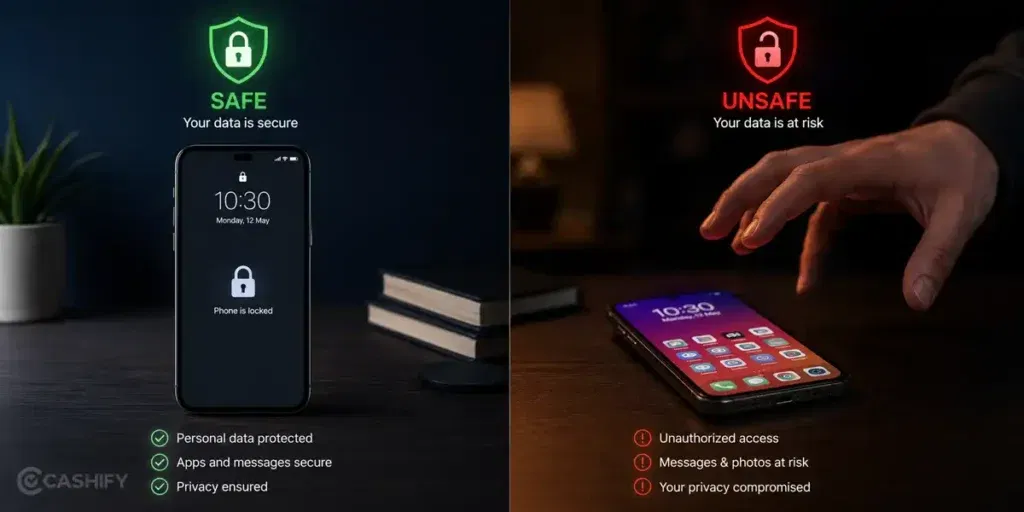
If 4636 code is so powerful, can someone misuse it against you?
Answer to this question is NO.
The 4636 menu doesn’t need your password or lock screen PIN to open. Anyone holding your unlocked phone can dial it and take a peek. But it only shows network stuff. Signal strength, data usage, IP address, IMEI. It doesn’t show your messages, photos, banking apps, or saved passwords.
So if a stranger picks up your unlocked phone and opens this menu, they can see your IMEI number and Wi-Fi name. They couldn’t already find some other way.
The real risk isn’t the code. It’s leaving your phone unlocked around people you don’t trust. The 4636 menu is not a backdoor for hackers.
Don’t post your IMEI number publicly online, especially in resale listings. It’s how phones get tracked and scammers sometimes try to misuse exposed IMEI numbers too.
Does **4636** Code Even Work on Your Phone?
Not every phone brand plays nice with this code. Some have disabled it entirely. Some work fine. And some have their own version of the same thing under a different code. Here’s the brief overview.
| Phone Brand | Does **4636** Work? | What to Try Instead |
| Samsung | Hit or miss (older models better) | Samsung Members app or dial #0# |
| Xiaomi / Redmi | Yes, usually | Works on most MIUI versions |
| OnePlus | Partially | Try *#808# for engineering menu |
| Realme | Yes on most models | Stick to the default dialer |
| Oppo | Hit or miss | Check Settings > About Phone |
| Google Pixel | Works but limited | Enable Developer Options for more |
| Nokia | Usually works fine | Default dialer required |
| Motorola | Yes on most models | Stock Android, works well |
One thing I’d add here is always use the phone’s built-in dialer when trying these codes, not Truecaller or any other third-party app. Third-party dialers block these codes from running, which is why a lot of people think the code is broken when it’s actually just the wrong app. Switch back to the default, try again, and it’ll likely work.
What’s New With the 4636 Code in 2026?
Android keeps evolving, and with every new version, the 4636 code behaves differently across phones. Let’s learn about these changes in brief.
4636 Code and Android 15
Whether the 4636 code works or not on Android 15 depends on your phone brand. As per the testing conducted in 2025, it is confirmed that the 4636 code works on a Google Pixel 8 running Android 15, but it failed to open on a Samsung Galaxy A25 and a Samsung Galaxy S25+. So, if you own the Google Pixel, you’re lucky. The code will work perfectly on Android 15, but if you use a Realme, Samsung, or Oppo device, the code is likely to be blocked by default.
How can Samsung users fix the 4636 Code Not Working?
If you use the default Samsung dialer app, it blocks the 4636 code, but here is how you can fix this issue. All you need to do is install the Google Phone app from the Play Store and set it as your default dialer. It restores access to the hidden testing menu. Here is what you can do.
- Download the Google Phone app from the Play Store.
- Set it as your default phone app.
- Open the dialer and type *#*#4636#*#*
- The hidden testing menu opens instantly.
If you’re a Samsung user, turn off the Auto Blocker in your settings before running the code.
5G Network Control
Whenever you open the menu and click on Phone Information, you see the dropdown menu called Set Preferred Network Type. This dropdown lists every network mode that your phone supports. From the dropdown menu, select NR only to lock your phone to 5G only. To switch back, choose NR/LTE/TDSCDMA/CDMA/EvDo/GSM/WCDMA from the same dropdown.
It is useful specifically when your phone keeps switching between 4G and 5G randomly. You want to test if your 5G connection is actually working or if your carrier’s auto mode is giving you unstable speeds.
If you lock your phone to 5G only and move to an area without 5G coverage, you will lose network connectivity entirely. You should always switch back to auto mode before travelling.
Built-in Ping Testing Tool
Most people don’t know that the 4636 menu has a built-in ping test tool. You don’t need any third-party app for this. To check Wi-Fi signal stats in real-time, you can run ping tests directly from the hidden menu. It helps you figure out if your Wi-Fi connection is stable or just showing full bars while delivering slow speeds.
If you want to use it, you need to follow the steps below.
- Open the 4636 menu
- Click on Wi-Fi information
- Search for the ping option
- Enter any address, such as google.com, and check the response time.
What if None of the Above Methods Works?
If none of the above methods work, you should try brand-specific codes like:
Samsung – Dial *#0011# for network information or use the Samsung Member app for diagnostics.
Xiaomi or POCO – Dial *#*#64663#*#* if you want to access the hardware testing menu
Realme/Oppo – Dial *#899# for engineering mode access
OnePlus – Dial *#808# for the similar diaognistic menu
If you want to know battery and usage stats on your Samsung device, go to Settings -> Device Care or Battery as an alternative to the 4636 menu.
These won’t replace the 4636 menu completely, but give you similar diagnostic information on devices where 4636 is blocked.
In short, the 4636 code is still alive and useful in 2026, but if you want to know which phones support it and how to unlock it, use the steps above. If you do so, you will rarely need any third-party app for basic phone diagnostics.
Conclusion
In conclusion, 4636 code in phone is a useful code that provides access to information about the Android’s battery health, Wi-Fi connection, and other diagnostics. By using this code, users can optimise their phone’s performance and troubleshoot any issues they may be experiencing.
If you are looking to upgrade your phone, visit Cashify.com to sell your old device and get the best price for it. With Cashify, you can easily sell your phone online and get instant payment for it. Click here to get started today!
Also Read: Easy Ways to Fix WhatsApp Verification Code Problem
Frequently Asked Questions
What is 4636 code in phone used for?
4636 is a secret code in phone used to access information about WiFi network connection, signal strength, IP address and more.
Why is 4636 code not working in my phone?
Google has increased security measures to prevent any unauthorized access to sensitive diagnostic menus. As a result, the latest Android version might not have an option to access 4636 code.
What is the meaning of *# 0 *#?
*# 0 *# mean Service mode or Test mode in Samsung phones. This code allows you access to various hardware and software tests and diagnostic tools, thus letting users check the functionality of phone components like screen, cameras, speakers and more.
What is the 4636 code on Android phones?
It’s a secret diagnostic code that gives access to hidden system and network info (like IMEI, data usage etc.) not normally visible to regular users.
What purpose does the 4636 code serve?
It helps check phone health, network details, battery status, WiFi info, signal strength, and data usage.
How do I use or activate the 4636 code?
Open the phone-dial pad, type 4636, then press “send” or similar. No special app needed.
Does the code work on all Android phones?
No. Some manufacturers or Android versions may block or not support it.
What info can I check using the 4636 code?
Some items you can check: phone number, IMEI, WiFi & cellular data usage, signal strength, network SSID, IP address.
Is the 4636 code safe to use?
Mostly safe for viewing information. However, changing settings from the hidden menu can cause problems or system issues, so best to be cautious or avoid modifications.
What if the 4636 code doesn’t work on my phone?
It could be because your Android version, phone brand, or security settings don’t support that code.
Is this related to USSD or MMI codes?
Yes. Android short codes like 4636 use protocols like USSD or MMI, which start and end with special characters (like * and #) and are used to access hidden menus or network services.
Why is the code “hidden”?
It is because showing all internal system info and allowing changes can confuse non-technical users or accidentally damage settings. Therefore, manufacturers keep these menus inaccessible normally.
Can I modify settings via the 4636 menu?
Sometimes yes, but it’s not recommended unless you know what you’re doing. Changing hidden system settings incorrectly may lead to data loss or performance issues.
Does iPhone have a code like 4636?
No, iPhone does not have a code like 4636, but iPhone has its own version of a hidden diagnostic menu. Dial *3001#12345#* and hit Call. This opens Field Test Mode, which shows signal strength and cell tower details, similar to what 4636 shows on Android.
The difference is iPhone hides this even deeper. There’s no menu of options to tap through. It mostly just shows raw signal numbers, and you need to tap the signal bars or dig through settings to see anything readable. Android’s 4636 is a lot friendlier for regular users.
Does dialing the 4636 code cost money or use data?
No, it’s completely free. Even though you type it on the dial pad and sometimes hit the call button, it never actually places a phone call or uses your mobile data. It’s just your phone’s way of recognizing a special command and opening a hidden menu already built into the system. You can use it as many times as you want, with zero cost and zero data used.
If you’ve just bought a new phone and don’t know what to do with your old phone, then here’s your answer. Sell old mobile to Cashify and get the best price for it. If you are planning to buy a new phone, check out Cashify’s refurbished mobile phones. You can get your favourite phone at almost half price with six-month warranty, 15 days refund and free delivery.