OPPO’s ColorOS 16 August update is now in the final days of its rollout. The update brings new AI tools, security improvements, home screen changes and useful features to supported OPPO phones.
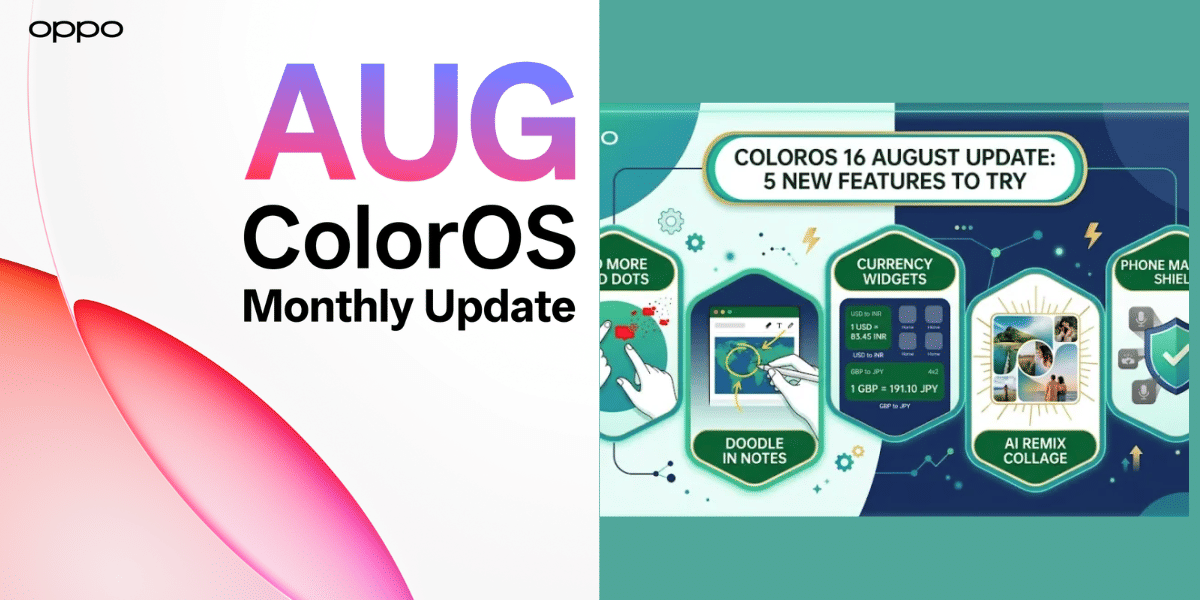
The biggest addition is AI Remix Collage, which lets users create personalised stickers, mood boards and collages from their photos. The update also adds Currency Converter widgets and several improvements to Phone Manager and Notes.
Is Your OPPO Phone Getting the ColorOS 16 August Update?
The August rollout was scheduled from August 1 to August 31. Supported devices include select models from OPPO’s Find and Reno series.
OPPO Find Series
- OPPO Find N6
- OPPO Find N5
- OPPO Find X9 Ultra
- OPPO Find X9 Pro
- OPPO Find X9s
- OPPO Find X9
- OPPO Find X8 Pro
- OPPO Find X8
OPPO Reno Series
The rollout can vary by device and region, so eligible users may receive the update at different times.
Also Read: iPhone 15 Rakhi Deal: Rs 25000 Off On 256GB Model On Zepto
What’s New in ColorOS 16?
AI Remix Collage is the headline feature. Users can cut out subjects from photos, customise outlines and arrange different layers to create new collages.
OPPO has also improved Phone Manager. It can detect suspicious activity such as malicious pop-ups, unusual battery consumption and abnormal attempts to control the device.
The update adds Currency Converter widgets in 2×2 and 4×2 sizes. They show real-time exchange rates directly on the home screen, which can be useful while travelling or shopping internationally.
Other changes include:
- Clear all notification badges with a two-finger gesture
- Draw and highlight images inside Notes
- A cleaner Storage Cleanup page
- Easier access to hidden apps through floating windows
With the rollout entering its final days, OPPO users with a supported phone should check for the update in their device settings. The new AI and everyday-use features make this more than a routine security update.
Are you still browsing through your broken screen? Don’t worry! Book at-home mobile phone screen repair with Cashify—an affordable and one-stop destination for all your mobile phone needs. In case you break your screen within 1 month of repair, we will replace your screen again—for FREE.