Choosing a new MacBook can feel like a daunting task, especially with Apple’s ever-improving chips. The MacBook M5 vs MacBook M4 Pro are both impressive, but they are built for slightly different users. In this blog, let us talk about the MacBook M5 vs MacBook M4 Pro in detail to help you make the right decision.
Also Read: DDR6 RAM Release Date, Price, Speed: Is It Worth Waiting?
What Are the M5 and M4 Pro Chips?
Before deciding which one you should pick between MacBook M5 vs MacBook M4 Pro, you must know what these chips are:
Apple M5
The M5 is one of Apple’s newest generation chips- designed to be fast, efficient, and future‑ready. It improves performance in everyday tasks, creative work, and demanding apps. You’ll find it in newer MacBook Air or MacBook Pro models.
Think of the M5 as Apple’s fresh, refined chip that aims to balance power and battery life.
Apple M4 Pro
The M4 Pro, on the other hand, is part of the previous generation of Apple silicon. “Pro” in the name means it’s designed for professional users- people who edit videos, work with large software, multitask heavily, or need more sustained performance.
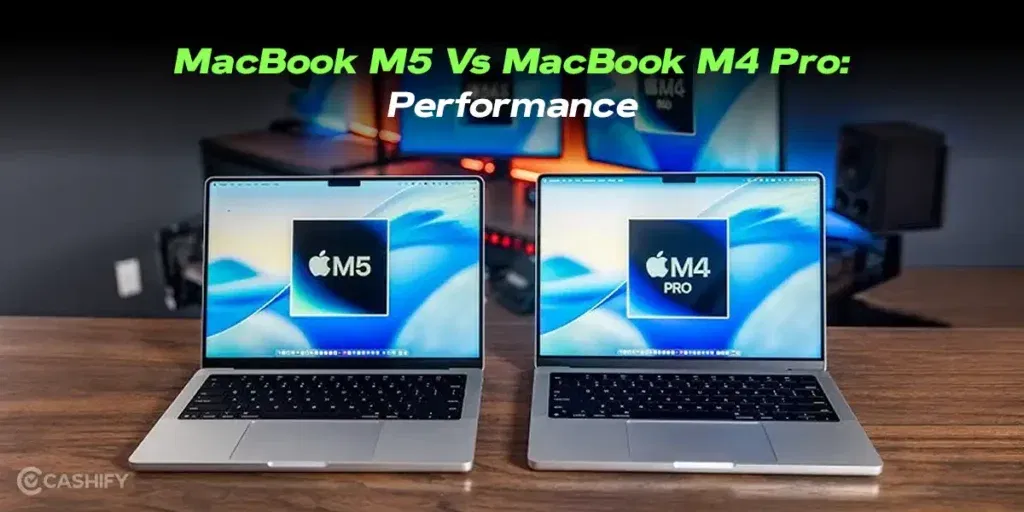
Performance Comparison
Everyday Tasks
If your work mainly includes browsing the web, writing documents, watching videos, or using office apps, both chips feel extremely fast. In both the laptops, apps open quickly, multitasking is smooth, and even dozens of browser tabs won’t slow you down.
- M5: Slightly snappier in casual tasks, more energy-efficient
- M4 Pro: Performs just as well for light use, but its power isn’t fully utilized unless you push it hard
Creative and Professional Work
Here’s where the difference is more noticeable between MacBook M5 vs MacBook M4 Pro:
- M5: Handles light creative work, like editing short videos or photos. Ideal for students or hobbyists.
- M4 Pro: Built for professionals. Editing long 4K videos, running Adobe Suite, or multitasking across heavy apps is smooth and reliable.
Example: If you’re producing a 10-minute 4K video while running Photoshop and music software, the M4 Pro will stay fast without hiccups, while the M5 may slow slightly during longer sessions.
Also Read: OnePlus Nord 6 Release Date, Price, Specs And More
Battery Life
Battery life is another key consideration when choosing between MacBook M5 vs MacBook M4 Pro:
- M5: Optimized for efficiency, giving you longer battery life for light-to-medium tasks. Great for school, work, and travel.
- M4 Pro: Slightly higher power consumption under heavy workloads, but provides consistent performance.
Tip: If you value portability and longer battery life, go with M5. If you’re stationary or mainly use your MacBook plugged in during heavy tasks, M4 Pro is better.
Heat and Comfort
Apple laptops stay cooler than many competitors, but there are slight differences between MacBook M5 vs MacBook M4 Pro:
- M5: Runs cooler during everyday tasks and light creative work. Fan noise is minimal.
- M4 Pro: Can get warmer under sustained heavy workloads but remains manageable thanks to Apple’s thermal design.
If you often use your MacBook on your lap, the M5 might feel more comfortable.
Software and App Compatibility
Both MacBook M5 vs MacBook M4 Pro run macOS efficiently, so you won’t face app compatibility issues.
- Everyday apps (Zoom, Slack, Microsoft Office, Safari) run flawlessly on both.
- Creative apps (Final Cut Pro, Logic Pro, Adobe Photoshop) run on both, but the M4 Pro handles heavy multitasking better.
For casual users, both are excellent. For professionals, M4 Pro gives peace of mind during intensive workloads.
Price and Value
Price is always a deciding factor between MacBook M5 vs MacBook M4 Pro:
- M5 MacBooks: Generally more affordable, offering excellent performance for everyday use and light creative tasks.
- M4 Pro MacBooks: More expensive, but worth it if you need sustained high performance.
Who Should Choose Which?
Here’s a quick take to decide between MacBook M5 vs MacBook M4 Pro:
Choose M5 If You
- Do school work, browsing, emails, and light creative projects
- Want long battery life for portability
- Prefer a cooler and quieter laptop
- Are budget-conscious
Choose M4 Pro If You
- Edit long videos or run heavy creative software
- Multitask across demanding apps
- Need raw performance for professional workflows
- Don’t mind paying extra for sustained power
Pros and Cons at a Glance
Here, have a look at the pros and cons of MacBook M5 vs MacBook M4 Pro at a glance:
| Feature | M5 | M4 Pro |
| Everyday Performance | Excellent | Excellent |
| Heavy Creative Work | Good | Excellent |
| Battery Life | Longer for light use | Shorter under heavy use |
| Heat | Cooler for everyday use | Warms up under intensive tasks |
| Price | Affordable | Premium |
| Ideal Users | Students, casual users, light creators | Professionals, heavy multitaskers, creative power users |
Final Thoughts
Both the MacBook M5 vs MacBook M4 Pro chips are fantastic, and choosing the right one depends largely on how you plan to use your MacBook. The M5 is ideal if you prioritize efficiency, long battery life, and smooth performance for casual to light creative work. It’s a perfect fit for students, travelers, and anyone looking for a high-performing MacBook without spending a fortune.
On the other hand, the M4 Pro is designed for professionals, creatives, and power users who push their laptops to the limit. Its extra power ensures consistent, sustained performance even during demanding tasks like video editing, 3D rendering, or heavy multitasking.
No matter which one you pick, you’ll enjoy Apple’s smooth macOS experience, premium build quality, and reliable performance for years.
Also Read: Samsung Galaxy Z Fold 8 Ultra Release Date, Price, Specs And More
Frequently Asked Questions
1. Which MacBook chip is better for students?
For students, the M5 is ideal. It offers fast performance for everyday tasks, long battery life, and efficient multitasking, making it perfect for studying, online classes, and light creative work without extra cost.
2. Can the M4 Pro handle heavy video editing?
Yes, the M4 Pro is built for professionals. It manages long 4K video edits, multitasking across demanding apps, and creative workflows efficiently, maintaining speed and stability even during extended high-performance sessions.
3. Which MacBook lasts longer on battery?
The M5 offers better battery life for casual to moderate use. Its energy-efficient design allows you to work, study, or stream content longer on a single charge compared to the M4 Pro during heavy tasks.
4. Is the M5 suitable for creative professionals?
The M5 handles light creative work like photo and short video editing smoothly. For professionals working on intensive projects or multitasking with high-end apps, the M4 Pro is a more suitable choice.
5. Are both chips future-proof?
Yes, both chips are highly capable and will support macOS updates for years. The M5, being newer, may receive slightly longer updates, while the M4 Pro offers raw power to handle demanding software for professional users.
If you’ve just bought a new phone and don’t know what to do with your old phone, then here’s your answer. Sell old mobile to Cashify and get the best price for it. If you are planning to buy a new phone, check out Cashify’s refurbished mobile phones. You can get your favourite phone at almost half price with six-month warranty, 15 days refund and free delivery.