Want to know how to access PM-WANI Wi-Fi? Here’s a simple guide to help you connect to government-backed public Wi-Fi hotspots. These hotspots are secure and easy to use on the go.
The GOI (Government Of India) has a large and growing network of PM-WANI hotspots across India. It comes with a significant number of users nationwide. PM-WANI is helping expand internet accessibility. This is especially true for Tier-2 and Tier-3 cities as well as rural areas. PM-WANI can be a practical alternative worth trying out. Let’s get started:
Also Read: How To Download Aadhaar Card On WhatsApp: Simple Steps
PM-WANI In 2026: The Numbers At A Glance
PM-WANI is bigger than most people think. Here is where it stands, going by government data shared in Parliament:
- 4,09,403 public hotspots (PDOs) were live as of 28 February 2026.
- 207 PDO aggregators and 113 app providers are registered.
- 2.44 crore people have used a PM-WANI hotspot.
- About 58.64 petabytes of data has been used so far.
Delhi, Maharashtra, Karnataka and Uttar Pradesh lead in hotspot numbers. One caution: these are registered hotspots
PM WANI: Affordable And Portable Internet
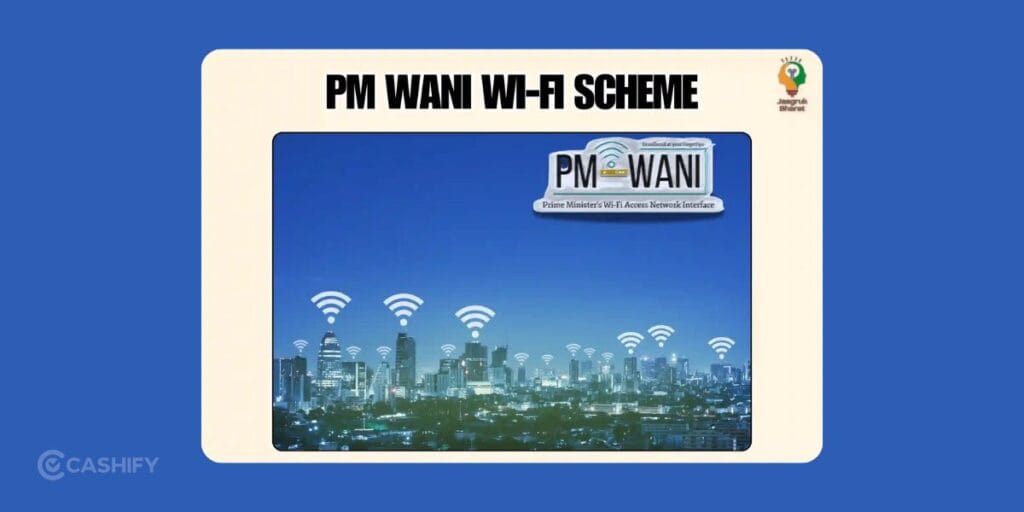
The GOI rolled out PM-WANI to make broadband more widely available through public Wi-Fi hotspots.
Traditional private providers usually come with heavy setup costs and monthly plans. PM-WANI simplifies access. It does that by enabling an open ecosystem. Here, small businesses can set up public Wi-Fi hotspots without needing a telecom license or paying government spectrum fees.
The idea is to make internet access more affordable, flexible, and widely available. Users can connect through dedicated apps. Local business owners (Public Data Offices) handle the last-mile connectivity using their existing broadband connections.
If you compare it to private fibre providers like Jio or Airtel, PM-WANI spreads connectivity through thousands of small hotspots across the country. It’s also supported by policies like the TRAI tariff order. That helps keep prices reasonable for everyday users.
Also Read: Jio AirFiber Plans: All The Offers And Details
How To Get PM Wani Wifi Connection? Easiest Ways
Getting on PM-WANI Wi-Fi is actually pretty quick and easy. Here’s how you can do it:
- Download a PM-WANI compatible app from the Play Store or App Store. Some popular ones include Nanovise PMWANI Lets Connect, UdayaWANI by Inventum, and Data PMWANI. You can also search “PM-WANI” as there are many certified apps available through approved providers.
- Sign up using your mobile number and verify it with an OTP.
- Turn on your location services so the app can find nearby hotspots.
- Open the app and look for available PM-WANI hotspots.
- Pick the closest one and connect.
- Choose a data plan and pay via UPI or vouchers. Some hotspots may also offer limited free or low-cost trial access.
Note that pricing depends on the local provider (PDO/PDOA), so it can vary by location. Typically, small prepaid “sachet” packs are available at low cost. Larger data packs may be priced higher depending on usage and provider. There is no fixed nationwide monthly plan, and pricing remains flexible.
Recent Updates: 3 PM-WANI Upgrades From May 2026
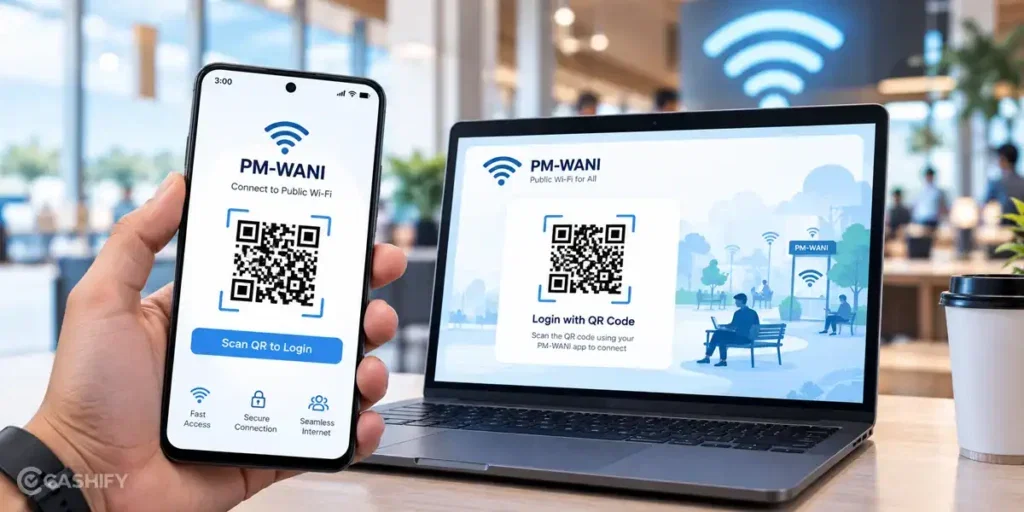
On May 26, 2026, the Department of Telecommunications (DoT) announced three changes to make PM-WANI easier. Hotspot operators had eight weeks to apply them, so they should be live across the network from July 2026.
- QR login for laptops. You can now connect a laptop by scanning a QR code with your phone app. No separate sign-up is needed.
- Short plans. Operators are advised to offer 15, 30 and 60-minute plans. These suit commuters, students and anyone who needs the internet for a short time.
- Standard hotspot names. Hotspot names now carry PMWANI branding. This helps you spot real networks and avoid fake ones.
Minister of State Chandra Sekhar Pemmasani said, “PM-WANI is our platform for universal public Wi-Fi access.”
How To Connect Your Laptop To PM-WANI
- Install a PM-WANI app on your phone and sign in with your mobile number.
- On your laptop, connect to a Wi-Fi network with “PMWANI” in its name.
- Open your browser. The login page should appear.
- Choose a plan and pay through the app.
- Scan the QR code on the login page using your phone app. Your laptop connects.
PM-WANI Plans: What Is The Cost Of Using Wifi?
PM-WANI has a “pay-as-you-need” approach instead of expensive monthly plans. Most users opt for small sachet-style packs, which are generally low-cost and vary by provider and location.
Prices are not fixed nationwide and depend on the local Public Data Office (PDO) or aggregator (PDOA). The goal is to keep internet access affordable and flexible so users only pay for what they use.
There is no fixed national price. Each hotspot owner sets their own. Still, you can expect three kinds of plans. Sachet packs are often quoted at ₹5 to ₹10 for around 1 GB. Always check the price in your app before you pay.
| Plan type | What it offers | Best for |
| Sachet data pack | Small data packs, often ₹5–₹10 per GB | Occasional use |
| Short-time plan | 15, 30 or 60 minutes (price set by the hotspot) | Commuters, quick tasks |
| Monthly pack | Set by the provider | Regular use at one place |
Data usage under PM-WANI has already crossed 58+ petabytes. It shows more and more people are starting to rely on it for everyday internet access.
Also Read: Best Smartphones: Our Top Picks Across All Budgets
PM-WANI Vs Mobile Data: Which Is Better?
PM-WANI is not always cheaper. ThePrint reports that mobile data costs about ₹7.87 per GB as of December 2025. That is close to PM-WANI’s sachet prices.
PM-WANI works well when:
- Your mobile signal is weak.
- You want to save your phone’s data.
- You need to connect a laptop.
Mobile data works better when:
- You want instant access with no sign-in.
- You are travelling and hotspots are scarce.
- You don’t want to buy a separate pack.
Mobile operators say much the same. Their industry body, COAI, argues that public Wi-Fi has lost much of its relevance now that mobile data is cheap.
Get PM Wani Wifi Connection Installed At Your Place? The PDO Scheme
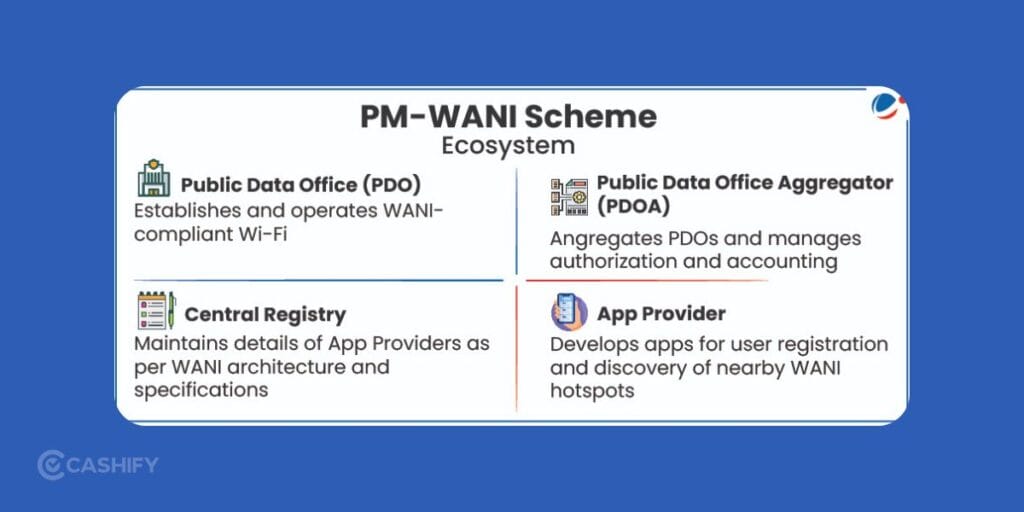
If you’re thinking of setting up a PM-WANI hotspot at your home, café, shop, or office, you’ll need to become a Public Data Office (PDO). The government doesn’t install Wi-Fi at your place for you. You use your own broadband connection and share it publicly through the PM-WANI system.
How To Become A PDO? Quick Steps
Get a solid broadband connection
A reliable fiber (FTTH) connection is recommended. Options include Jio, Airtel, BSNL, or local ISPs.
Register on the official portal
Go to the PM-WANI Central Registry and complete the PDO registration process by submitting basic details such as name, mobile number, and location.
Partner with a PDO Aggregator (PDOA)
PDOAs handle backend functions like authentication, app integration, billing, and compliance. You can choose from multiple registered PDOAs listed on the official registry.
Set up a compatible Wi-Fi access point
You’ll need a PM-WANI compliant router. Usually, your PDOA will guide you or provide one.
Complete KYC (if required)
This may include Aadhaar, PAN, address proof, and bank details.
Once everything is approved and synced with the central registry, your hotspot becomes visible across all PM-WANI apps. After this, users nearby can start connecting.
There’s no license fee or government charge to become a PDO. Many small business owners are already using PM-WANI to bring in more customers and earn extra income.
Also Read: Arattai vs WhatsApp Features Compared: Which App Should You Use?
Best Apps To Get PM Wani Wifi
Here are the best portals to get PM Wani Wifi connection.
- PMWANI Lets Connect by Nanovise.
- Data PM-Wani by WaniWifi.
- Xceednet PM-WANI App.
- UdayaWANI by Inventum.
- Linescan Service PDOA PMWANI.
Can’t Find Or Connect To A Hotspot? Try This
Hotspots on the app map are not always working. ThePrint’s reporter found many hotspots listed in Delhi’s Lajpat Nagar market, yet shopkeepers knew little about them and working ones were hard to find. If you face this:
- Check that the network name has “PMWANI” in it.
- Move closer to the shop or office running it.
- Try another nearby hotspot.
- Make sure your plan shows as active in the app.
- Ask the shop owner or contact the app’s support.
Travellers without an Indian SIM may struggle, because sign-up needs a mobile number and OTP.
How to Stay Safe On Public Wi-Fi
No public Wi-Fi is risk-free. A few habits help:
- Download apps only from the Play Store or App Store.
- Never share your OTP with anyone.
- Avoid banking and other sensitive logins on any public network.
- Use a VPN if you must handle private data.
- Log out and forget the network when you are done.
What’s Next: TRAI Reviews The Model
PM-WANI was approved in December 2020 with a target of one crore hotspots. Today, there are about 4.1 lakh, which is less than 5% of that target. In April 2026, TRAI released a consultation paper asking whether the model needs a reset. It is also looking at tools like Passpoint and OpenRoaming. These would let your phone connect to hotspots automatically, without repeated logins.
Mobile operators such as Jio and Airtel say public Wi-Fi matters less now. Digital policy expert Prasanto K Roy argues the original economics were “fundamentally broken.” TRAI is studying the feedback and will send its recommendations to the government. For readers, this means the rules and features may change again soon.
FAQs
How do I connect to PM-WANI Wi-Fi?
Download a PM-WANI app, then sign up using your mobile number and verify OTP. Turn on location, open the app, pick a nearby hotspot, choose a data plan, then complete payment using UPI or a voucher.
Which apps work for PM-WANI Wi-Fi access?
Some common apps include Nanovise PMWANI Lets Connect, UdayaWANI by Inventum, Data PM-Wani, Xceednet PM-WANI App, and Linescan Service PDOA PMWANI. You can also find more certified apps on app stores.
What is the cost of PM-WANI internet?
Pricing is low and depends on the local provider and area. People usually pick small pay-per-use plans. There is no fixed monthly charge across India.
Can I set up PM-WANI Wi-Fi at my shop or home?
Yes, you need to become a Public Data Office. Use a broadband connection, register on the PM-WANI Central Registry, connect through a PDOA partner, and install a compatible router. KYC may be needed during setup.
Is PM-WANI Wi-Fi safe and useful?
PM-WANI hotspots use app-based access and OTP verification for users. It helps people get internet access in areas where regular broadband is limited.
Do I need a SIM to use PM-WANI?
You need a mobile number to sign up and verify with an OTP. Travellers without an Indian SIM may find this hard.
Can I connect my laptop to PM-WANI?
Yes, since the 2026 upgrade, you can scan a QR code with your phone app to log in to your laptop.
How do I know a hotspot is real?
Look for “PMWANI” in the network name. Use only apps from official stores.
Is PM-WANI cheaper than mobile data?
Not always. Sachet prices are close to mobile data rates. It helps most when your signal is weak or when you need to connect a laptop.
End Note
That’s pretty much everything you need to know about accessing or setting up a PM-WANI Wi-Fi connection in 2026. It is growing fast, with new hotspots popping up regularly and policies. This makes it easier for both users and small providers to get involved.
Just know that the plans, availability, and features can vary depending on your location and the PDO you’re connecting through. For the most accurate and up-to-date info, it’s always best to check the official PM-WANI Central Registry or the app you’re using.
Also Read: Cashify Data Wipe Process: What You Must Do & What We Do Internally
If you’ve just bought a new phone and don’t know what to do with your old phone, then here’s your answer. Sell old mobile to Cashify and get the best price for it. If you are planning to buy a new phone, check out Cashify’s refurbished mobile phones. You can get your favourite phone at almost half price with six-month warranty, 15 days refund and free delivery.