In the world of AI image generation, Krea AI has built a dedicated fan base among users thanks to its exceptional features. This model was launched in December 20, 2023. But it is particularly noted for its speed and ability to let users visualise prompt changes instantly. Moreover, its real-time image generation with maximum accuracy sets it apart from other image generation models. Let’s know everything about Krea AI and how to generate images with this model.
Also Read: 12 Best Google Gemini AI Photo Editing Prompts
How To Generate Real-Time Image Generation With Krea AI
To create real-time images using Krea AI, you just have to log in to the app or the web. Currently, I’m using the web to generate the images. For your information, this AI is not completely free; it just offers a few built-in credits and different models, but you have to buy credits to use Krea AI widely.
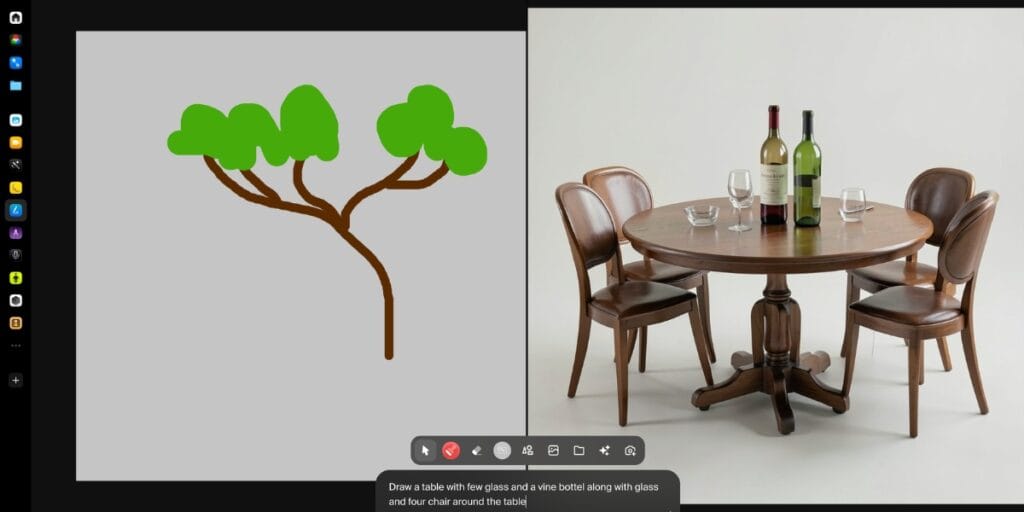
So, at the top of the page, you can see the real-time image section. Then click on it and give a prompt; it will generate real-time images based on your prompt. You can see my images where I created a table with glassware and a vine with just one line prompt.
Image Generation (Text-to-Image)
Like ChatGPT and Gemini, you can also create any images in Krea AI. You just have to describe everything in detail to get better results. Other models offer a single image at a time, but in this model, you will get four images at the same time. Now you can look out photo which genrated with this prompt:
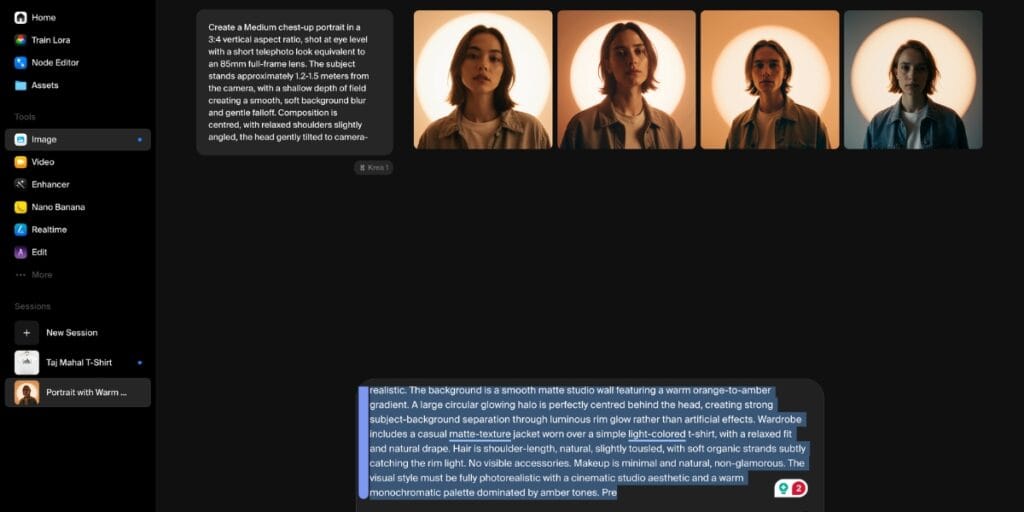
“Create a Medium chest-up portrait in a 3:4 vertical aspect ratio, shot at eye level with a short telephoto look equivalent to an 85mm full-frame lens. The subject stands approximately 1.2-1.5 meters from the camera, with a shallow depth of field creating a smooth, soft background blur and gentle falloff. Composition is centred, with relaxed shoulders slightly angled, the head gently tilted to camera-left (subject’s right), chin slightly lowered, and direct eye contact into the lens. Lighting consists of a single dominant warm backlight combined with soft frontal fill.
A diffused frontal key light is positioned slightly above eye Level, low contrast, warm colour temperature around 3800-4200K. Directly behind the subject, a large circular backlight forms a soft-edged glowing halo centred behind the head, with a smooth gradient falloff. The backlight is strong enough to create clear separation and a warm glow around the hair and shoulders. Shadows are soft and minimal, naturally forming under the chin and along the jawline.
Overall contrast is moderate-cinematic but realistic. The background is a smooth matte studio wall featuring a warm orange-to-amber gradient. A large circular glowing halo is perfectly centred behind the head, creating strong subject-background separation through luminous rim glow rather than artificial effects. Wardrobe includes a casual matte-texture jacket worn over a simple light-colored t-shirt, with a relaxed fit and natural drape.
Hair is shoulder-length, natural, slightly tousled, with soft organic strands subtly catching the rim light. No visible accessories. Makeup is minimal and natural, non-glamorous. The visual style must be fully photorealistic with a cinematic studio aesthetic and a warm monochromatic palette dominated by amber tones.”
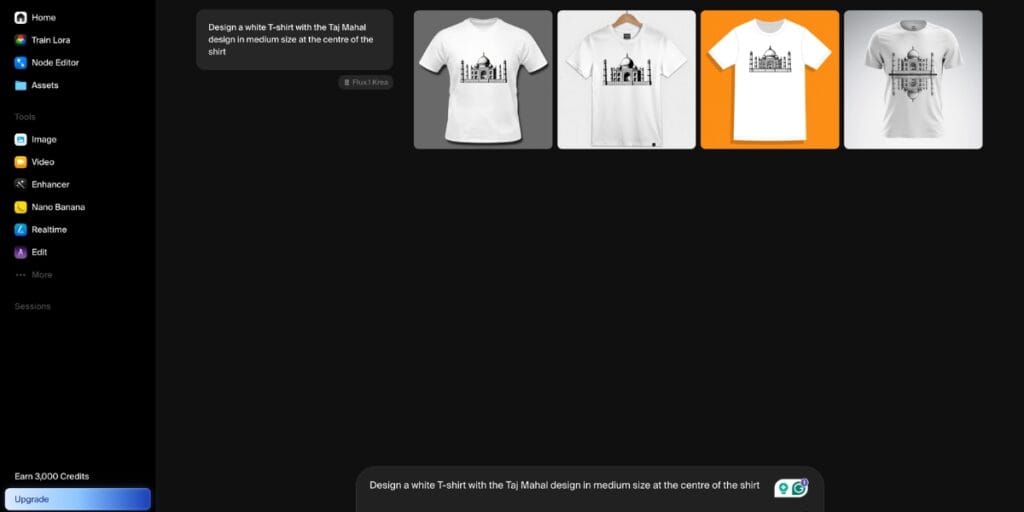
I also created merchandise with a simple prompt. Here it is:
Also Read: How To Use Remaker AI Face Swap: Step-By-Step Guide For Beginners
A Few Highlighted Features Of Krea AI
Real-time Image Generation (Canvas)
Krea’s standout feature lets you generate images as you type or draw. The output updates instantly on the canvas, allowing rapid experimentation and creative iteration without waiting for final renders.
Multi-Model Access (All-in-One AI Suite)
Krea integrates top AI models such as Flux, Runway, and others into a single platform. This means you don’t need multiple subscriptions; everything is accessible from a single interface.
AI Video Generation (Text-to-Video)
You also convert text prompts into realistic videos within seconds using Krea AI. It also supports cinematic outputs with motion, style, and scene control for storytelling or marketing.
Image-to-Video Conversion
You can animate static images into dynamic videos. This feature helps maintain subject consistency while adding motion, making it ideal for reels, ads, or creative storytelling.
Image Upscaling (Enhancer Tool)
Krea can upscale images up to ultra-high resolutions (even 22K). It improves sharpness, clarity, and details, turning low-quality visuals into professional-grade assets.
AI Image Editing (Inpainting & Outpainting)
You can edit generated or uploaded images directly, like removing objects, extending backgrounds, or refining details. So, everything is integrated into a smooth workflow.
Real-time Rendering Engine
Unlike traditional tools, Krea provides instant feedback while designing. This speeds up the creative process and helps refine ideas quickly without multiple re-generations.
3D Generation & Rendering
Krea also supports the generation and enhancement of 3D objects. You can convert visuals into 3D-style outputs or use them for design, gaming, or product mockups.
LoRA Training (Custom AI Models)
You can also train AI models using your own images to create custom styles, characters, or branding assets. This is useful for creators and businesses needing consistency.
Style Library (1000+ Styles)
Krea offers a huge library of styles from realistic photography to abstract art. You can instantly apply different looks to your visuals without manual editing.
AI Prompt Assistance
This Built-in AI helps you write better prompts, refine ideas, and generate captions. So, it reduces the learning curve for beginners.
Real-time Canvas Drawing Input
You can sketch rough shapes or compositions, and Krea instantly converts them into detailed AI-generated visuals. This blends manual creativity with AI power.
Parallel Generation (Faster Workflow)
Krea allows multiple generations at once (images/videos). This helps creators test different ideas quickly and choose the best result.
Video Editing (Extend & Merge Clips)
You can extend video scenes or merge clips using AI. It can continue scenes automatically or create smooth transitions between shots.
Also Read: Best Gaming Phones Under 20000 In India
AI Audio Generation for Videos
Krea can generate synchronised sound effects, ambient audio, and even dialogue for videos to make content more immersive.
Asset Manager (Creative Workflow Hub)
It includes a built-in system to manage your generated assets (images, videos, projects), helping you stay organised during large creative workflows.
Mini Apps (Specialised Tools)
Krea provides mini tools for specific tasks like logo creation, patterns, and design experiments, ideal for quick creative outputs.
Studio Canvas (Advanced Editing Workspace)
A more advanced interface where professionals can combine manual design with AI tools for detailed creative control.
Commercial Use Licensing
Paid plans allow you to use generated content for business purposes like marketing, branding, or client work.
Also Read: Best Mobile Phones Under 30000- Latest & Reliable Picks In 2026
Krea AI Pricing (2026)
Free Plan $0/month
Best for: Beginners & testing
- 100 compute units per day (refresh daily)
- Access to real-time image generation
- Limited access to image, video, 3D, and LoRA tools
- Limited upscaling and editing features
- No commercial license
- Good for trying the platform, but quite restricted.
Basic Plan: $9/month
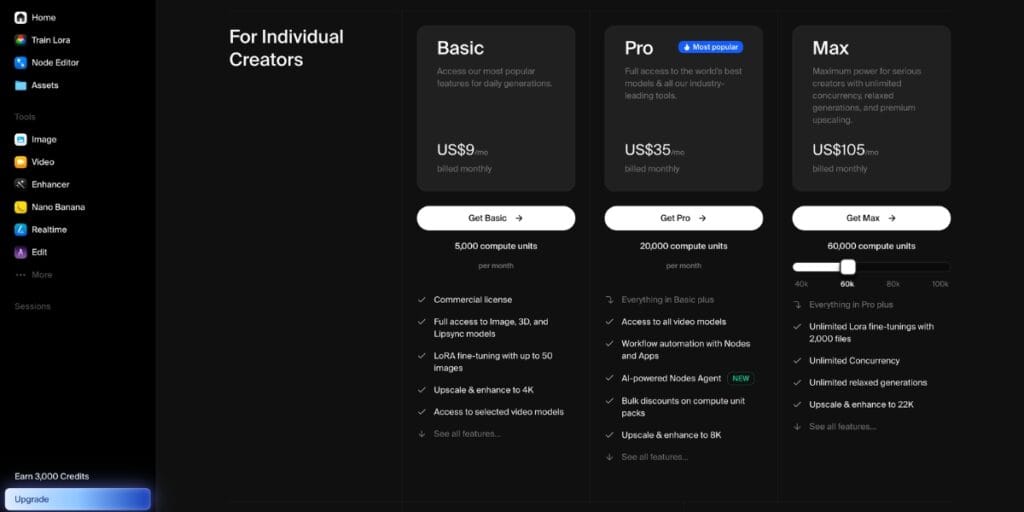
- Best for: Casual creators
- 5,000 compute units per month
- Full access to image, 3D, and lip-sync models
- Limited access to video models
- Upscaling up to 4K
- LoRA training (up to 50 images)
- Commercial usage allowed
- Entry-level paid plan with core features unlocked.
Pro Plan: $35/month
- Best for: Regular creators & content teams
- 20,000 compute units per month
- Access to all video models
- Workflow automation (nodes & apps)
- Bulk discounts on compute packs
- Upscaling up to 8K
- All Basic features included
- Most popular plan with a strong balance of power + price.
Max Plan: $105/month
- Best for: Power users & professionals
- 60,000 compute units per month
- Unlimited LoRA training (up to 2,000 files)
- Unlimited concurrency (faster parallel generation)
- Unlimited relaxed generations
- Upscaling up to 22K resolution
- All Pro features included
- Designed for heavy production workflows.
Business $200/ Enterprise Custom Pricing
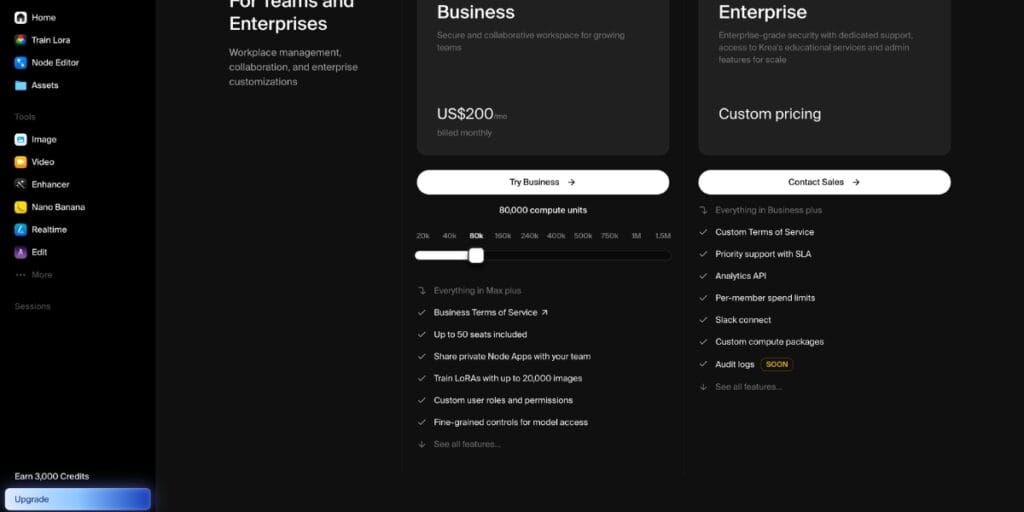
- Best for: Teams & companies
- 80,000+ compute units/month (scalable)
- Up to 50 team seats
- Collaboration tools & centralised billing
- Legal/data protection terms
- Priority processing & enterprise support
- Pricing depends on usage, team size, and customisation.
Also Read: Best Mobile Phones Under 25000 In India
Conclusion
Krea AI stands out as a fast, intuitive, and powerful creative platform that simplifies image and video generation. Its real-time canvas, multi-model access, and advanced editing tools make it ideal for both beginners and professionals. While the free plan is limited, the paid tiers unlock its true potential, making Krea AI a strong choice for modern content creators.
Are you still browsing through your broken screen? Don’t worry! Book an at-home mobile phone screen repair with Cashify—an affordable and one-stop destination for all your mobile phone needs. In case you break your screen within 1 month of repair, we will replace your screen again—for FREE.