Looking for the latest GB WhatsApp update? GB WhatsApp is a modified version of WhatsApp that offers additional customisation, privacy controls, and file-sharing features not available in the official app. However, since it is an unofficial application, it also comes with security and privacy risks. In this guide, we explain how to update GB WhatsApp, its latest features, safety concerns, and alternatives you can consider in 2026.
Important Disclaimer
GB WhatsApp is an unofficial modified version of WhatsApp. We do not recommend downloading APK files from unverified sources. Users should carefully review security and privacy implications before installing any third-party messaging application.
Also Read: Read This Before You Download Yo WhatsApp- Do’s And Don’ts
What Is GB WhatsApp?
GB WhatsApp is an unofficial, modified version of WhatsApp developed by third parties. It is not an official app from WhatsApp or Meta, and it is not the same as WhatsApp Business or an official WhatsApp beta.
The modified app is known for extra customisation options and messaging controls. Depending on the version, it may advertise features such as custom themes, hiding online status, freezing last seen, viewing deleted messages and downloading Status updates.
However, these features are not guaranteed across all versions. Different websites may distribute different builds, and there is no verified official GB WhatsApp release channel.
WhatsApp does not support GB WhatsApp because it cannot validate its security and privacy practices. Using it also violates WhatsApp’s Terms of Service and may lead to account restrictions or a temporary or permanent ban.
If you want additional messaging features, check the options available in the official WhatsApp app before trying a modified version.
Also Read: WhatsApp Emoji Meaning: Types Of Emojis & What Do They Mean
How to Get the GB WhatsApp App?
GB WhatsApp is an unofficial modified application and is not an authorised WhatsApp download. You may find APK files advertised on third-party websites. However, their authenticity, security and update history cannot be reliably verified.
Downloading an APK from a website does not automatically mean it contains malware. Still, installing an unverified messaging app can expose your device and personal information to security risks.
WhatsApp warns that unofficial apps may carry malware, compromise personal data and affect account access. Avoid downloading or installing GB WhatsApp APK files, even if a website claims that the app is safe, official or anti-ban.
For safer messaging, download WhatsApp or WhatsApp Business through an official distribution channel.
How To Update GB WhatsApp?
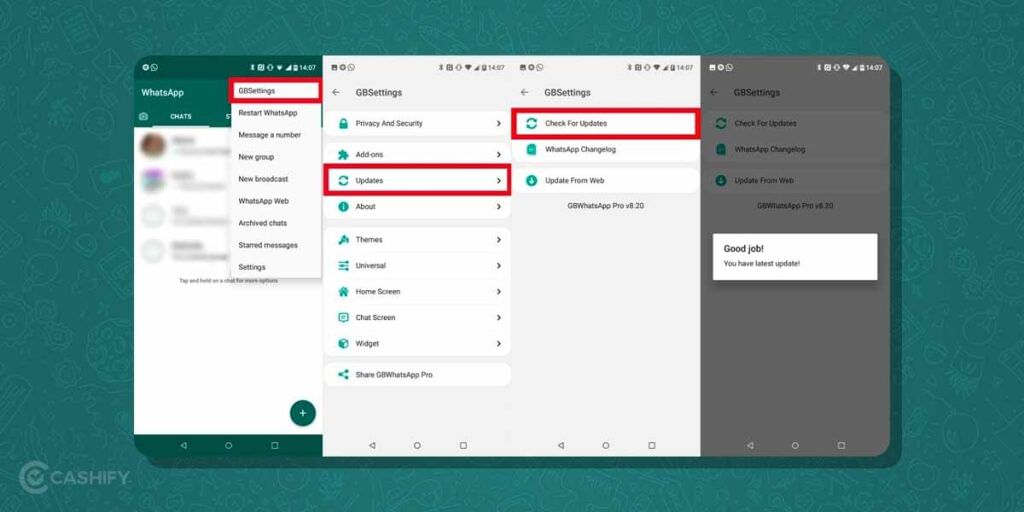
If you are using GB WhatsApp, you must know that just like the original WhatsApp, you can update GB WhatsApp too. The app keeps on adding new features which can be availed once it is fully updated. Here’s how to do so:
- Open GB WhatsApp on your smartphone.
- Click on the three dots present at the top right corner of the screen.
- Click on Fouad Mods.
- Then, click on Updates.
- Now, tap on Check for Updates option.
- If there is a GB WhatsApp update available, you can tap on it and it will take you to the browser from where you can download the update.
- Wait for a few minutes till the latest version of GB WhatsApp is being downloaded.
- Once done, click on it.
- Now, allow Install from an unknown source.
- Click on Install to update GB WhatsApp on your phone.
- Wait for a few seconds till the process is completed.
Once the update is done, you can go back to using your GB WhatsApp. Don’t worry, your current chats won’t get deleted.
Also Read:WhatsApp Group Features – Here’s All That You Need To Know
Key Features Of GB WhatsApp
GB WhatsApp is a modified version of WhatsApp that adds several features you won’t normally find on the official app. For Indian users who like more control over privacy, chats and personalisation, it can look like an interesting alternative.
GB WhatsApp comes with several cool features that make the app more enjoyable to use. One of the main benefits is that you can customise how the app looks. You can choose different themes, fonts, and colours to make the app feel more personal and suited to your style. You can change the app’s appearance, customise chats and get additional controls over how your online activity appears to others.
The biggest difference is the extra flexibility. While regular WhatsApp keeps things fairly simple, GB WhatsApp gives users more options for managing messages, media and status updates. However, it is important to remember that GB WhatsApp is unofficial and third-party, so there can be privacy, security and account-ban risks.
Here are al the key features of GB WhatsApp:
- More customisation: You can change themes, fonts, colours and chat styles inside GB WhatsApp and all for free.
- Extra privacy: GB WhatsApp helps you hide online status, typing indicators and read receipts.
- Better messaging controls: Auto-reply and additional broadcast options.
- Larger media sharing: Send bigger files and more images at once.
- More status options: Additional controls for saving and managing statuses.
- Chat protection: Added passcode and privacy options for individual chats.
Also Read: How To Use Two WhatsApp Accounts In iPhone: Simple Steps!
Who Should Use The GB WhatsApp
Best For:
- Users who want extensive customization
- People who value advanced privacy controls
- Those who need to share large files frequently
- Business users needing auto-reply features
- Users who want more control over their messaging
Not Recommended For:
- Users concerned about account security
- Those who share sensitive information
- People who want official support
- Users who prefer official apps only
Differences Between GB WhatsApp and Official WhatsApp
GB WhatsApp has some attractive features, but it’s important to understand that it’s not an official version and can have security risks.
The main difference is that GB WhatsApp is created by a third party and is not approved or supported by WhatsApp Inc. This means it’s not connected to the official WhatsApp company.
The official WhatsApp is regularly updated with new features and security fixes to keep your messaging safe and reliable. In contrast, GB WhatsApp gets its updates from unofficial sources, which might not be as secure or trustworthy. This could put your personal information at risk, or even expose your device to malware.
Also, using GB WhatsApp goes against WhatsApp’s terms of service. If WhatsApp detects that you’re using it, your account could be temporarily or permanently banned. WhatsApp keeps an eye on users who break their rules, and using apps like GB WhatsApp is considered a violation.
Here’s a quick glance!
| Feature | GB WhatsApp | Official WhatsApp |
|---|---|---|
| Developer | Third-party developers | |
| App status | Unofficial modified app | Official messaging app |
| Customisation | Additional options may be advertised; features vary by build | Supported chat themes, wallpapers and other customisation options |
| Privacy controls | Extra controls may be available, but their security cannot be verified | Officially supported privacy settings |
| Account security | Unverified security practices | Supported account security features |
| Updates | No verified official release channel | Official update channels |
| Chat backups | Backup compatibility and security are uncertain | Supported backup options |
| Chat transfer | No guaranteed migration to official WhatsApp | Officially supported transfer options |
| Account restrictions | Use violates WhatsApp’s Terms of Service | Subject to WhatsApp’s Terms of Service |
| Official support | Not supported by WhatsApp | Supported through official channels |
Verdict: GB WhatsApp may advertise additional features, but that does not make it a better messaging app. Official WhatsApp is the recommended choice for security, account reliability and supported updates.
Using GB WhatsApp Safely
GB WhatsApp cannot be considered a safe alternative to official WhatsApp because its security and privacy practices are not verified by WhatsApp.
WhatsApp warns that unofficial apps may contain malware, compromise personal information and put user accounts at risk. There is no reliable guarantee that messages, shared files or location information handled through an unofficial client will remain private and secure.
Official WhatsApp uses end-to-end encryption for personal messages and calls by default. With GB WhatsApp, users cannot rely on the same level of verified security assurances simply because the app looks or works like WhatsApp.
Using GB WhatsApp also violates WhatsApp’s Terms of Service. Your account may face temporary or permanent bans or other restrictions.
For these reasons, we recommend using the official WhatsApp app instead.
If you decide to use GB WhatsApp, here are some tips to stay safe:
- Download from Trusted Sources: Only download GB WhatsApp from reputable websites to avoid malware.
- Keep Your App Updated: Check for updates regularly to ensure you have the latest version with security fixes.
- Avoid Sharing Sensitive Information: Since GB WhatsApp isn’t as secure as the official app, avoid sharing sensitive information like bank details or passwords.
- Use a Secondary Number: If you’re worried about getting banned, consider using a secondary phone number for GB WhatsApp.
What Are the Alternatives to GB WhatsApp?
If you’re not comfortable using GB WhatsApp but still want extra features, there are some alternatives:
- WhatsApp Business: This is an official app from WhatsApp designed for small businesses. It has features like auto-reply and labels for organising chats.
- Telegram: Telegram is a messaging app with many of the same features as GB WhatsApp, including custom themes and large file sharing. It’s also more secure.
- Official WhatsApp Features: WhatsApp is constantly adding new features, like disappearing messages and custom wallpapers. Make sure you’re using the latest version of the app to enjoy these updates.
Pros of GB WhatsApp
GB WhatsApp may advertise the following features, depending on the version:
- Additional themes and interface customisation
- Extra messaging and visibility controls
- Options to download Status updates
- Additional media-sharing controls
- Auto-reply and other automation features in some builds
These are advertised features, not independently verified guarantees across all versions.
Cons of GB WhatsApp
- Violates WhatsApp’s Terms of Service
- Risk of temporary or permanent account bans
- Unverified privacy and security practices
- Potential exposure to malware through modified APKs
- No verified official update channel
- No official WhatsApp support
- Chat backup and transfer issues
- Uncertainty around feature availability and reliability
Frequently Asked Questions
Is GB WhatsApp available for iPhone?
No, GB WhatsApp is mainly designed for Android devices.
Will I get banned for using GB WhatsApp?
Yes, using GB WhatsApp violates WhatsApp’s terms of service, and if detected, your account could be temporarily or permanently banned.
Can I move my chats from GB WhatsApp to the official WhatsApp?
No, there is no official way to transfer chats from GB WhatsApp to the official WhatsApp.
What is GB WhatsApp?
GB WhatsApp is a modified version of the official WhatsApp app that offers extra features not available in the original app. It lets you customise themes, hide your online status, view deleted messages, and send larger files. The app is created by third-party developers, not by WhatsApp’s official team. While it looks similar to regular WhatsApp, it provides more control over privacy settings and appearance customisation.
How do I update GB WhatsApp?
Open GB WhatsApp, tap the three dots at the top right, select Fouad Mods, then Updates, and click Check for Updates. If an update is available, it will redirect you to a browser where you can download the latest version. After downloading, install the update by allowing installation from unknown sources. Your existing chats won’t be deleted during the update process.
Can I use GB WhatsApp on an iPhone?
No, GB WhatsApp is primarily designed for Android devices only. iPhone users cannot install GB WhatsApp because Apple’s iOS system doesn’t support third-party modified apps like this. If you’re an iPhone user looking for extra features, you might want to explore the official WhatsApp Business app or consider other alternatives like Telegram that work on iOS.
What are the main differences between GB WhatsApp and official WhatsApp?
GB WhatsApp is created by third parties and is not approved by WhatsApp Inc., while official WhatsApp receives regular security updates. The modified version offers customization options and advanced privacy features that the official app doesn’t have. However, using GB WhatsApp violates WhatsApp’s terms of service and could result in your account being temporarily or permanently banned.
What features make GB WhatsApp popular among users?
GB WhatsApp offers theme customisation, privacy controls like hiding online status and read receipts, and the ability to send larger files without size restrictions. You can also freeze your last seen status, view deleted messages and stories, and set custom backgrounds for individual chats. These enhanced features give users more control over their messaging experience compared to the standard WhatsApp application.
Is GB WhatsApp legal?
GB WhatsApp is not illegal in most regions, but it violates WhatsApp’s terms of service and may result in account restrictions.
What is the latest GB WhatsApp version?
The latest version changes frequently. Users should check the source from which they downloaded the APK.
Conclusion: Is GB WhatsApp Worth It?
GB WhatsApp continues to attract users with advanced customisation and privacy features that go beyond the official WhatsApp experience. However, these benefits come with significant security, privacy, and account-ban risks.
If protecting your data is a priority, the official WhatsApp app remains the safer choice. Before installing any GB WhatsApp update, carefully consider whether the extra features are worth the potential risks.
Also Read: 30+ Best WhatsApp Group Names For Girls
You can now Sell phone online or Recycle old phone with Cashify. Visit our website to know more.