Videos have become a major part of your daily life. Whether you’re watching tutorials, saving travel clips, collecting educational content, or keeping entertaining videos for offline viewing, there are times when you want access to videos even without an internet connection. That’s why video downloader apps for iOS have become increasingly popular, helping you save and organize videos directly on your iPhone or iPad for convenient offline access.
However, downloading videos on an iPhone isn’t always as straightforward as it is on other devices. Apple’s ecosystem prioritizes privacy and security, which means you’ll often need dedicated apps to save and manage videos effectively.
The good news is that several reliable apps can make the process simple. With the right app, you can save videos for offline viewing, organize your media library, and access your favorite content anytime.
Also Read: Apple iPhone 15 Long-Term Review: Still Worth Every Rupee
Video Mate: Video Saver
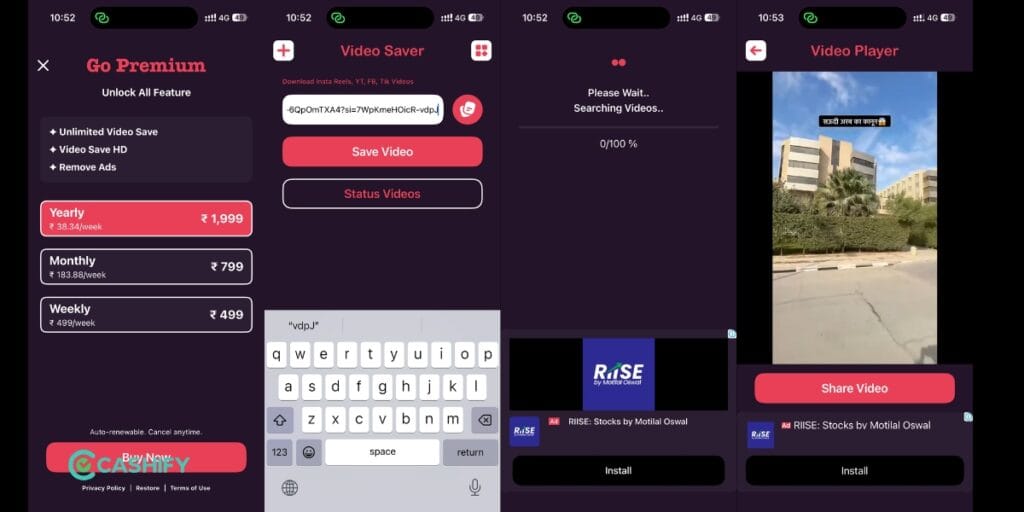
VideoMate has repositioned itself as much an editing suite as a downloader. Alongside saving videos for offline access, it now bundles a Reels & Story maker with templates, text overlays, stickers, and audio tracks, clearly aimed at people who want to both grab content and repackage it for their own posts.
The free tier gets you basic saving and organizing. Editing tools, templates, and high-resolution export sit behind a subscription: $3.99/week, $8.99/month, or $17.99/year. That’s a meaningfully steeper price ladder than most apps in this category, so it’s only worth it if you actually want the editing features, not just downloads.
Good for: people who want to save a clip and immediately repurpose it into a story or reel. Skip if: you just want a plain downloader, you’ll be paying for editing tools you won’t touch.
Key Features
- Easy copy-paste video downloading
- Direct save option to Photo Album
- Supports downloads from multiple social media platforms
- Simple user interface for beginners
- Free version supports standard-quality downloads
- Premium subscription unlocks higher video quality
Also Read: Best Mobile Phones Under 30000- Latest & Reliable Picks In 2026
Video Downloader
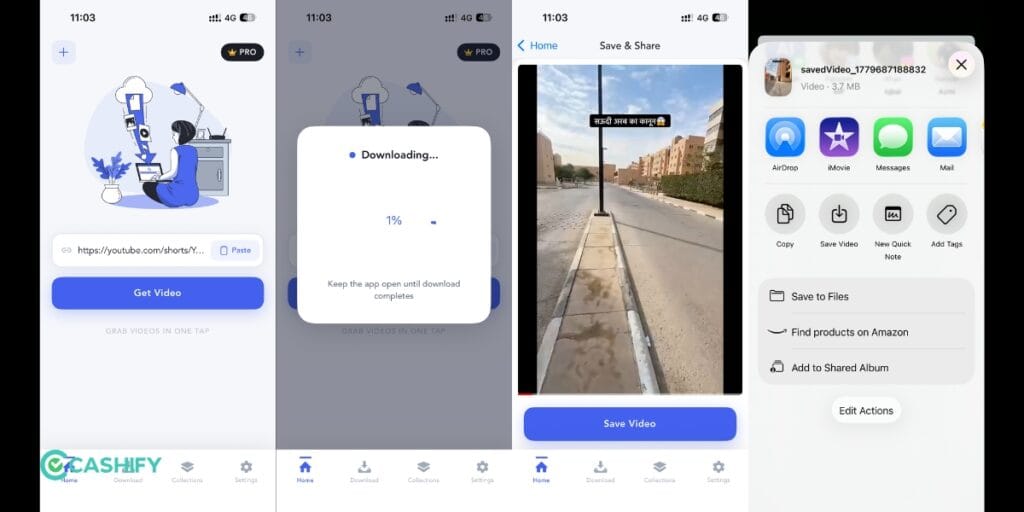
This is the closest thing to a true general-purpose downloader on this list. It auto-detects video and photo links, saves with a long-press, and supports a genuinely wide format list, MP4, MP3, M4A, MOV, AVI, WMV, plus documents like PDF and DOC. It also runs a full download manager: pause, resume, background downloads, multiple simultaneous downloads.
Real user reviews are mixed in useful ways. One reviewer reported the app storage ballooning to 29GB over time, forcing a delete-and-reinstall to fix it. Another noted the free version caps offline playback at five videos before you have to reopen the app to unlock more, a soft paywall rather than a hard one. On the positive side, several reviews specifically confirm it works reliably for YouTube saves when other apps failed for them.
Good for: the widest format support and the most “just works” experience of the group. Watch for: the storage bloat issue if you’re saving a lot of video, keep an eye on your Settings and then iPhone Storage regularly.
Key Features
- Quick video link detection and downloading
- Supports YouTube, Instagram, and Facebook links
- Direct video saving to device storage
- Lightweight and easy-to-use interface
- Fast processing for short videos
- Built-in download manager
All Video Saver
Search “video downloader” on the App Store today and you’ll find dozens of near-identical apps, similar names, similar icons, similar ad-heavy free tiers, from different individual developers. Several rotate in and out of the Store within months. One representative example currently listed racked up a review describing the download bar sitting stuck at 0% for a full fifteen minutes, with the app demanding to stay open and in the foreground the entire time, a common complaint across this whole category, not a one-off.
For example, after pasting a video link, the app offers multiple download formats and resolutions, ranging from 4K to 144p. However, free users can only download up to 720p quality. Higher resolutions require a subscription.
Moreover, the app also gives options to download videos without audio, audio-only files, MP3 versions, GIFs, SRT subtitles, JPG thumbnails, MP4A files, and more. This makes it a more feature-rich option compared to many other apps available on iOS.
Key Features
- Multiple download resolutions from 144p to 4K
- Download videos without audio
- Convert videos into MP3 audio files
- GIF download support
- Subtitle (SRT) download option
- Thumbnail download support
- Multiple file format support, including MP4A
- Better customisation compared to most iOS downloader apps
Also Read: Best Mobile Phones Under 25000 In India
Why Use Video Downloader Apps For iOS?
There are many situations where downloading videos can be useful.
You may be traveling and want to watch videos without using mobile data. You might need to save educational content for later reference or keep work-related videos accessible when you’re offline.
Using video downloader apps for iOS can help you:
- Watch videos without an internet connection
- Reduce mobile data consumption
- Save content for travel
- Organize your favorite videos
- Access tutorials and learning materials anytime
- Manage media files more efficiently
Instead of streaming the same video repeatedly, you can save it once and watch it whenever needed.
Conclusion
Finding reliable video downloader apps for iOS is not as easy as Android due to Apple’s strict App Store policies. However, apps like Video Mate: Video Saver, Video Downloader, and All Video Saver still provide useful options for downloading videos from different platforms. While some apps come with ads or quality restrictions, they can still help users save videos quickly and manage downloads more conveniently on iPhones.
FAQs
Which is the best video downloader app for iOS?
Black Hole Spliter is one of the easiest video downloader apps for iOS because it offers one-tap downloads and directly saves videos to the Photo Album.
Can iPhone users download videos from YouTube and Instagram?
Yes, several video downloader apps for iOS allow users to download videos from YouTube, Instagram, Facebook, and other platforms using copied links.
Are video downloader apps for iOS free?
Most video downloader apps for iOS offer free downloading features, but many include ads and restrict higher-quality downloads behind subscriptions.
Does Apple allow video downloader apps on the App Store?
Apple allows limited video downloader apps on the App Store, but they must follow strict App Store policies and often come with certain restrictions.
Which iOS video downloader app supports MP3 and GIF downloads?
All Video Saver supports additional download options such as MP3 audio files, GIFs, subtitles, thumbnails, and multiple video formats.
Do video downloader apps for iOS support 4K downloads?
Some apps like All Video Saver support 4K downloads, but higher resolutions are usually locked behind premium subscriptions.
Is there a fully free, ad-free option?
Not really, not consistently. Every app currently on the Store in this category monetizes through either ads, a subscription, or both. Treat “100% free” claims in app descriptions skeptically until you’ve actually used the app.
Are you still browsing through your broken screen? Don’t worry! Book an at-home mobile phone screen repair with Cashify—an affordable and one-stop destination for all your mobile phone needs. In case you break your screen within 1 month of repair, we will replace your screen again—for FREE.