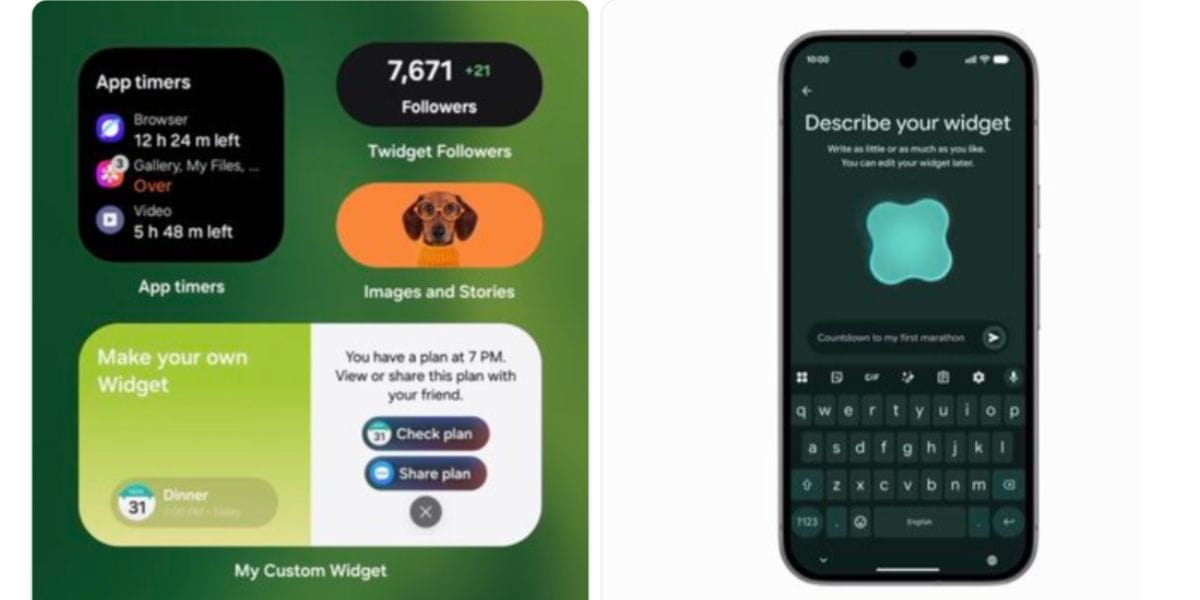
Samsung’s latest One UI 9.5 update is bringing a new ‘custom widgets’ feature where you can literally change your whole screen layout with the help of AI. Yes, the new Samsung One UI 9.5 My Custom Widget feature will include AI prompts, and you can transform your widgets through AI and create your own version of lock screen and home screen widgets that would appear on the screen. Let us tell you more about this feature right here.
Samsung Now Allows You To Use AI To Create Your Own Screen Look: All About One UI 9.5 My Custom Widget
Samsung is advancing mobile personalisation with the development of "My Custom Widget," an AI-driven tool spotted in early One UI 9.5 test builds. Built on Android 17's foundational intelligence, this feature enables Galaxy users to generate bespoke home screen widgets using natural language prompts.
By integrating multi-app data streams, such as calendars and messaging, all into a single modular card, Samsung simplifies real-time information access. The feature is slated to debut with upcoming Galaxy flagships before expanding across the broader Galaxy ecosystem via subsequent software updates.
What Does Social Media Say?
<blockquote class="twitter-tweet"><p lang="en" dir="ltr">Samsung and Google are taking Android widgets in a new direction.<br><br>Samsung’s “My Custom Widget” has appeared in an early One UI 9.5 build, spotted by Fahad Ali Javed.<br><br>Samsung focuses on combining different information and actions into one widget, while Google’s “Create My… <a href="https://t.co/fjr2dicwAy">pic.twitter.com/fjr2dicwAy</a></p>— Procast (@procastx) <a href="https://x.com/procastx/status/2090498480150319195?ref_src=twsrc%5Etfw">August 20, 2026</a></blockquote> <script async src="https://platform.x.com/widgets.js" charset="utf-8"></script>
How to Use The Samsung One UI 9.5 My Custom Widget Feature?
- Access Menu: Long-press any empty home screen space and select Widgets.
- Launch Builder: Tap the new My Custom Widget AI creation card.
- Input Prompt: Type a brief text description specifying layout and preferred data.
- Combine Sources: Select connected apps like Calendar, Messages, or Weather to merge.
- Preview & Place: Review the generated modular card and pin it to your screen.
Which Devices Will Support This Feature?
As per our reports, the Samsung One UI 9.5 custom widgets feature might have the following set of eligible devices:
- Galaxy S27 and S26 series.
- S24, S25, and S23 series.
- Foldables from Fold 8 to Fold 6.
Also See: Today’s Top News
Are you still browsing through your broken screen? Don’t worry! Book at-home mobile phone screen repair with Cashify—an affordable and one-stop destination for all your mobile phone needs. In case you break your screen within 1 month of repair, we will replace your screen again—for FREE.