WhatsApp has rolled out its new update and has introduced many features, some of which include voice calling, WhatsApp payments, and even being able to delete WhatsApp messages. However, there is a catch with the Message Deletion feature of how to delete WhatsApp messages.
It is only possible to delete a message sent by the user within seven minutes. So, if you mistakenly sent a message over seven minutes ago, you are out of luck. This guide will show you how to delete WhatsApp messages sent over seven minutes ago.
Also Read: How To Block Calls And Messages From A Particular Number!
However, with some modifications, it is now possible to circumvent WhatsApp’s strict deletion time limit in the Android app using a workaround. The workaround allows you to delete WhatsApp messages that aren’t just seven minutes old but up to seven days old.
How to delete WhatsApp messages up to seven days old?
Most individuals use WhatsApp, a free internet messaging service. Some people use a dictionary to fix their spelling while typing, which might lead to entering the wrong word instead of the one they wanted to write. The same is true for others, which may convey the incorrect message to someone, and so on. Have you ever made a mistake when organising and accidentally sent it? Then, we’re here to help you fix the problem you’ve encountered.
The common question is, “How do I clear out my inbox?” Of course, you may remove any communications from the past. Your thoughts could now turn to the issue of, “How do I delete old Messages for everyone?” We’re here to assist you in resolving this issue in a few easy steps.
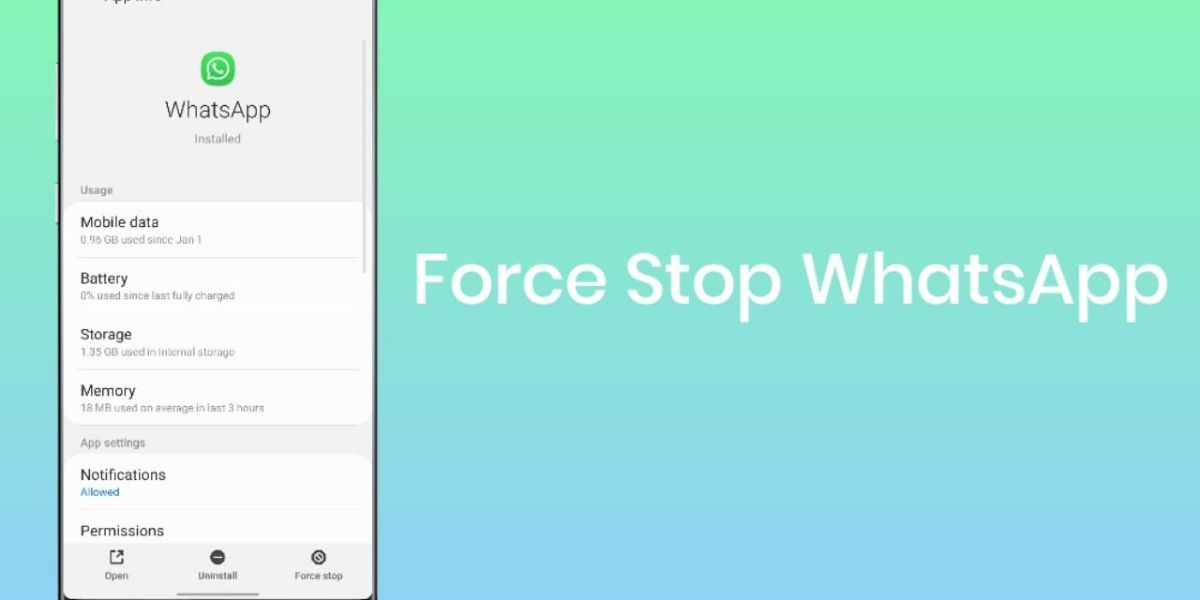
To start, you can go to the mobile settings and quickly turn off these features or use the quick toggles to do so easily. The next step is to navigate to the Apps section in the Settings app and look for WhatsApp in the list.
Also, Read- How To Install TWRP Recovery Without Root On Android
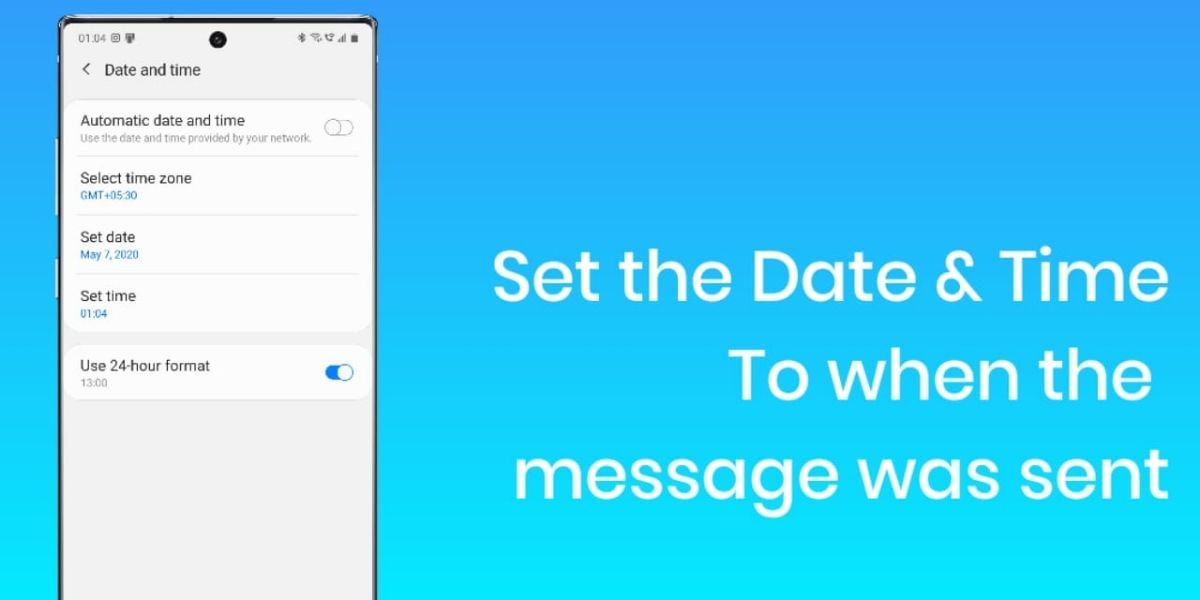
Open WhatsApp in the list of apps and tap on the Force Stop button; this will freeze the app and prevent it from running unless explicitly opened. Once you have successfully force-stopped the application, you can go to the Date & Time section. Delete WhatsApp messages in the Settings section and set the date to the time that matches the day you sent the original message.
Also Read: Hotstar Screencast / Mirroring Not Working On TV? Here’s How to Fix
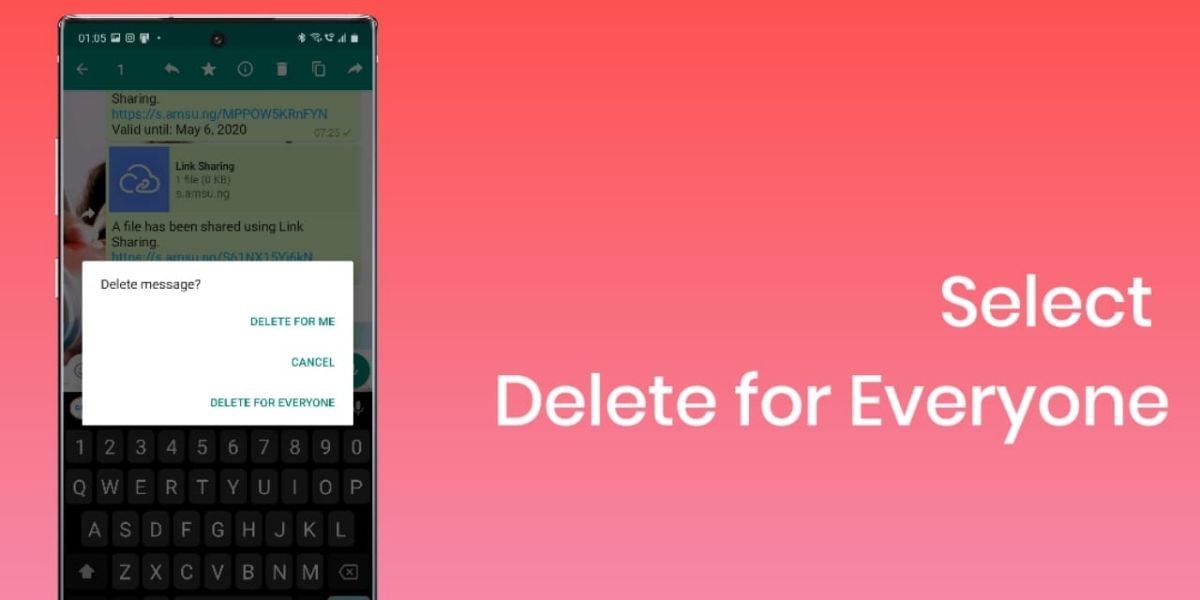
You can now follow the same process for deleting the message. Tap and Hold on to the message, and it should now show a window with options such as Delete for Me, Delete for Everyone, and Cancel. Select the Delete for Everyone option. Then, go back to the Settings app and revert the Date and Time to the original settings.
Also Read: PUBG Available For FREE On Google Stadia, But Only For Pro Subscribers!
After this, when you open WhatsApp, it should have replaced your original message with a placeholder message that reads: This message was deleted.
We have tried this trick and succeeded with shorter durations on the newer versions and longer durations on the older versions.
According to the official website, the time limit for deleting WhatsApp messages has been increased to one hour. This allows you to correct mistakes, such as sending a message to the wrong chat or group. It can also be useful when you mistakenly sent a message to the wrong user.
Also Read: How To Use Cloud Services To Back Up Your Android Device!
The above-listed method has seen different levels of success on various Android devices with different versions of Android. In most cases, we could delete at least 12 hours old messages. So, while this particular how to delete WhatsApp messages bug might not last forever, it could be a massive lifesaver for anyone with an instant message regret. Do try it out and let us know in the comment section.
Essential Points to Keep in Mind
- Even if you adjust your device’s date and time settings, you cannot remove messages older than four months. If you move too far back in time, WhatsApp will send you an error notice notifying you that your date and time settings are incorrect, and you will have to restart the application.
- It is possible that removing a message for everyone would not function in some instances. On the other hand, WhatsApp will not tell you if the transaction fails.
- Even after erasing the message for everyone, iOS users may still have media assets stored on their devices.
The Takeaway
If you need to erase WhatsApp messages for everybody a long time after receiving them, you must adjust your phone’s date and time settings. This is because you must go back through time to a point before you deliver that message to make the “Delete for everyone” option available to you. So, do make sure that you have done that. Otherwise, this trick will not work for you.
FAQs
Q1: How do I delete my Whatsapp messages?
Go to the App Store and search for WhatsApp on your iPhone or Android device. Select the chat with the message you want to delete from the “Chats” menu. To see a list of options, press and hold your finger on the message you want to erase. Delete the message by tapping “Delete.”
Q2: Is it right that clearing a WhatsApp chat deletes it for all users?
No. If you clear chats, only WhatsApp messages will be deleted. The messages on the receiver’s phone will be unaffected. To delete a message for everyone, tap the delete icon and choose the Delete for Everyone option.
Q3: How to delete all chats at once on WhatsApp?
In order to delete all your WhatsApp chats at one go, head over to WhatsApp > Settings > Chats > Chat History > Delete all chats
Also read: Complete A-Z Guide On How To VLOOKUP In Excel
FAQs
How do I delete all old WhatsApp messages?
To delete all old WhatsApp messages, go to Settings > Chats > Chat history in the Chats tab. Tap “Clear all chats,” select preferences like deleting media and starred messages, then confirm by tapping “Clear chats.”
Can you delete a WhatsApp message after it’s been read?
Yes, you can delete a WhatsApp message after it’s been read. Tap and hold the message, select “Delete,” and choose either “Delete for me” or “Delete for Everyone.” The recipient will see “This message was deleted” if you choose the latter.
How do I delete WhatsApp sent messages?
To delete sent WhatsApp messages, open the chat, tap and hold the message, select “Delete,” then “Delete for Everyone” to remove it from both chats. You can delete multiple messages at once using the same method.
When you delete a message on WhatsApp, can the other person see it?
If you delete a message using “Delete for Everyone,” it’s removed from both chats, and the recipient sees “This message was deleted.” Deleting for yourself leaves the message visible to the recipient.
Can someone read your deleted WhatsApp messages?
No, once a message is deleted using “Delete for Everyone,” it’s removed from both sides and cannot be recovered or read again by either party.
Cashify is the place to go for the newest in smartphone news. You may also compare mobile phones before purchasing with our help.