Google’s Circle to Search has quickly become one of its most popular features in recent years. Originally limited to Google and Samsung devices, the tool expanded to more Android phones in late 2024. Now, Google is bringing the Circle to Search feature to iPhone, though with certain restrictions. Unlike its seamless integration on Android—where users can activate it with a long press on the navigation bar and search by circling, scribbling, or tapping on any on-screen content—the iPhone version comes with notable limitations. So, read ahead to know more about this.
Circle To Search For iPhone: How Will It Work?
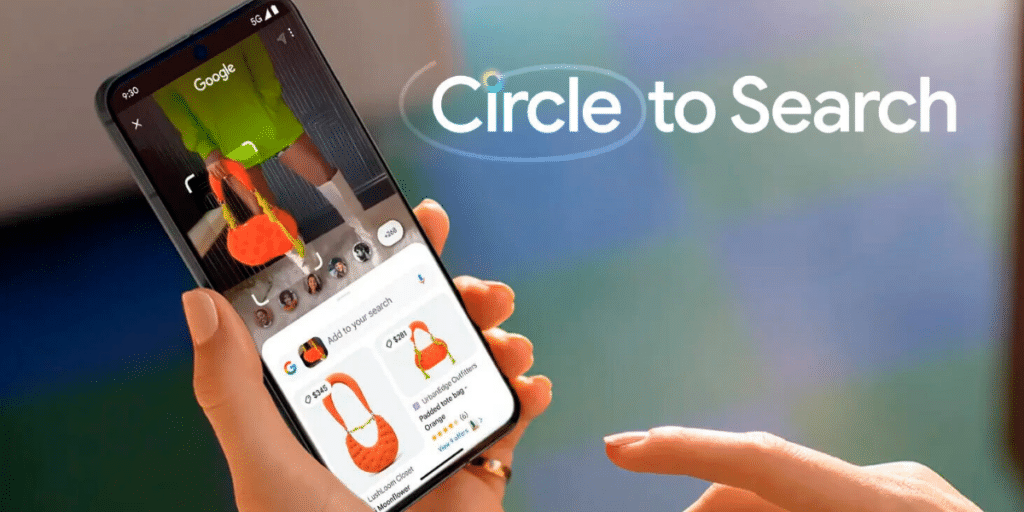
While Circle to Search works as a full-fledged features in Android phones, it will work with come limitations on iPhones.
Also Read: Everything You Should Know About Google Pixel 10a!
Instead of working across all apps, the Circle to Search feature confined to the Google app and Chrome. Users also lose the convenience of a long-press gesture, needing to tap the three-dot menu and select “Search this Screen” to initiate a search. Rather than fully adapting Circle to Search for iOS, Google has embedded its core functionality into Google Lens, making it an extension of search within Chrome and the Google app.
Moreover, Google plans to introduce a new Lens icon in the coming months to streamline access to the feature. However, full system-wide integration—like what’s available on Android—remains off the table for now.
Google Lens Just Got Smarter With AI Overviews
Google Lens is expanding its capabilities with AI-powered enhancements. iPhone users can now use Lens to search for content directly on their screens. The standalone Google Lens app for both Android and iOS is also receiving an upgrade. This update introduces AI overviews, which provide AI-generated descriptions of objects identified through Lens. So, iPhone users embrace themselves to witness the Circle to Search feature on their handsets.
Are you still browsing through your broken screen? Don’t worry! Book at-home mobile phone screen repair with Cashify—an affordable and one-stop destination for all your mobile phone needs. In case you break your screen within 1 month of repair, we will replace your screen again—for FREE.